We use machine learning technology to do auto-translation. Click "English" on top navigation bar to check Chinese version.
The authenticated Amazon Web Services Pricing Calculator is now generally available
This blog was made better by Som Chatterjee, Software Development Manager, Amazon Web Services
Today, we’re excited to announce the general availability of the authenticated Amazon Web Services Pricing Calculator in the Amazon Web Services Billing and Cost Management Console. The new capability improves the accuracy of cost estimates for new workloads or modifications to your existing Amazon Web Services usage by incorporating eligible discounts and commitment savings. You can now easily model cost changes for things such as migrating workloads between regions, modifying existing or planning new workloads, and planning for commitment purchases. To get started, login into the Amazon Web Services Billing and Cost Management Console and click Pricing Calculator under the “Budget and Planning” section in the left navigation.
A quick recap of the Amazon Web Services Pricing Calculator, previously available in public preview
The authenticated Pricing Calculator capability was made available as a public preview feature at 2024 re:Invent. The in-console Amazon Web Services Pricing Calculator has three main capabilities. First, you can estimate costs for specific workloads while incorporating applicable discounts. Second, the calculator enabled you to estimate complete Amazon Web Services bills using the same computation logic as actual Amazon Web Services billing, allowing you to model Savings Plans and Reserved Instances before making a commitment. Third, you can log in with your Amazon Web Services accounts to import historical usage data and persist these estimates in your account.
The preview offered two types of estimates: 1) workload estimates, which helped model cost impacts for specific applications or workload modifications, and 2) bill estimates, which allowed management account users to model adjustments to Savings Plans and Reserved Instances alongside Amazon Web Services service usage changes. These capabilities supported various scenarios, from expanding existing workloads to migrating across regions and implementing rightsizing recommendations. See our preview announcement blog for details of the two types of cost estimates.
What’s new with the generally available version
1. Workload estimates now inclusive of all discounts and commitment savings
When you model cost changes for your workloads, such as creating cost projections for new workloads, or simulating configuration options for existing workloads, you can now receive cost estimates that take into consideration of your unique organization pricing terms. Before creating the workload estimates, you can select one of the three rate options for your estimate (see the screenshot below).
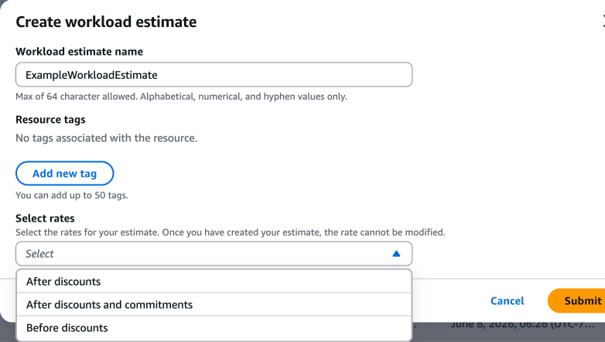
Figure 1. workload estimates rate selection in Amazon Web Services Pricing Calculator
For the purpose of the demonstration, we imported historical usage of services (Amazon EC2, Amazon DynamoDB, Amazon RDS, and Amazon SageMaker) that are covered by reservation and Savings Plans. When we selected the rate “after discounts”, the baseline cost returned as $30,614.82 (Figure 2). And that number was reduced to $30,004.70 (Figure 3), when “after discounts and commitments” option was selected, indicating $610.12 saving was received from reservation and Savings Plans.
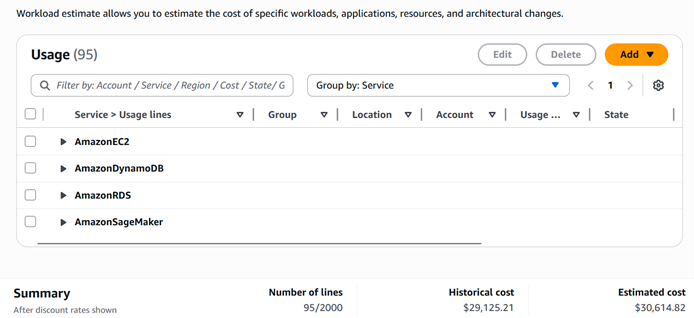
Figure 2. workload estimate with “after discounts” rate selected
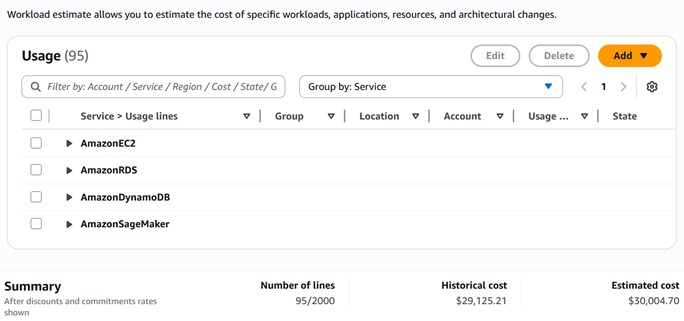
Figure 3. workload estimate with “after discounts and commitments” rate selected
As a management account, you can choose from three rate configurations: before discounts, after discounts, and after discounts and commitments. As a member account, you will have access to datasets based on your rate preferences set by your management account. Additionally, we’ve expanded rate configuration support for standalone accounts, providing more precise cost estimation capabilities for different account types. Read this user guide for more details on discount rate configurations.
2. Enhanced export capabilities for workload estimates
We’ve added flexible export options for workload estimates, allowing you to download your estimates in both CSV and JSON formats. This enables better integration with your existing BI tools and application workflows for further analysis and sharing. Read this user guides for instructions.

Figure 4. workload estimate export options
Conclusion
The new Pricing Calculator will help set the right expectation, as you plan for your next projects and expedite the process to get the budget approval your organizations need to drive your business forward. For more details see the Amazon Web Services Pricing Calculator user guide, API documentation, and pricing.

Bowen Wang
Bowen is a Principal Product Marketing Manager for Amazon Web Services Billing and Cost Management services. She focuses on enabling finance and business leaders to better understand the value of the cloud and ways to optimize their cloud financial management. In her previous career, she helped a tech start up enter the Chinese market.

Jeremiah Myers
Jeremiah is a Senior Technical Product Manager for Amazon Web Services Billing and Cost Management services. He focuses on empowering leaders with cloud cost responsibility to better plan their future workloads on Amazon Web Services. In his previous career, he has launched multiple global software products and cofounded a venture-backed startup.
The mentioned AWS GenAI Services service names relating to generative AI are only available or previewed in the Global Regions. Amazon Web Services China promotes AWS GenAI Services relating to generative AI solely for China-to-global business purposes and/or advanced technology introduction.