We use machine learning technology to do auto-translation. Click "English" on top navigation bar to check Chinese version.
Performance and metrics enhancements for Amazon Transit Gateway and Amazon Web Services Cloud WAN
In late 2024 we launched several enhancements to Amazon Transit Gateway and Amazon Web Services Cloud WAN services:
- Path MTU Discovery (PMTUD) support for Transit Gateway and Amazon Web Services Cloud WAN
- Appliance Mode Routing Enhancement for improved Availability Zone (AZ) awareness
- Per-AZ Amazon CloudWatch Metrics
- Amazon Web Services Cloud WAN: Service Insertion Operational Enhancement
In this post, we explain how these feature enhancements work, what benefits they bring to your overall Amazon Web Services networking infrastructure, and important considerations for using these features.
1. Transit Gateway and Amazon Web Services Cloud WAN PMTUD support
In November 2024, Amazon Web Services announced PMTUD support for both Transit Gateway and Amazon Web Services Cloud WAN. With this enhancement, Transit Gateway and Amazon Web Services Cloud WAN now support PMTUD for both IPv4 and IPv6 protocols.
How does PMTUD work with Transit Gateway and Amazon Web Services Cloud WAN core network edge (CNE)?
PMTUD is used to determine the path MTU between two devices. The path MTU is the maximum packet size supported on the path between the originating host and the receiving host. When there is a difference in MTU sizes in the network between two hosts, PMTUD enables the network device (Transit Gateway/CNE) in the path to respond to the originating host with an Internet Control Message Protocol (ICMP) message. This ICMP message instructs the originating host to use the lowest MTU size along the network path and resend the request. Without this negotiation, packet drops can occur when requests are too large for the receiving host to accept, as shown in the following figure.
 Figure 1: PMTUD packet flow
Previously, jumbo frames (9001 MTU) packets that exceeded the Transit Gateway/CNE MTU (8500 bytes) were silently dropped on VPC attachments. With this update, when these packets are detected, either an ICMP Fragmentation Needed message for ICMPv4 (Type 3, Code 4), or a Packet Too Big (PTB) message for ICMPv6 (Type 2) message, is sent back to the sender hosts. This notification instructs the transmitting host to adjust the packet MTU size, thereby eliminating packet loss caused by MTU mismatches in the network.
Use cases
- The default Amazon Linux Amazon Machine Image (AMI) uses an MTU of 9001 (jumbo frames). This feature allows users to continue using jumbo frames MTU (9001) on Amazon Elastic Compute Cloud (Amazon EC2) instances while sending traffic through Transit Gateway/Amazon Web Services Cloud WAN, without having to manually configure Linux/Windows instances to use an MTU lower than the Transit Gateway/CNE supported value of 8500.
- Jumbo frames are supported for VPC peering connections within the same Amazon Web Services Region. Previously when users migrated from VPC peering to Transit Gateway, traffic would be silently dropped, necessitating that users manually configure the MTU to less than 8500 on potentially hundreds or thousands of EC2 instances across VPCs before migration. This manual configuration is no longer needed.
Considerations
- Transit Gateway/Amazon Web Services Cloud WAN PMTUD functionality is enabled by default. Users don’t need to make any configuration changes.
- Make sure that security groups and network access lists (NACLs) allow the necessary ICMP rules.
- At the time of writing, Transit Gateway and Amazon Web Services Cloud WAN don’t support PMTUD on Amazon Web Services Site-to-Site VPN, Amazon Direct Connect, or Transit Gateway/Amazon Web Services Cloud WAN inter- and intra-Region peering attachments.
- If you want to use jumbo frames and have an inspection VPC with third-party virtual appliances in the traffic path connected through Transit Gateway, then make sure to check and enable jumbo frames on those Network Virtual Appliances (NVAs).
- For more information, go to Transit Gateway MTU considerations and MTU settings for your EC2 instances.
2. Amazon Web Services enhances Transit Gateway and Amazon Web Services Cloud WAN Appliance Mode routing for improved AZ awareness
The second enhancement we launched improves packet routing behavior for Transit Gateway and Amazon Web Services Cloud WAN CNE attachments with Appliance Mode enabled. This update improves AZ awareness in the routing process and has been deployed across all Amazon Web Services Regions where Transit Gateway and Amazon Web Services Cloud WAN were available as of November 30, 2024.
We created Appliance Mode to support inspection VPC architectures where network traffic passes through security appliances such as firewalls, inline analytics, or other “bump in the wire” devices. These security appliances maintain state information about network connections to properly inspect and control traffic flows. For example, when a firewall sees the initial outbound connection, it creates state information that it needs to properly evaluate the returning traffic. If return traffic were to flow through a different firewall appliance in another AZ, then that state information would be missing, thus causing the return traffic to be blocked. Appliance Mode makes sure that both directions of a connection flow through the same security appliance in the same AZ, which is a concept known as symmetric routing.
Previously, when Appliance Mode was enabled on a VPC attachment, Transit Gateway and Amazon Web Services Cloud WAN CNE would choose an AZ for traffic by using a flow hash algorithm. This algorithm was based-on the four-tuple of the IP packet and didn’t consider the source or destination AZ for the traffic flow. This could result in traffic taking a longer path than necessary by transiting through a different AZ.
With this enhancement, Transit Gateway and Amazon Web Services Cloud WAN CNE now consider both the source and destination AZs of the traffic flow when choosing a traffic path. When both the source and destination of a flow are in the same AZ, traffic is kept within that AZ when passing through the inspection VPC. This results in more efficient routing and potentially reduced latency.
The following scenario shows the impact of this enhancement
Consider a traffic flow through Transit Gateway between resources located in the same AZ (use1-az1), as shown in the following figure. This flow travels through an inspection VPC that has attachment points in two AZs: use1-az1 and use1-az2. Before the enhancement, traffic could have been sent to an inspection appliance in either AZ, even though both the source and destination were in use1-az1. With this enhancement, Transit Gateway maintains AZ affinity by routing traffic through use1-az1 in the inspection VPC, resulting in reduced latency and more predictable network performance.
 Figure 2: Appliance Mode AZ affinity
This Appliance Mode enhancement doesn’t impact existing flows through Transit Gateway and Amazon Web Services Cloud WAN CNE. Only new flows are routed according to the new behavior, which makes sure of a smooth transition for current workloads. AZ affinity is automatic, thus you don’t need to enable it. There is no further cost for using this enhancement. This update represents a significant improvement in how Amazon Web Services manages network traffic across AZs in complex architectures involving Transit Gateway and Amazon Web Services Cloud WAN.
3. Per-AZ CloudWatch Metrics enhance visibility for Transit Gateway and Amazon Web Services Cloud WAN
We recently released an important enhancement to Transit Gateway and Amazon Web Services Cloud WAN: Per-AZ metrics in CloudWatch. This new capability provides more granular visibility into traffic patterns and performance at the AZ level. You can now monitor your global network through performance and traffic metrics, such as bytes in/out, packets in/out, packets dropped, and more. These metrics were launched on November 11, 2024, and are available in all Amazon Web Services Regions where Transit Gateway and Amazon Web Services Cloud WAN are available. Previously, these metrics were available at the attachment level.
Per-AZ metrics provide increased operational insight into how traffic is distributed across a Region’s AZs. These metrics help you analyze traffic patterns and make informed decisions about optimization and capacity planning. Transit Gateway and Amazon Web Services Cloud WAN quotas are established per-AZ. Therefore, this release helps you understand how your traffic flows align with these quotas. Per-AZ metrics are published to both the resource owner’s account and the attachment owner’s account (for cross-account scenarios).
Viewing Transit Gateway per-AZ metrics in CloudWatch
- Navigate to the CloudWatch console and choose Metrics, then All metrics.
- Choose the Amazon Web Services/TransitGateway namespace, and choose Per-TransitGatewayAttachment AvailabilityZone Metrics.
- Choose the checkbox next to each Per-AZ metric you want to include in the graph. The Label for each metric is prefixed with the AZ identifier, such as “use-1-az1” or “use1-az2”.
Figure 3 shows the per-AZ metrics graphed alongside aggregated metrics for a Transit Gateway.
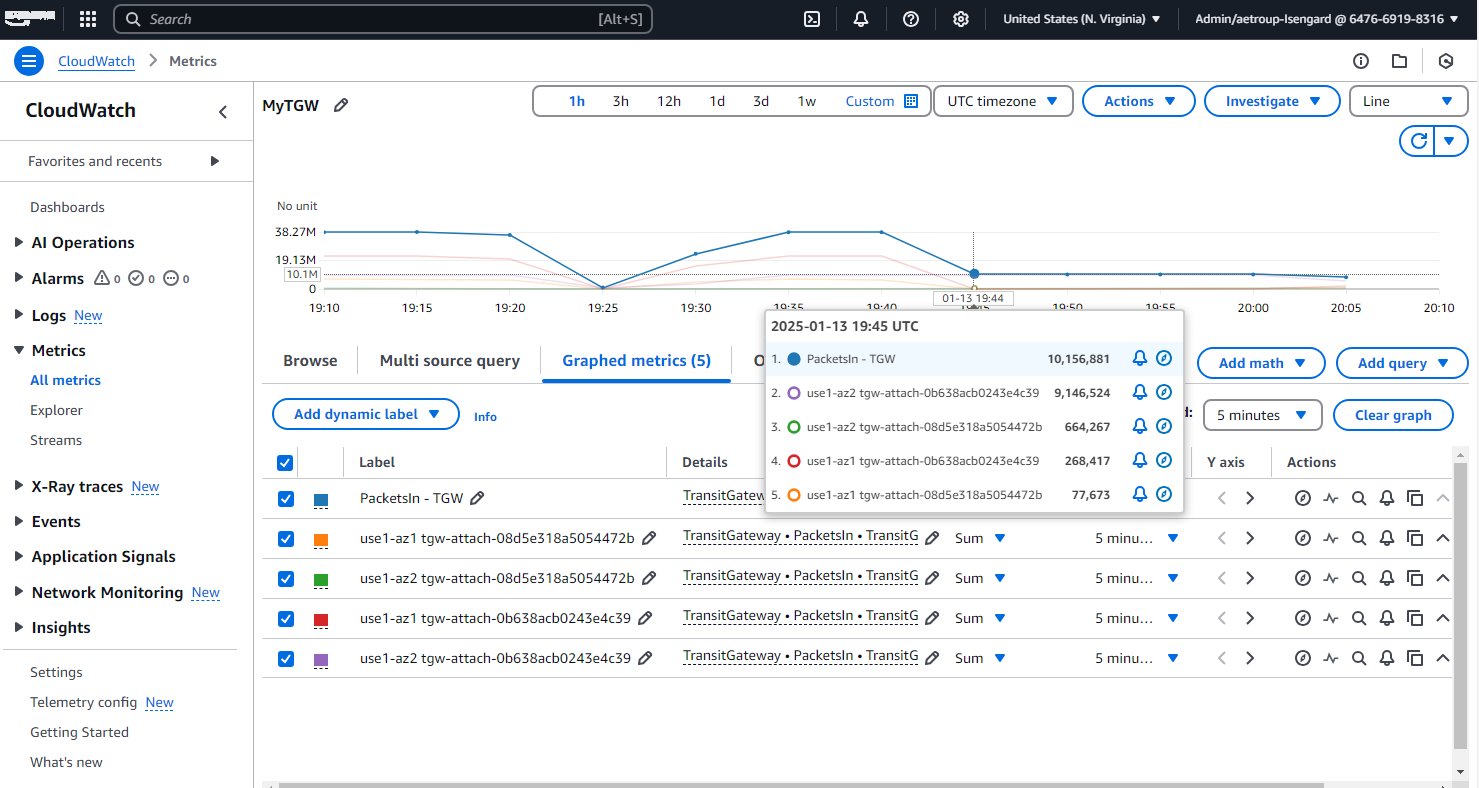
Figure 3: Transit Gateway shows both aggregate and Per-AZ metrics in CloudWatch
To use these new metrics, you can use the Amazon Web Services Management Console, Amazon Web Services Command Line Interface (Amazon Web Services CLI), or Amazon Web Services Software Development Kits (SDKs) to access CloudWatch and create custom dashboards or alarms based on the per-AZ data. No further configuration is needed to enable these metrics, and they are automatically available for supported attachment types.
There are no further costs specific to the per-AZ metrics. However, standard CloudWatch pricing applies to API operations that exceed the Amazon Web Services Free Tier limits. For more information, see CloudWatch metrics in Amazon VPC Transit Gateways and CloudWatch metrics in Amazon Web Services Cloud WAN.
4. Amazon Web Services Cloud WAN: service insertion operational enhancement
The section assumes that you are familiar with these Amazon Web Services Cloud WAN components: global network, core network, core network policy, attachments, core network edge, network segments, and the Amazon Web Services Cloud WAN service insertion feature called Network Functions Groups (NFG).
NFG
An NFG (Figure 4) is, under the hood, a single segment consisting of a collection of core network attachments that point to a VPC that hosts specialized network or security functions. These functions can include Next-Generation Firewalls (NGFW), Intrusion Detection Systems (IDS), Intrusion Prevention Systems (IPS), Amazon Network Firewall or Gateway Load Balancer services deployed as part of the global Amazon Web Services Cloud WAN network.
NFG allows you to automatically steer same-segment or cross-segment traffic through a network functions deployed in VPCs attached to Amazon Web Services Cloud WAN. You can specify an NFG that contains a set of core network attachments (VPC, Site-to-Site VPN, Direct Connect, or Transit Gateway route table) where your network functions reside. Then, you can specify a segment or segment pairs for which traffic needs to be redirected to the network functions. Amazon Web Services Cloud WAN automatically redirects network traffic between the segments through the specified core network attachments for the respective NFG. This redirection works for both same-Region (intra-Region) and cross-Region (inter-Region) traffic on the core network.
Prior to this enhancement, an NFG needed to be associated with core network attachment(s) before a segment action of ”send-to” or ”send-via” could be created for service insertion through an NFG. This led to blocking easy expansion to new Amazon Web Services Cloud WAN Regions.
With the new Amazon Web Services Cloud WAN service insertion enhancement, a network function group doesn’t need to be associated with attachment(s) for the Amazon Web Services Cloud WAN policy to succeed. If you specify segment actions of ”send-to” or ”send-via” to a network function group with no associated attachments, then the Amazon Web Services Cloud WAN policy execution is successful. However, all traffic destined for that NFG is black-holed until you associate attachments to that NFG in the appropriate Regions, as shown in the following figure.
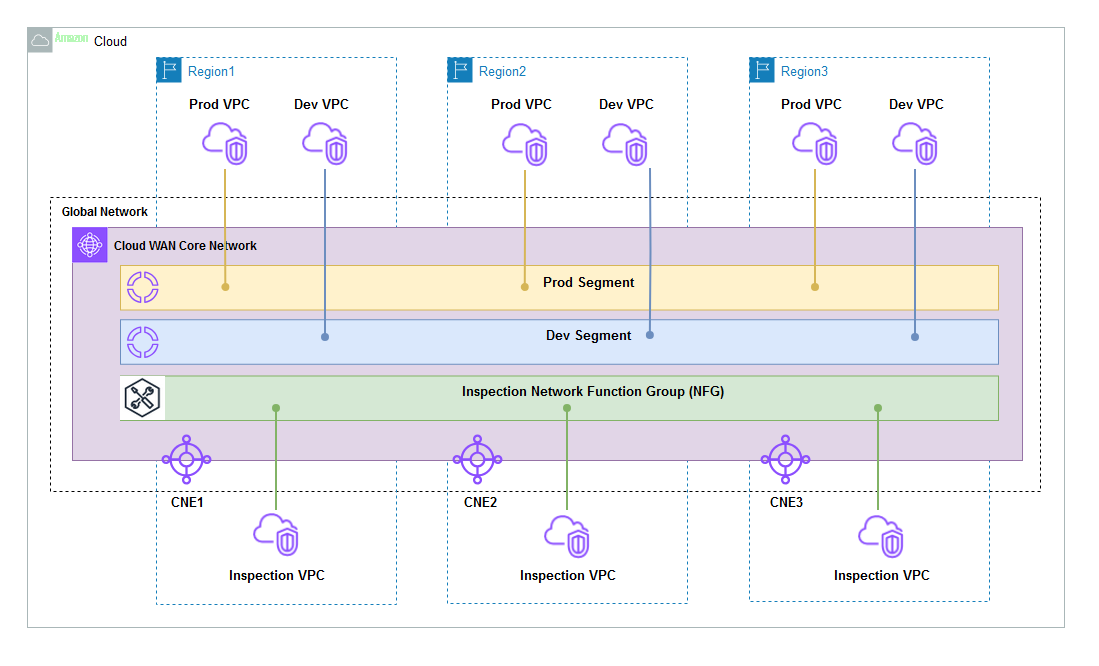 Figure 4: Amazon Web Services Cloud WAN NFG
This enhancement makes it easier for users to expand Amazon Web Services Cloud WAN NFG to new Amazon Web Services Regions, eliminates the need for multiple policy executions, and streamlines the overall service insertion provisioning workflow.
There are no further charges for using service insertion beyond the standard Amazon Web Services Cloud WAN pricing.
Conclusion
The latest enhancements to Amazon Transit Gateway and Amazon Web Services Cloud WAN represent significant improvements in network performance, visibility, and operational efficiency. These enhancements demonstrate the continued commitment of Amazon Web Services to improving network management capabilities while reducing operational overhead. Whether you’re managing complex multi-AZ architectures, implementing security controls, or optimizing network performance, these features enable you to build more reliable and efficient cloud networks.
For detailed guidance and best practices, refer to our technical documentation for Transit Gateway and Amazon Web Services Cloud WAN, or contact your Amazon Web Services account team or Amazon Support.
About the authors

Tushar Jagdale
Tushar is a Specialist Solutions Architect focused on Networking at Amazon Web Services, where he helps customers build and design scalable, highly-available, secure, resilient and cost effective networks. He has over 15 years of experience building and securing Data Center and Cloud networks.

Andrew Troup
Andrew is an Enterprise Technologist at Amazon Web Services who brings over 20 years of experience helping U.S. Federal Customers navigate complex technology transformations. He specializes in networking, compute, resilience, and observability. His passion for communications technology enables him to provide real-world, experience-based guidance to Amazon Web Services customers.
The mentioned AWS GenAI Services service names relating to generative AI are only available or previewed in the Global Regions. Amazon Web Services China promotes AWS GenAI Services relating to generative AI solely for China-to-global business purposes and/or advanced technology introduction.