We use machine learning technology to do auto-translation. Click "English" on top navigation bar to check Chinese version.
Deploy to ARM-Based Compute with Amazon Web Services Deploy Tool for .NET
We’re excited to announce that the Amazon Web Services Deploy Tool for .NET now supports deploying .NET applications to select ARM-based compute platforms on Amazon Web Services! Whether you’re deploying from Visual Studio or using the .NET CLI, you can now target cost-effective ARM infrastructure like Amazon Web Services Graviton with the same streamlined experience you’re used to.
Why deploy to ARM?
ARM-based instances, such as Amazon Web Services Graviton, deliver great price-performance and are energy efficient, making them a smart choice for many .NET workloads. With this update, you can take full advantage of ARM across supported services without changing how you deploy your applications.
If you’re already using the Amazon Web Services Deploy Tool for .NET, deploying to ARM is as simple as selecting an ARM-based compute option like Amazon Elastic Beanstalk or Amazon Elastic Container Service (ECS) using Amazon Fargate.
Getting started in Visual Studio
To get started in Visual Studio, install the latest version of the Amazon Web Services Toolkit for Visual Studio from the Visual Studio Marketplace, where it is also known as Amazon Web Services Toolkit with Amazon Q. Once you install the toolkit and configure your Amazon Web Services credentials, right click in Solution Explorer on the project to deploy by selecting the Publish to Amazon Web Services… menu item.
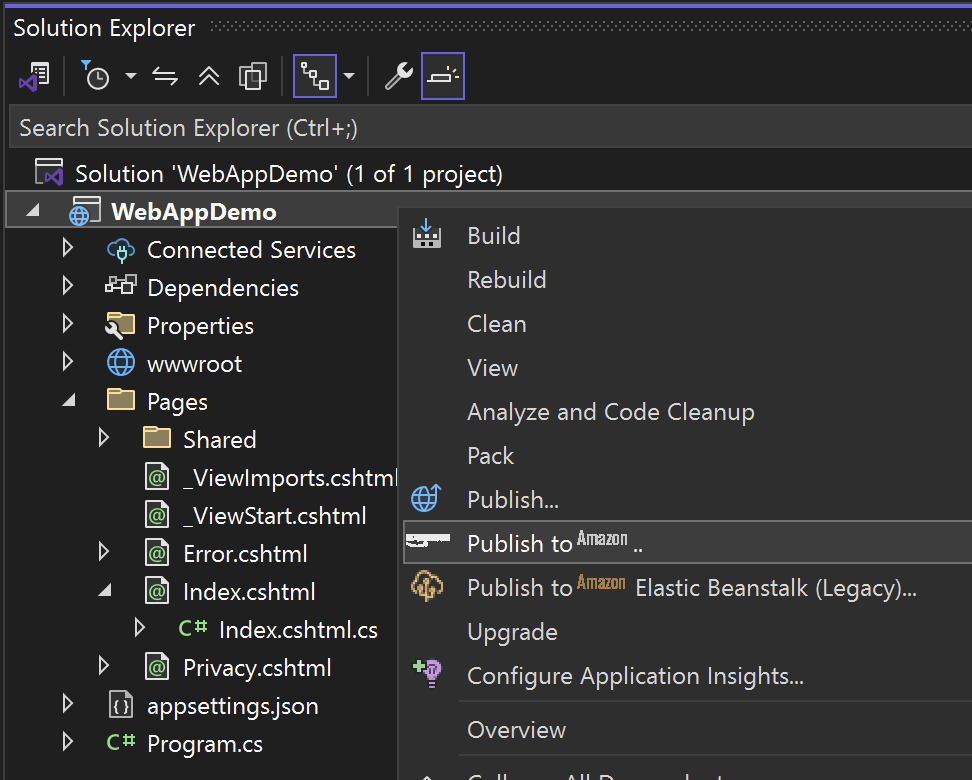
From there, select one of the following Publish Targets, which have now been updated to support ARM-based architecture:
- ASP.NET Core App to Amazon Elastic Beanstalk on Linux
- ASP.NET Core App to Amazon ECS using Amazon Fargate
- Scheduled Task on Amazon Elastic Container Service (ECS) using Amazon Fargate
- Service on Amazon Elastic Container Service (ECS) using Amazon Fargate
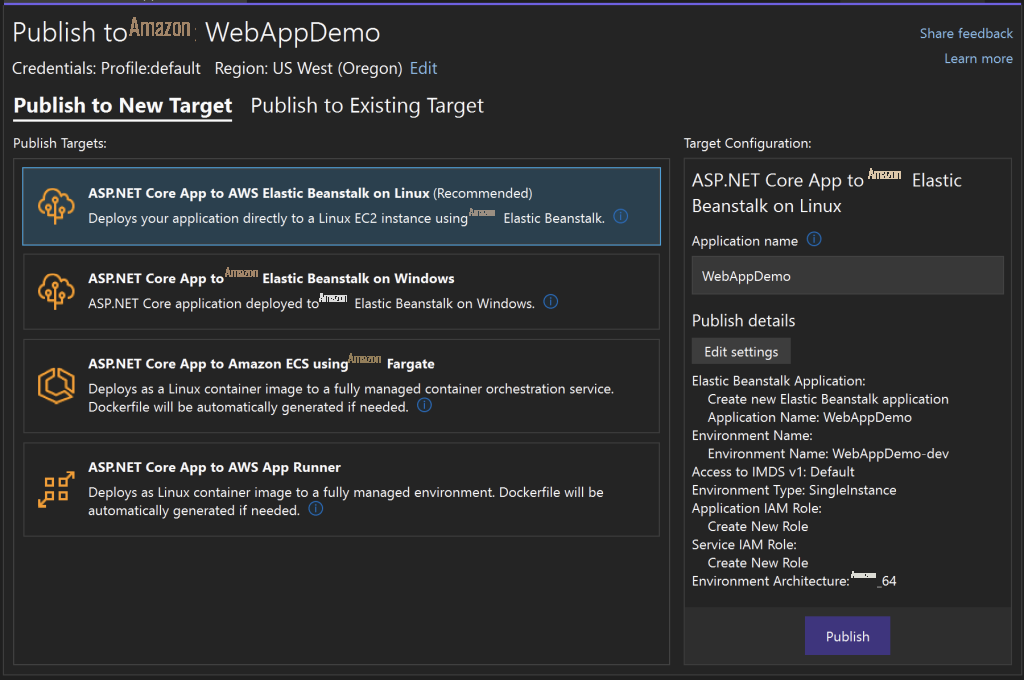
On the right side, under Target Configuration, select Edit settings. On the settings screen, select Project Build in the left pane and then switch the Environment Architecture to Arm64.
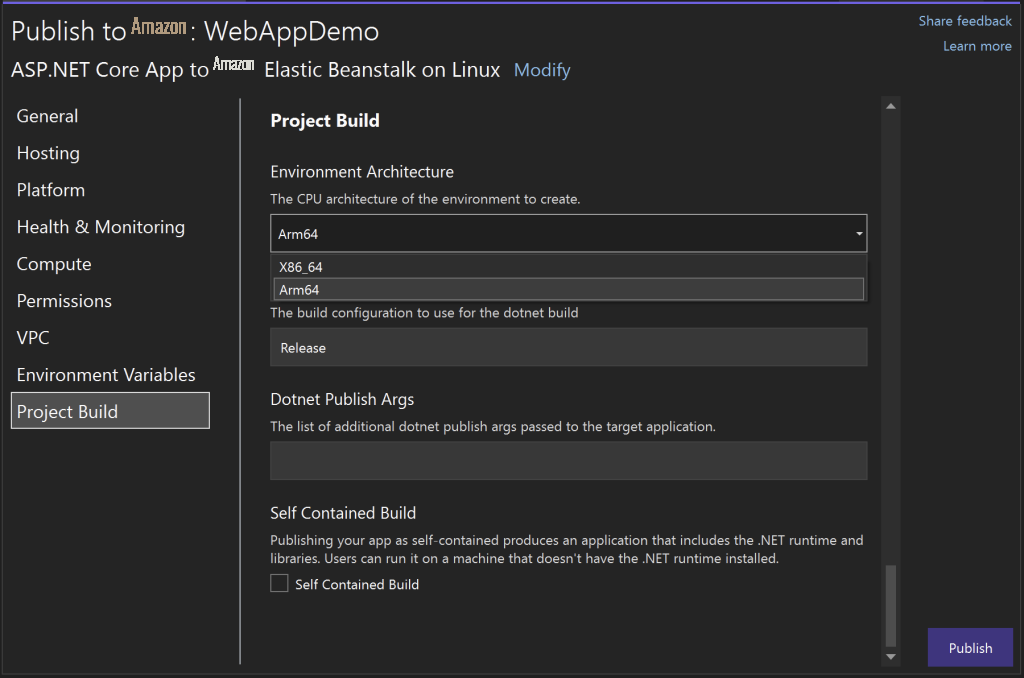
Finally, click Publish to start your ARM-based application deployment.
Getting started from the .NET CLI
To get started from the .NET CLI, you just need to run the following command to install the tooling from NuGet:
dotnet tool install --global Aws.Deploy.ToolsOnce the tooling is installed, run the following command to start the deployment experience:
dotnet aws deployThe CLI guides you to select Deployment Option. Select an option that supports deploying to an ARM-based architecture and then update the Environment Architecture setting to Arm64.
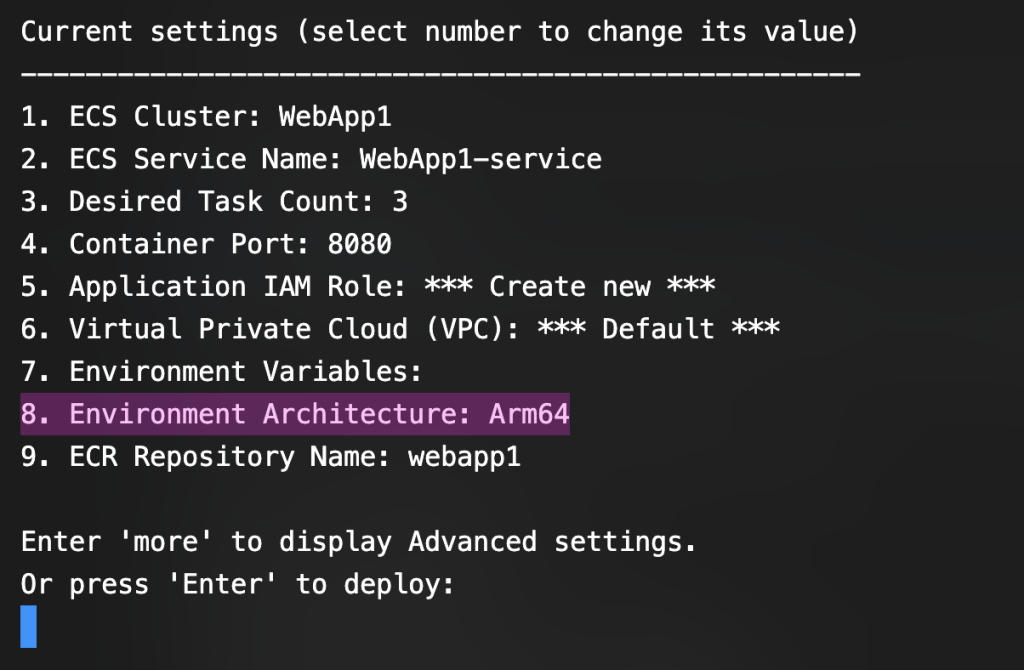
When you’re done updating your deployment settings, press Enter to start the deployment.
Conclusion
With support for ARM-based compute options now available in the Amazon Web Services Deploy Tool for .NET, it’s easier than ever to deploy .NET applications to Graviton-backed infrastructure. You can benefit from improved price-performance with minimal changes to your existing workflow.
Next steps:
- Try deploying your .NET apps to ARM-based compute by installing or updating to the latest version of the Amazon Web Services Deploy Tool for .NET.
- Explore the Developer Guide and check out our GitHub repo for more documentation and sample projects.
- Don’t hesitate to create an issue or a pull request if you have ideas for improvements.
About the author:
The mentioned AWS GenAI Services service names relating to generative AI are only available or previewed in the Global Regions. Amazon Web Services China promotes AWS GenAI Services relating to generative AI solely for China-to-global business purposes and/or advanced technology introduction.