We use machine learning technology to do auto-translation. Click "English" on top navigation bar to check Chinese version.
Amazon Backup adds new Multi-party approval for logically air-gapped vaults
Today, we’re announcing the general availability of a new capability that integrates Amazon Backup logically air-gapped vaults with Multi-party approval to provide access to your backups even when your Amazon Web Services account is inaccessible due to inadvertent or malicious events. Amazon Backup is a fully managed service that centralizes and automates data protection across Amazon Web Services services and hybrid workloads. It provides core data protection features, ransomware recovery capabilities, and compliance insights and analytics for data protection policies and operations.
As a backup administrator, you use Amazon Backup logically air-gapped vaults to securely share backups across accounts and organizations, logically isolate your backup storage, and support direct restore to help reduce recovery time following an inadvertent or malicious event. However, if a bad or unintended actor gains root access to your backup account or the management account of your organization, your backups suddenly become inaccessible, even though they’re still safely stored in the logically air-gapped vault. While traditional account recovery involved working through support channels, Amazon Backup with Multi-party approval delivers immediate access to recovery tools, empowering you with faster resolution times and greater control over your recovery timeline.
Multi-party approval for Amazon Backup logically air-gapped vaults adds an additional layer of protection for you to recover your application data even when your Amazon Web Services account becomes completely inaccessible. Using Multi-party approval, you can create approval teams which consist of highly trusted individuals in your organization, then associate them with your logically air-gapped vault. If you get locked out of your Amazon Web Services accounts due to inadvertent or malicious actions, you can request your own approval team to authorize sharing of your vault from any account, even those outside your Amazon Organizations account. Once approved, you gain authorized access to your backups and can begin your recovery process.
How it works
Multi-party approval for Amazon Backup logically air-gapped vaults combines the security of logically air-gapped vaults with the governance of Multi-party approval to create a recovery mechanism that works even when your Amazon Web Services account is compromised. Here’s how it works:
1. Approval team creation
First, you create an approval team in your Amazon Organizations management account. If the management account is new, first create an Amazon Identity and Access Management (IAM) Identity Center instance before creating the approval team. The approval team consists of trusted individuals (IAM Identity Center users) who will be authorized to approve vault sharing requests. Each approver receives an invitation to join the approval team through a new Approval portal.
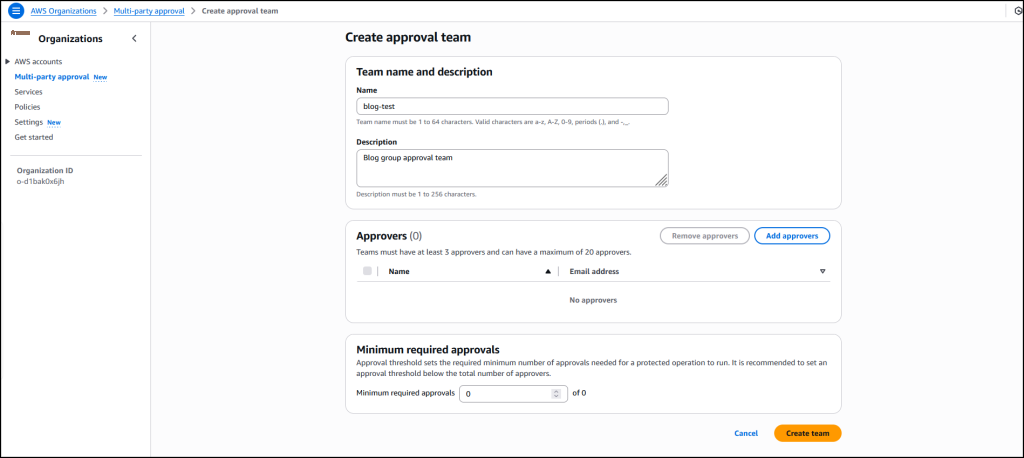
2. Vault association
When your approval team is active, you share it with accounts that own logically air-gapped vaults using Amazon Resource Access Manager (Amazon RAM) to safeguard against requests for approval from arbitrary accounts. Backup administrators can then associate this approval team with new or existing logically air-gapped vaults.
3. Protection against compromise
If your Amazon Web Services account becomes compromised or inaccessible, you can request access to your backups from a different account (a clean recovery account). This request includes the Amazon Resource Name (ARN) of the logically air-gapped vault in the format arn:aws:backup:<region>:<account>:backup-vault:<name> and an optional vault name and comment.
4. Multi-party approval
The request is sent to the approval team, who review it through the approval portal. When the minimum required number of approvers authorize the request, the vault is automatically shared with the requesting account. All requests and approvals are comprehensively logged in Amazon CloudTrail.
5. Recovery process
With access granted, you can immediately start restoring or copying your data in the new recovery account without waiting for your compromised account to be remediated.
This approach provides an entirely separate authentication path to access and recover your backups, completely independent of your Amazon Web Services account credentials. Even if the bad actor has root access to your account, they can’t prevent the approval team-based recovery process.
1. Create a new logically air-gapped vault
To create a new logically air-gapped vault, provide a name, tags (optional), and vault lock properties.
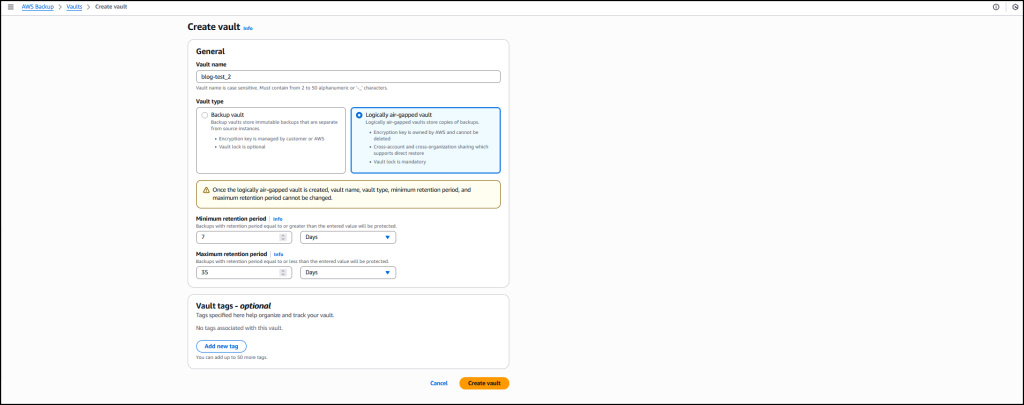
2. Assign an approval team
When the vault has been created, choose Assign approval team to assign it with an existing approval team.

Choose an existing approval team from the drop-down menu then select Submit to finalize the assignment.

Now your approval team is assigned to your logically air-gapped vault.

Good to know
It’s essential to test your recovery process before an actual emergency:
- From a different Amazon Web Services account, use the Amazon Backup console or API to request sharing of your logically air-gapped vault by providing the vault ID and ARN.
- Request approval of your request from the approval team.
- Once approved, verify that you can access and restore backups from the vault in your testing account.
As a best practice, monitor the health of your approval team regularly using Amazon Backup Audit Manager to ensure they have sufficient active participants to meet your approval threshold.
Multi-party approval for enhanced cloud governance
Today, we’re also announcing the general availability of a new capability that Amazon Web Services account administrators can use to add Multi-party approval to their product offerings. As highlighted in this post, Amazon Backup is the first service to integrate this capability. With Multi-party approval, administrators can enable application owners to guard sensitive service operations with a distributed review process.
Good to know
Multi-party approval provides several significant security advantages:
- Distributed decision-making, eliminating single points of failure
- Full auditability through Amazon CloudTrail integration
- Protection against compromised credentials
- Formal governance for compliance-sensitive operations
- Consistent approval experience across integrated services
Now available
Multi-party approval is available today in all Amazon Web Services Regions where Amazon Organizations is available. Multi-party approval for Amazon Backup logically air-gapped vaults is available in all Amazon Web Services Regions where Amazon Backup is available.
– Veliswa.

Veliswa Boya
Veliswa Boya is a Senior Developer Advocate, based in South Africa and working closely with the builder community in Sub-Saharan Africa. She has fulfilled many roles in tech, which range from developer to analyst, architect to cloud engineer, and now a developer advocate. Veliswa especially enjoys working with those who are new to tech—and those getting started with Amazon Web Services.
The mentioned AWS GenAI Services service names relating to generative AI are only available or previewed in the Global Regions. Amazon Web Services China promotes AWS GenAI Services relating to generative AI solely for China-to-global business purposes and/or advanced technology introduction.