We use machine learning technology to do auto-translation. Click "English" on top navigation bar to check Chinese version.
Assess compliance and configuration of Kubernetes resources with Amazon Config
Many customers today rely on Amazon Config for recording configuration, tracking configuration history, and evaluating compliance of their Amazon Web Services resources such as Amazon Elastic Compute Cloud (EC2) instances, Amazon Simple Storage Service (S3) buckets, and even Amazon Elastic Kubernetes Service (EKS) clusters. This provides them with a comprehensive view of their Amazon Web Services infrastructure configuration state and compliance posture.
However, when it comes to managing the compliance of Kubernetes resources running within Amazon EKS clusters (such as pods, deployments, and services), organizations often need to implement separate tooling. This is because Kubernetes resources exist within the cluster rather than as direct Amazon Web Services resources, placing them outside the standard Amazon Config recording scope.
The open-source solution described in this post bridges this gap by extending Amazon Config capabilities to Kubernetes resources. This integration allows you to:
- Record and track configuration changes of Kubernetes resources over time
- Query Kubernetes resources using Amazon Config advanced query capabilities
- Apply Amazon Config rules to evaluate compliance of Kubernetes resources
- Maintain a single source of truth for both Amazon Web Services and Kubernetes configurations
- Leverage existing Amazon Config dashboards and reporting for Kubernetes resources
Solution walkthrough
Deployment
The solution is deployed using Amazon CloudFormation, which provisions all the necessary resources in your Amazon Web Services account. For the deployment instructions, refer to the project documentation.
Configuring the solution
During deployment or afterwards, you can customize the solution with several CloudFormation parameters, including:
- Resource Kinds: Specify which Kubernetes resource types to record (e.g.,
Pod, Deployment, Service) - Namespace Filters: Include or exclude specific Kubernetes namespaces
- Label Selector: Filter resources to record based on Kubernetes labels
- Resource Fields: Control which fields are included or excluded from recording
These parameters allow you to tailor the solution to your specific needs, focusing on the resources and configurations most important to your organization. For the comprehensive list of parameters, refer to the project documentation.
Viewing recorded resources
Once deployed, you can view your Kubernetes resources in the Amazon Config console:
- Navigate to the Amazon Config console
- In the left menu, choose Resources
- Filter by resource type
AWSCustom::EKS::KubernetesResource - Browse the list of recorded Kubernetes resources, as illustrated in the following image
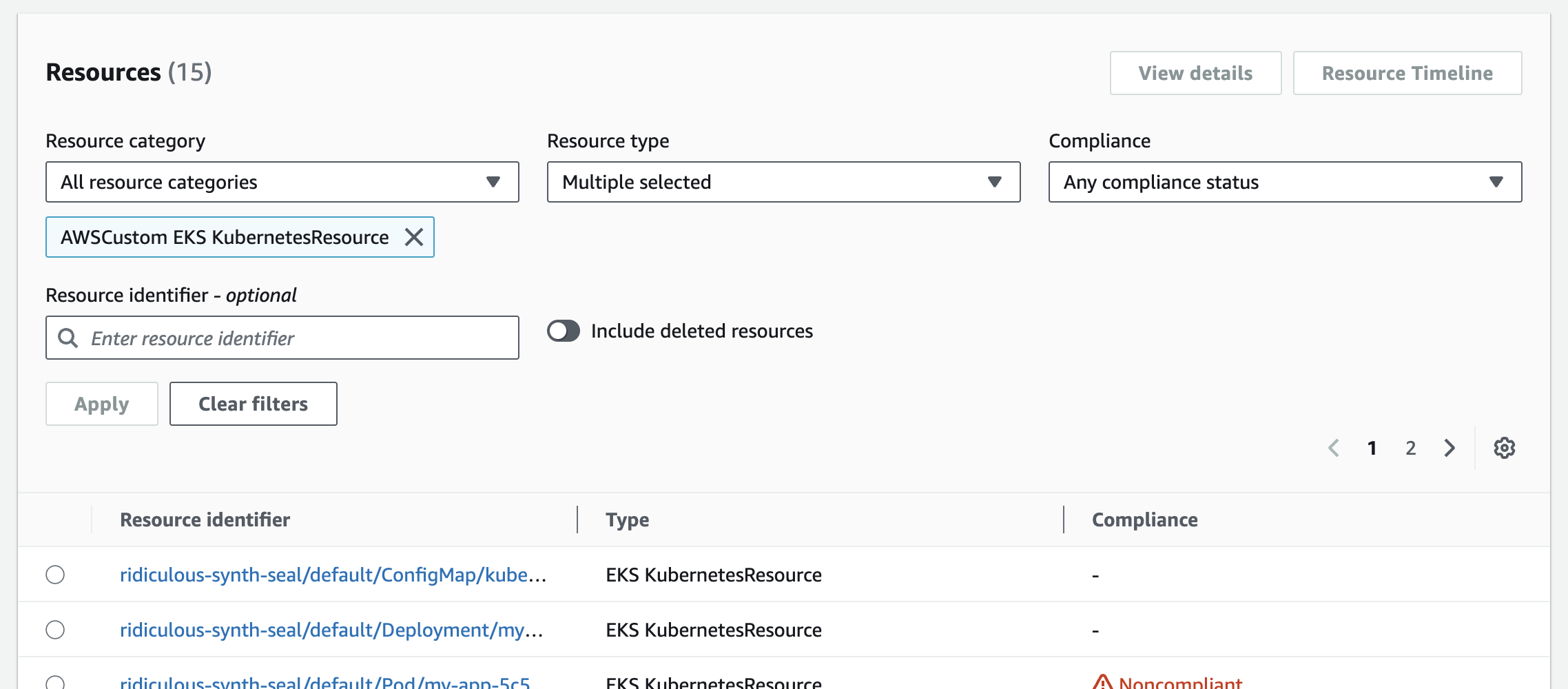
Figure 1 – Amazon Config console showing recorded Kubernetes resources
Choose a resource from the Resource identifier column to view its configuration details, including metadata, specifications, and Amazon Config-specific information. For example, the following image shows the details of a recorded Kubernetes Deployment:
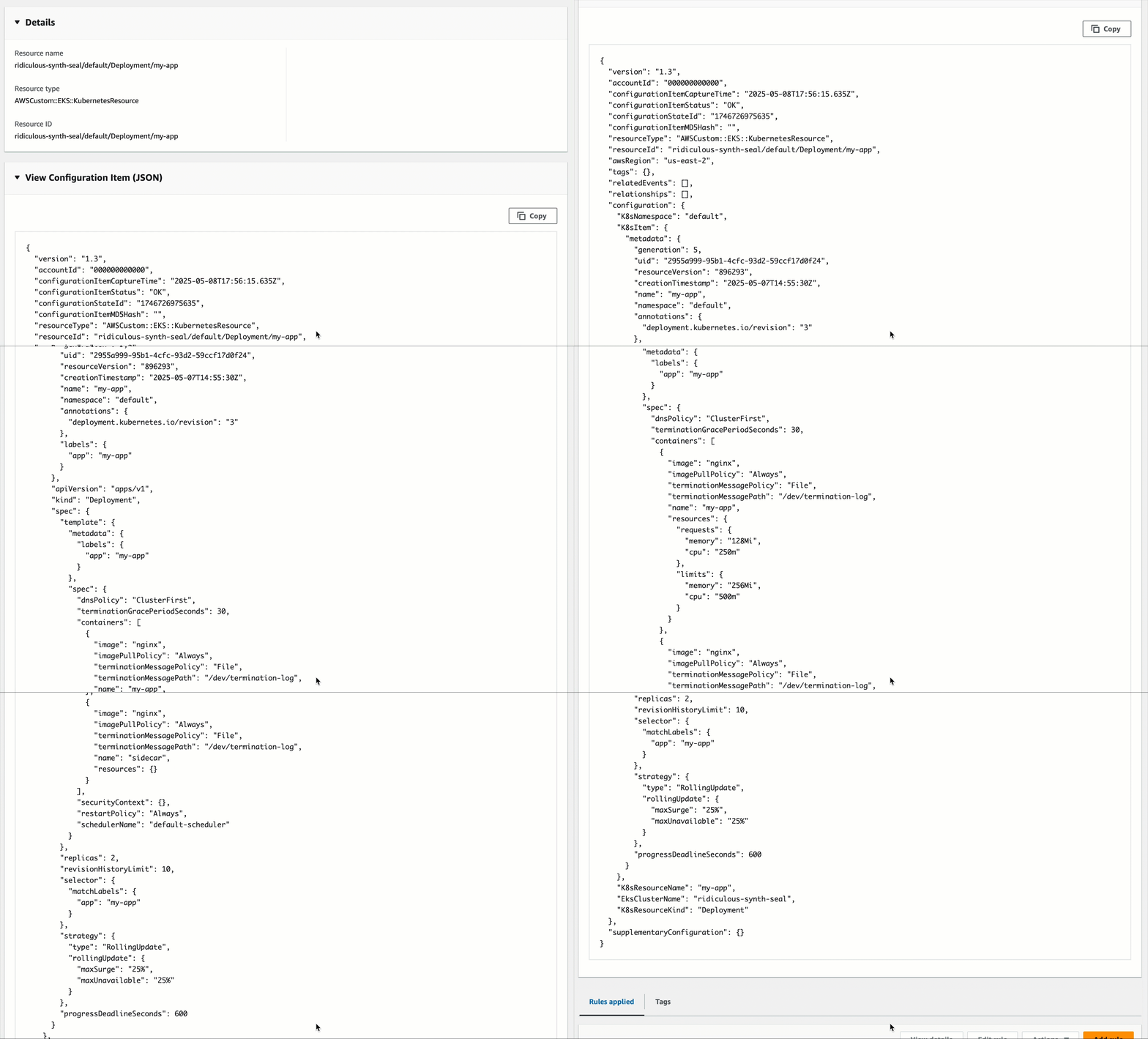
Figure 2 – Configuration details of a recorded Kubernetes Deployment in Amazon Config
In the resource page, choose Resource Timeline to view how the resource has changed over time. For example, the following image shows the configuration history of a recorded Kubernetes Deployment:
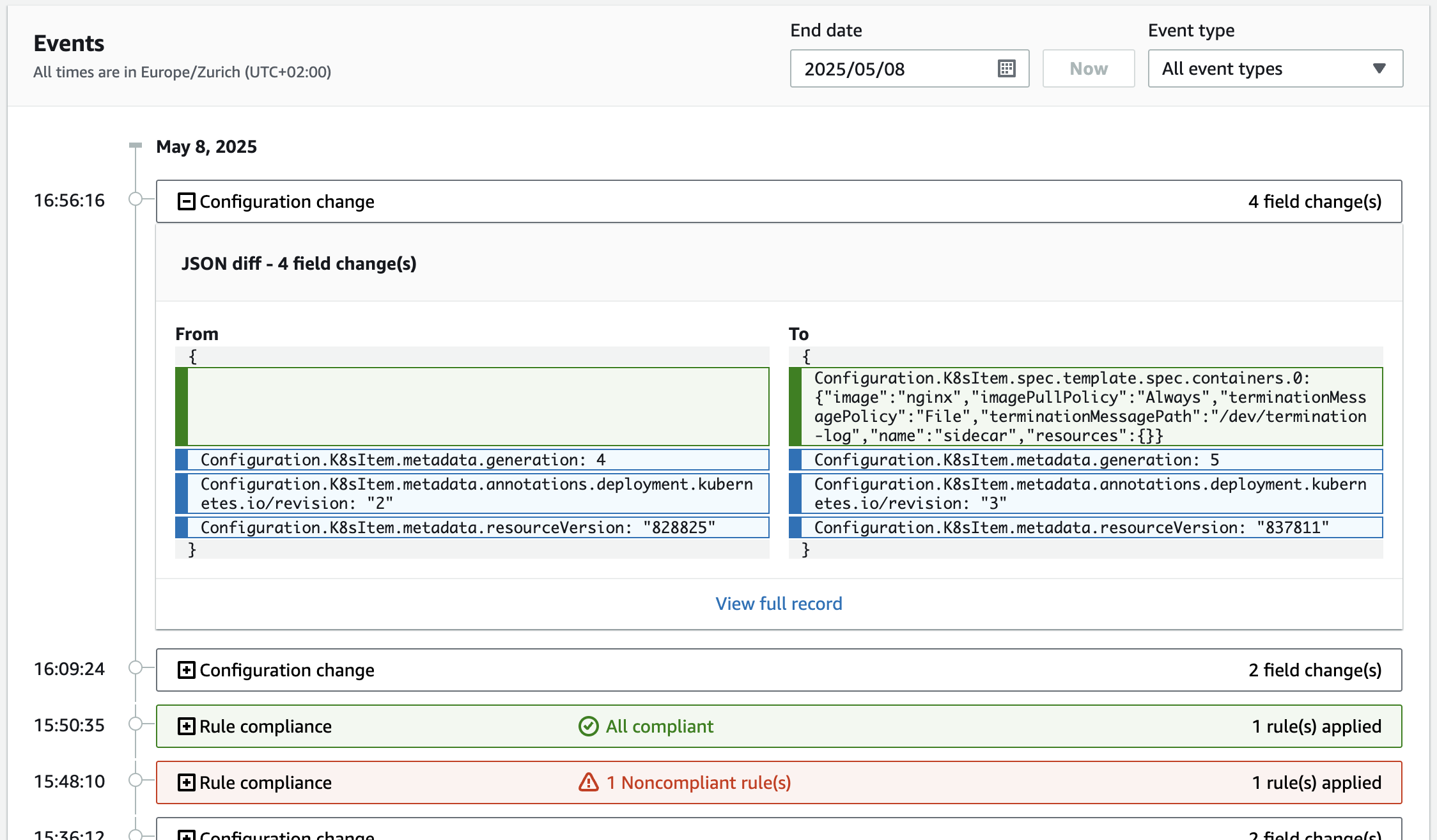
Figure 3 – Resource timeline showing configuration history of a Kubernetes Deployment in Amazon Config
Querying resources
One of the powerful capabilities this solution enables is the ability to retrieve your Kubernetes resources using Amazon Config advanced queries. For example:
This query returns all Kubernetes resources recorded in Amazon Config, as illustrated in the image below.
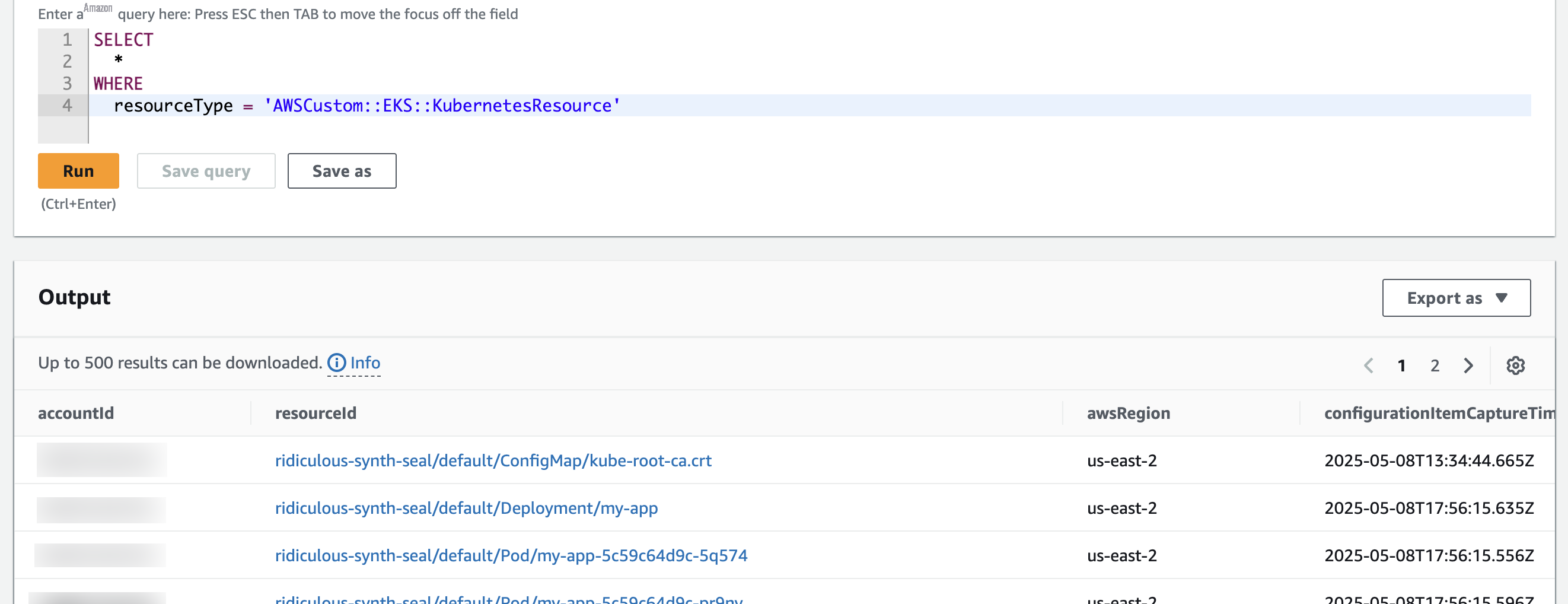
Figure 4 – Results of an Amazon Config advanced query for Kubernetes resources
You can also create more specific queries to find particular resources. For example:
This query returns all Kubernetes ConfigMap resources in the kube-system namespace for a specific EKS cluster.
Evaluating compliance
With your Kubernetes resources recorded in Amazon Config, you can create Amazon Config rules to continuously evaluate their compliance. For example, you might want to ensure:
- Deployments follow specific labeling conventions
- Services use approved port ranges
- Namespaces have network policies applied
You can create Amazon Config custom rules using Amazon CloudFormation Guard policy-as-code language or Amazon Lambda functions. Here is an example Guard rule that ensures deployments have at least two replicas:
And here is a more advanced rule that ensures all pods use images from approved registries:
To create these rules in Amazon Config:
- In the left navigation pane of the Amazon Config console, choose Rules
- Choose Add rule, choose Create custom rule using Guard, and choose Next.
- In the Configure rule page:
- For Rule name type a meaningful name (e.g.,
kubernetes_approved_registries) - For Rule content, paste your Guard rule content
- In the Evaluation mode section, for Scope of changes select Resources
- For Resource type, enter and select
AWSCustom::EKS::KubernetesResource
- For Rule name type a meaningful name (e.g.,
- Choose Next and choose Save
After creating the rule, Amazon Config continuously evaluates resources against it. The rule page shows the compliance status of all Kubernetes resources in scope, helping you quickly identify configuration issues. For example, the following image shows two compliant and two noncompliant pods.
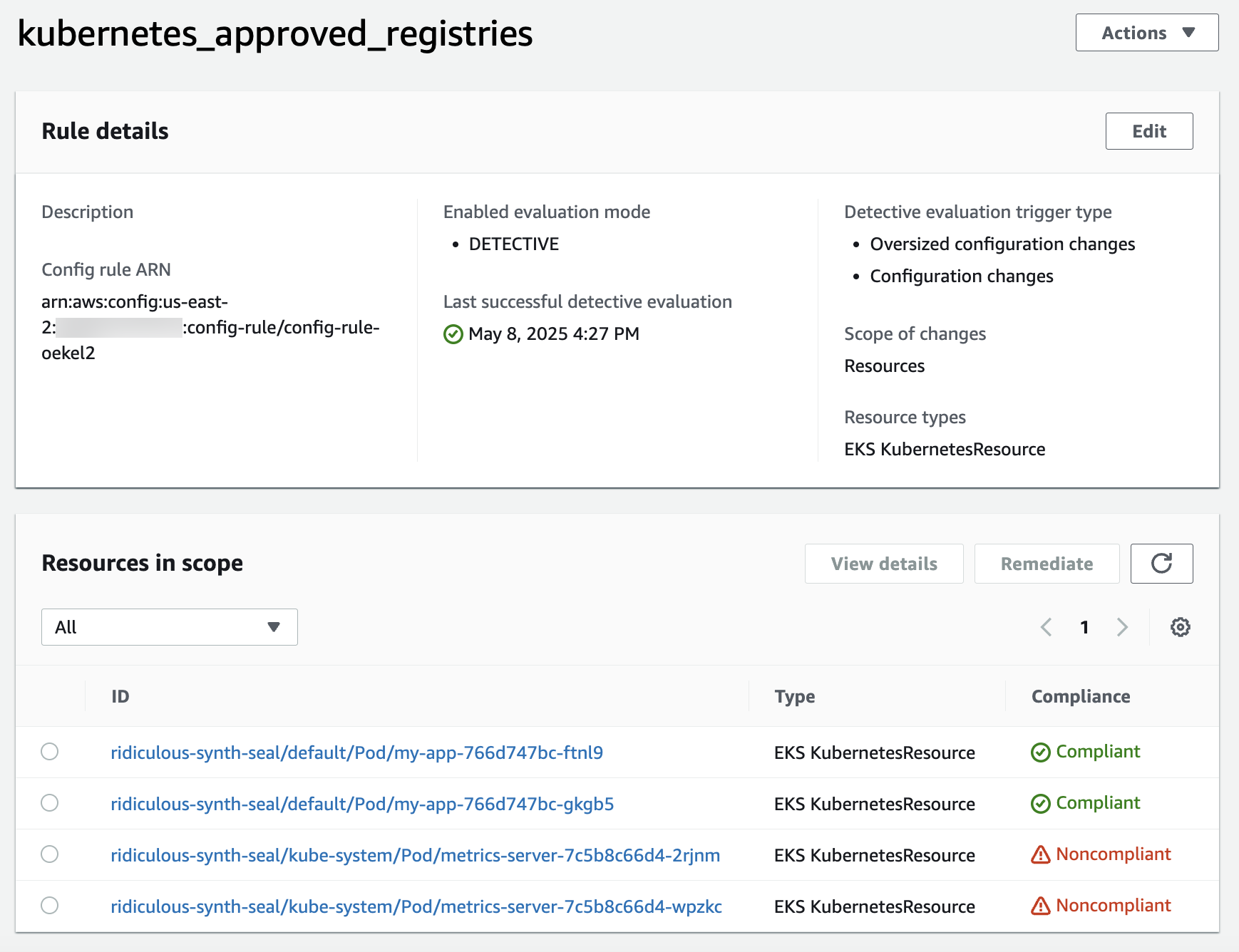
Figure 5 – Amazon Config rule compliance status for Kubernetes pods
Now you can return to the query editor and execute the following query to get all non-compliant pods in the default namespace of your cluster:
Dive deep – solution architecture
Now that you’ve seen what the solution can do, the following section explains how it works behind the scenes. The solution uses Amazon Step Functions to orchestrate the process of registering Kubernetes resources as Amazon Config custom resources.
The initial solution deployment registers a custom resource type AWSCustom::EKS::KubernetesResource with the CloudFormation registry. This includes a schema defining the structure and properties of Kubernetes resources that enables Amazon Config to properly interpret, validate, and track Kubernetes resource configurations. The deployment also provisions all necessary Amazon Web Services resources for the workflow operation (Lambda functions, Step Function state machine, S3 bucket, etc.). The following diagram shows the architecture of the solution.
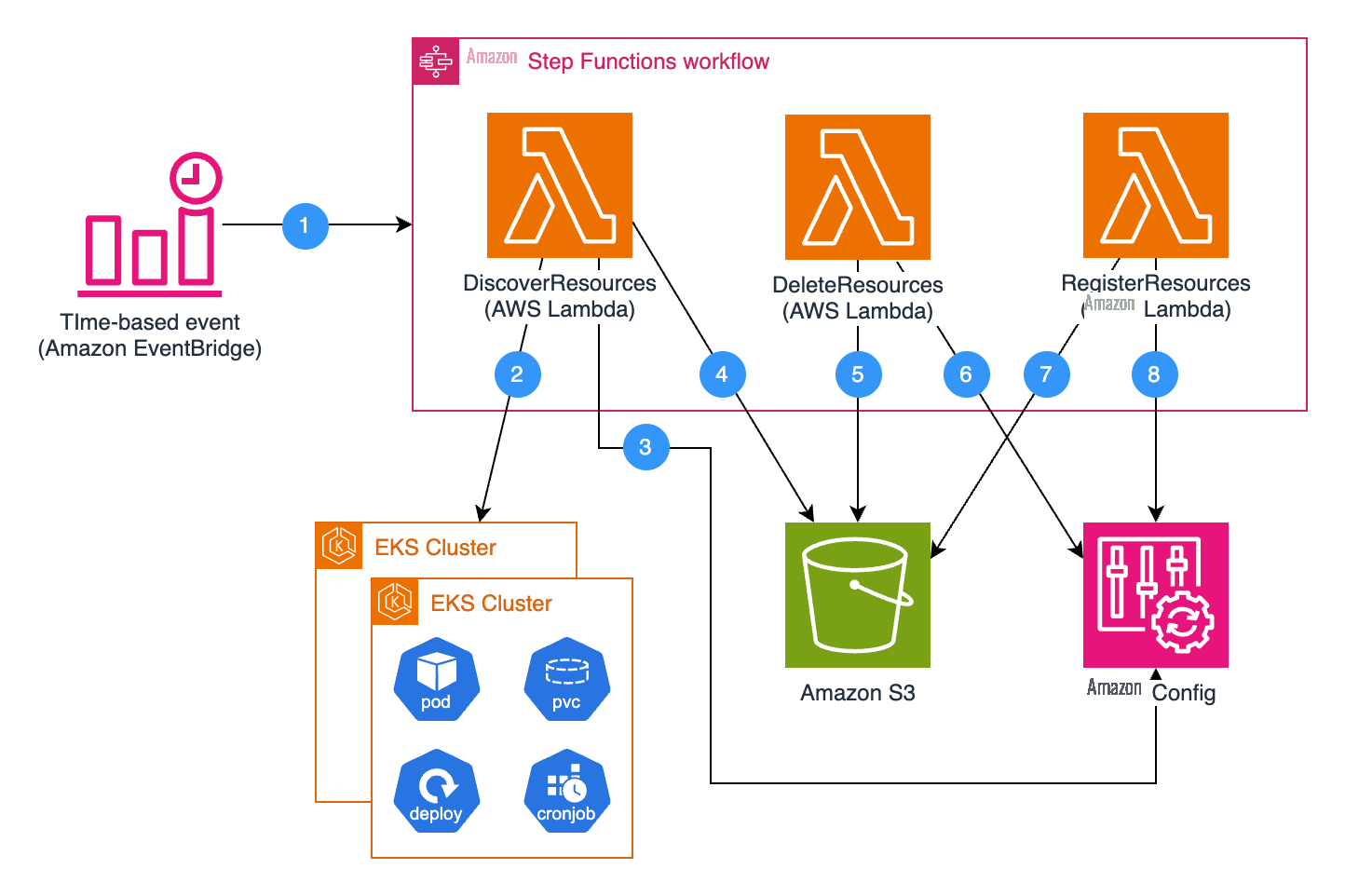
Figure 6 – Architecture diagram of the solution
The workflow then operates as follows:
- Scheduled Execution:
- An Amazon EventBridge rule triggers the Step Functions state machine on a configurable schedule (default: hourly).
- Resource Discovery and Analysis:
- The
DiscoverResourcesLambda function lists the EKS clusters in your Amazon Web Services account, connects to each cluster, and retrieves the relevant resources, filtering them based on your configuration (resource kinds, namespaces, labels, etc.). - The
DiscoverResourcesLambda function queries Amazon Config to get a list of Kubernetes resources currently recorded in Amazon Config. - The
DiscoverResourcesLambda function calculates which resources are stale and need to be deleted from Amazon Config, and which resources are new or changed and need to be registered. It saves both lists to S3.
- The
- Resources Deletion:
- The
DeleteResourcesLambda function reads the resources-to-delete list from S3. - It deletes these stale resources from Amazon Config.
- The
- Resources Registration:
- The
RegisterResourcesLambda function reads the resources-to-register list from S3. - It creates or updates these resources in Amazon Config as custom resources of type
AWSCustom::EKS::KubernetesResource, making them available for auditing and compliance evaluation.
- The
This architecture ensures that your Amazon Config resources stay in sync with the actual state of your Kubernetes resources.
Use cases and benefits
Centralized configuration management
By recording Kubernetes resources in Amazon Config, you gain a centralized view of your entire infrastructure, including both Amazon Web Services and Kubernetes resources. This unified approach simplifies configuration management and provides a single source of truth for your cloud environment.
Compliance monitoring
The solution enables continuous compliance monitoring of your Kubernetes resources against your organization’s policies and industry standards. You can create custom rules to enforce specific requirements and receive notifications when resources drift from compliance. Additionally, you can leverage Amazon Config conformance packs to group related rules and remediation actions, making it easier to apply and manage compliance at scale across your Kubernetes environments.
Security auditing
Security teams can use the recorded configuration data to audit Kubernetes resources for security best practices. For example, they can identify pods running with privileged access, containers using the root user, deployments without proper network policies, or unauthorized image repository sources.
Change tracking and troubleshooting
When issues arise, the configuration timeline in Amazon Config helps you understand what changed and when. This historical data is invaluable for troubleshooting and can help you quickly identify the root cause of problems.
Conclusion
The open-source solution from this post bridges the gap between Amazon Web Services and Kubernetes resource management by bringing Kubernetes resources into Amazon Config’s powerful configuration and compliance framework. This integration enables unified visibility, simplified compliance, and enhanced security across your environment.
To learn more about Amazon Config, visit the Amazon Config documentation. For implementing this solution, check out the open-source project repository.

Simone Pomata
Simone is a Principal Solutions Architect at Amazon Web Services. He has worked enthusiastically in the tech industry for more than 10 years. At Amazon Web Services, he helps customers succeed in building new technologies every day.
The mentioned AWS GenAI Services service names relating to generative AI are only available or previewed in the Global Regions. Amazon Web Services China promotes AWS GenAI Services relating to generative AI solely for China-to-global business purposes and/or advanced technology introduction.