- Products
- Amazon EFS
- Features
Amazon EFS Infrequent Access
Save up to 91% on file storage
Maximizing operational efficiency and reducing total cost of ownership are common drivers for moving business applications to the cloud. (EFS One Zone) Amazon EFS Standard-Infrequent Access (EFS Standard-IA) and Amazon EFS One Zone-Infrequent Access (EFS One Zone-IA) are storage classes that provide price/performance that is cost-optimized for files not accessed every day, with storage prices up to 91% lower compared to Amazon EFS Standard (EFS Standard) and Amazon EFS One Zone (EFS One Zone) respectively.
Amazon Elastic File System (Amazon EFS) provides a simple, serverless, set-and-forget elastic file system for use with Amazon Web Services Cloud services and on-premises resources. Amazon EFS Standard-Infrequent Access (EFS Standard-IA) and Amazon EFS One Zone-Infrequent Access (EFS One Zone-IA) are storage classes that provide price/performance that is cost-optimized for files not accessed every day, with storage prices up to 91% lower compared to Amazon EFS Standard (EFS Standard) and Amazon EFS One Zone respectively. The EFS One Zone-IA storage class costs only ¥0.107/GB-month*, and EFS Standard-IA costs only ¥0.2/GB-month**.
Using the industry accepted estimate that 20% of data is actively used and 80% is infrequently accessed, you can store your files on Amazon EFS at an effective price of ¥0.3136/GB-month (20% * ¥1.14/GB-month for files stored on EFS One Zone + 80% * ¥0.107/GB-month for files stored on EFS One Zone-IA = ¥0.3136/GB-month)*, or an effective price of ¥0.589/GB-month (20% * ¥2.145/GB-month for files stored on regional EFS Standard + 80% * ¥0.2/GB-month for files stored on EFS Standard-IA = ¥0.589/GB-month)**.
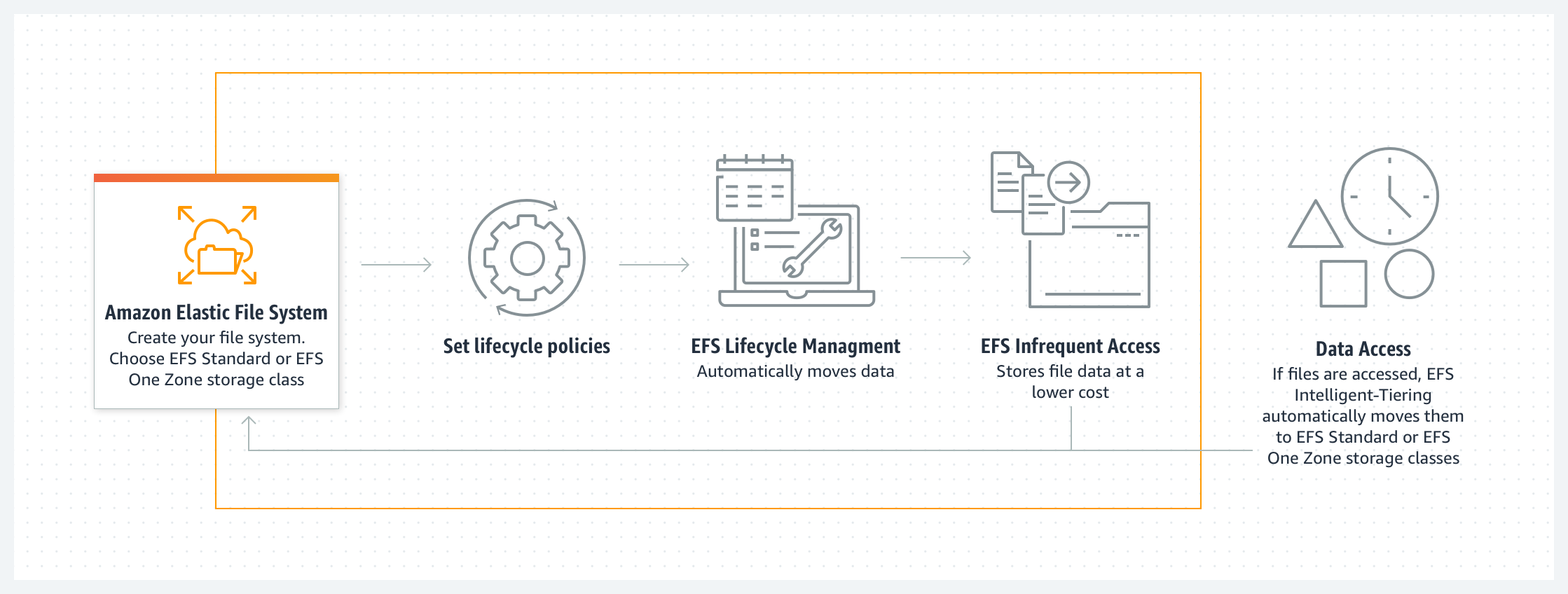
To get started with Infrequent Access storage classes, simply enable Amazon EFS Lifecycle Management for your file system by selecting a lifecycle policy that matches your needs. Amazon EFS will automatically and transparently move your files to lower cost regional EFS Standard-IA storage class or EFS One Zone-IA storage class based on the last time they were accessed. Amazon EFS transparently serves files from both frequent access storage classes (such as EFS Standard and EFS One Zone) and infrequent access storage classes (such as EFS Standard-IA and EFS One Zone-IA) from a common file system namespace when the lifecycle policy to move files to these storage classes is set. You don't have to worry about which of your files are actively used and which are infrequently accessed. Amazon EFS Intelligent-Tiering offers an additional lifecycle policy that moves files back to EFS Standard or EFS One Zone automatically.
Amazon EFS Intelligent-Tiering
EFS Intelligent-Tiering delivers automatic cost savings for workloads with changing access patterns by placing your file data in the appropriate storage class, at the right time, based on file access patterns.
EFS Intelligent-Tiering uses Lifecycle Management to monitor the access patterns of your workload and automaticallytransitions files that are not accessed for the duration of the Lifecycle policy (e.g., 30 days) from either the EFS Standard or EFS One Zone storage classes, to their corresponding Infrequent Access (IA) storage class (EFS Standard-Infrequent Access or EFS One Zone-Infrequent Access). If access patterns change and that data is read from or written to again, Lifecycle Management automatically moves the files back to EFS Standard or EFS One Zone, eliminating the risk of unbounded access charges.
To use EFS Intelligent-Tiering, simply set two lifecycle policies: one to automatically move files to EFS Standard-IA or EFS One Zone-IA and another policy to automatically move files back to EFS Standard or EFS One Zone if accessed.
*pricing in Amazon Web Services China (Ningxia) region, operated by NWCD, assumes 80% of your storage in EFS One Zone-IA
**pricing in Amazon Web Services China (Ningxia) region, operated by NWCD, assumes 80% of your storage in EFS Standard-IA
How it works
1.
Create file system
2.
Choose Lifecycle Management file access policy to transition files to infrequent access (7, 14, 30, 60, or 90 days) using the CLI, API, or Amazon EFS Management Console.
3.
Files not accessed according to the Lifecycle policy are moved to the EFS Standard-IA or EFS One Zone-IA storage class, depending on whether your file system uses Standard or One Zone storage classes.
4.
Additionally, choose the Lifecycle Management file access policy to transition files to EFS Standard or EFS One Zone if accessed (‘On First Access’) using the CLI, API, or Amazon EFS Management Console.
5.
Files that are read from or written to the IA storage classes (EFS Standard-IA or EFS One Zone-IA) are moved to EFS Standard or EFS One Zone, depending on whether your file system uses Standard or One Zone storage classes.