We use machine learning technology to do auto-translation. Click "English" on top navigation bar to check Chinese version.
Implementing automatic drift detection in CDK Pipelines using Amazon EventBridge
The
With CloudFormation stacks, there is the possibility that someone can manually change the configuration of stack resources outside the purview of CloudFormation and the pipeline that deploys the stack. This causes the deployed resources to be inconsistent with the intent in the application, which is referred to as “drift”, a situation that can make the application’s behavior unpredictable. For example, when troubleshooting an application, if the application has drifted in production, it is difficult to reproduce the same behavior in a development environment. In other cases, it may introduce security vulnerabilities in the application. For example, an
CloudFormation offers a
In this blog post you will see how CloudFormation drift detection can be integrated as a pre-deployment validation step in CDK Pipelines using an event driven approach.
Services and frameworks used in the post include CloudFormation, CodeBuild,
Solution overview
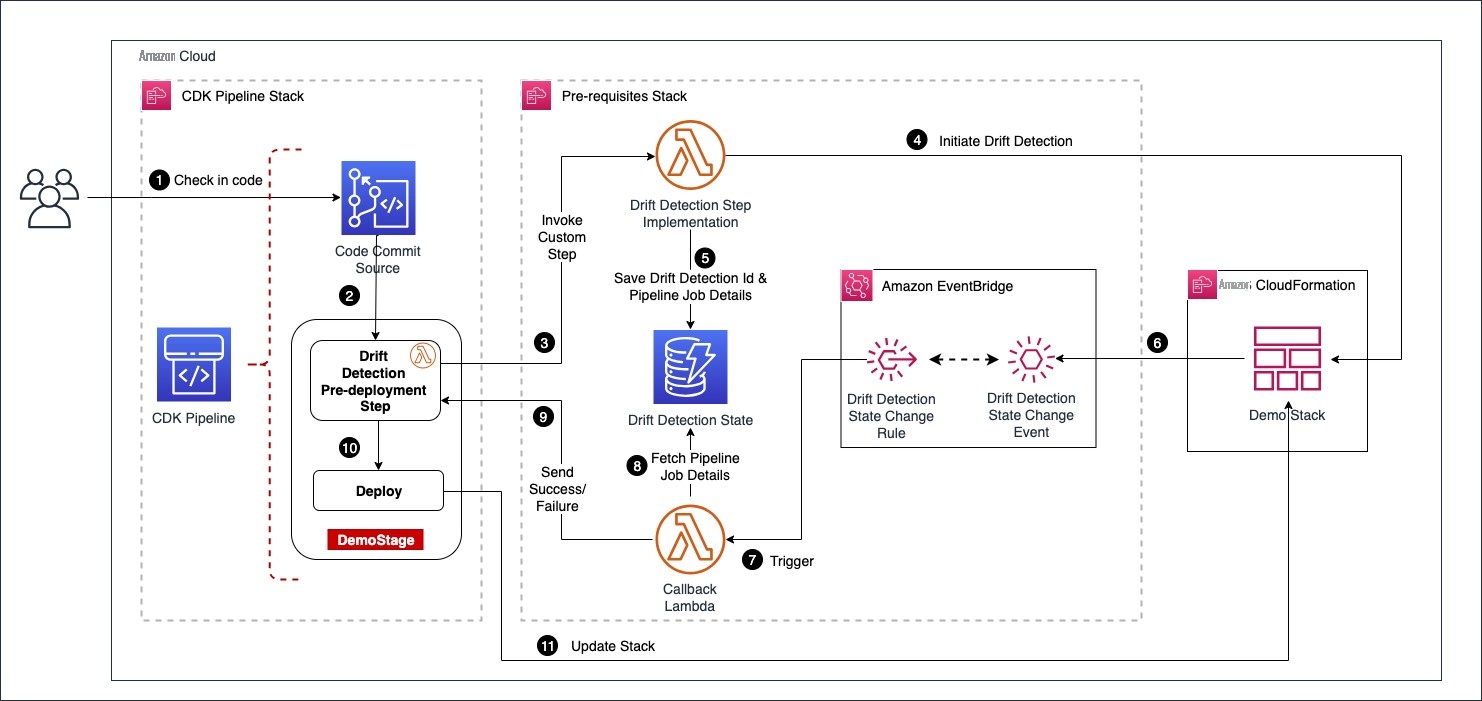
Architecture diagram
The user starts the pipeline by checking code into an
Demo Stack
and then saves the
drift_detection_id
along with
pipeline_job_id
in a DynamoDB table. In the meantime, the pipeline waits for a response on the status of drift detection.
The EventBridge rules are set up to capture the drift detection state change events for
Demo Stack
that are received by the default event bus. The callback lambda is registered as the intended target for the rules. When drift detection completes, it triggers the EventBridge rule which in turn invokes the callback lambda function with stack status as either
DRIFTED
or
IN SYNC
. The callback lambda function pulls the
pipeline_job_id
from DynamoDB and sends the appropriate status back to the pipeline, thus propelling the pipeline out of the wait state. If the stack is in the
IN SYNC
status, the callback lambda sends a success status and the pipeline continues with the deployment. If the stack is in the
DRIFTED
status, callback lambda sends failure status back to the pipeline and the pipeline run ends up in failure.
Solution Deep Dive
The solution deploys two stacks as shown in the above architecture diagram
- CDK Pipelines stack
- Pre-requisite stack
The CDK Pipelines stack defines a pipeline with a CodeCommit source and drift detection step integrated into it. The pre-requisite stack deploys following resources that are required by the CDK Pipelines stack.
- A Lambda function that implements drift detection step
-
A DynamoDB table that holds
drift_detection_idandpipeline_job_id - An Event bridge rule to capture “CloudFormation Drift Detection Status Change” event
- A callback lambda function that evaluates status of drift detection and sends status back to the pipeline by looking up the data captured in DynamoDB.
The pre-requisites stack is deployed first, followed by the CDK Pipelines stack.
Defining drift detection step
CDK Pipelines offers a
You start by defining a class called
DriftDetectionStep
that extends Step and implements
ICodePipelineActionFactory
as shown in the following code snippet. The constructor accepts 3 parameters
stackName
,
account
,
region
as inputs. When the pipeline runs the step, it invokes the drift detection lambda function with these parameters wrapped inside
userParameters
variable. The function
produceAction()
adds the action to invoke drift detection lambda function to the pipeline stage.
Please note that the solution uses an
export class DriftDetectionStep
    extends Step
    implements pipelines.ICodePipelineActionFactory
{
    constructor(
        private readonly stackName: string,
        private readonly account: string,
        private readonly region: string
    ) {
        super(`DriftDetectionStep-${stackName}`);
    }

    public produceAction(
        stage: codepipeline.IStage,
        options: ProduceActionOptions
    ): CodePipelineActionFactoryResult {
        // Define the configuraton for the action that is added to the pipeline.
        stage.addAction(
            new cpactions.LambdaInvokeAction({
                actionName: options.actionName,
                runOrder: options.runOrder,
                lambda: lambda.Function.fromFunctionArn(
                    options.scope,
                    `InitiateDriftDetectLambda-${this.stackName}`,
                    ssm.StringParameter.valueForStringParameter(
                        options.scope,
                        SSM_PARAM_DRIFT_DETECT_LAMBDA_ARN
                    )
                ),
                // These are the parameters passed to the drift detection step implementaton provider lambda
                userParameters: {
                    stackName: this.stackName,
                    account: this.account,
                    region: this.region,
                },
            })
        );
        return {
            runOrdersConsumed: 1,
        };
    }
}
Configuring drift detection step in CDK Pipelines
Here you will see how to integrate the previously defined drift detection step into CDK Pipelines. The pipeline has a stage called
DemoStage
as shown in the following code snippet. During the construction of
DemoStage
, we declare drift detection as the pre-deployment step. This makes sure that the pipeline always does the drift detection check prior to deployment.
Please note that for every stack defined in the stage; we add a dedicated step to perform drift detection by instantiating the class
DriftDetectionStep
detailed in the prior section. Thus, this solution scales with the number of stacks defined per stage.
export class PipelineStack extends BaseStack {
    constructor(scope: Construct, id: string, props?: StackProps) {
        super(scope, id, props);

        const repo = new codecommit.Repository(this, 'DemoRepo', {
            repositoryName: `${this.node.tryGetContext('appName')}-repo`,
        });

        const pipeline = new CodePipeline(this, 'DemoPipeline', {
            synth: new ShellStep('synth', {
                input: CodePipelineSource.codeCommit(repo, 'main'),
                commands: ['./script-synth.sh'],
            }),
            crossAccountKeys: true,
            enableKeyRotation: true,
        });
        const demoStage = new DemoStage(this, 'DemoStage', {
            env: {
                account: this.account,
                region: this.region,
            },
        });
        const driftDetectionSteps: Step[] = [];
        for (const stackName of demoStage.stackNameList) {
            const step = new DriftDetectionStep(stackName, this.account, this.region);
            driftDetectionSteps.push(step);
        }
        pipeline.addStage(demoStage, {
            pre: driftDetectionSteps,
        });
Demo
Here you will go through the deployment steps for the solution and see drift detection in action.
Deploy the pre-requisites stack
Clone the repo from the GitHub location
Deploy the CDK Pipelines stack
Clone the repo from the GitHub location
script-deploy.sh
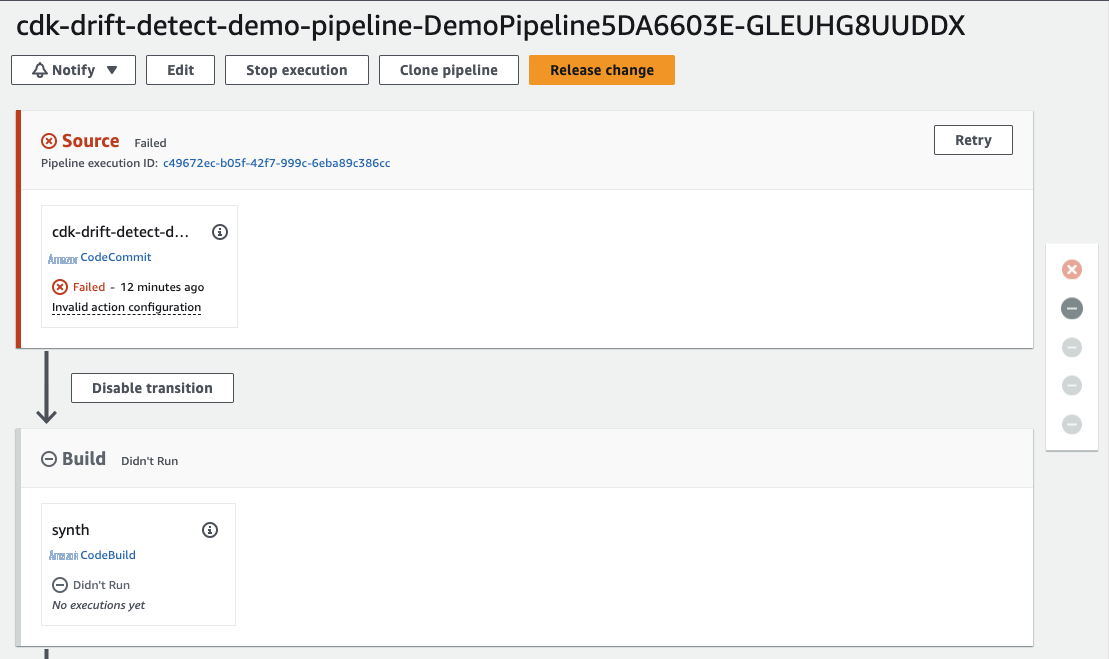
. This deploys a pipeline with an empty CodeCommit repo as the source. The pipeline run ends up in failure, as shown below, because of the empty CodeCommit repo.
Next, check in the code from the cloned repo into the CodeCommit source repo. You can find detailed instructions on that in
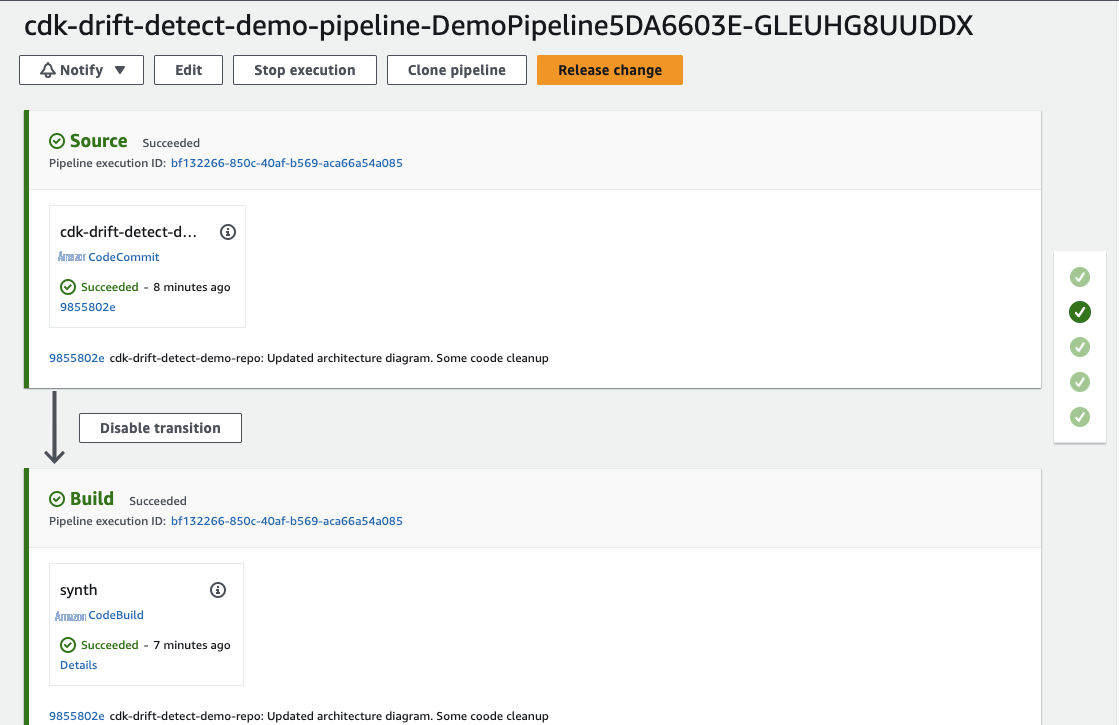
The pipeline deploys two stacks
DemoStackA
and
DemoStackB
. Each of these stacks creates an S3 bucket.

Demonstrate drift detection
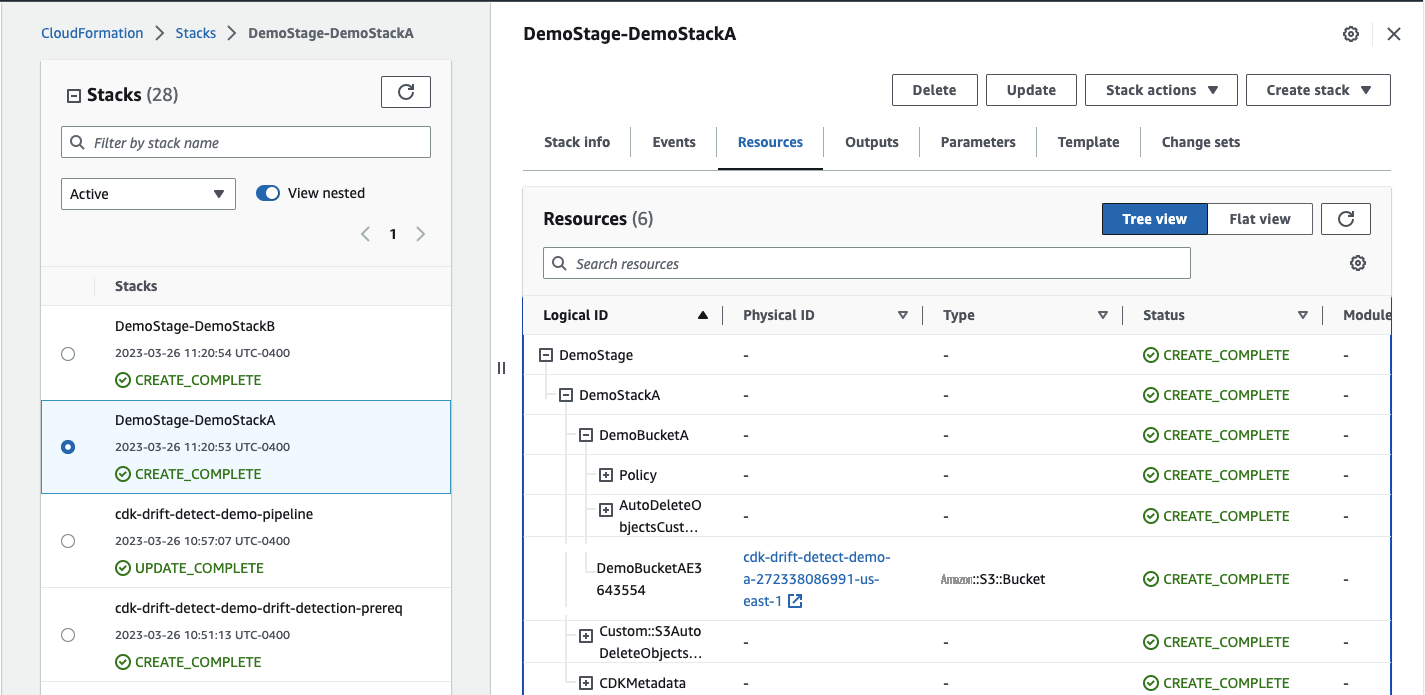
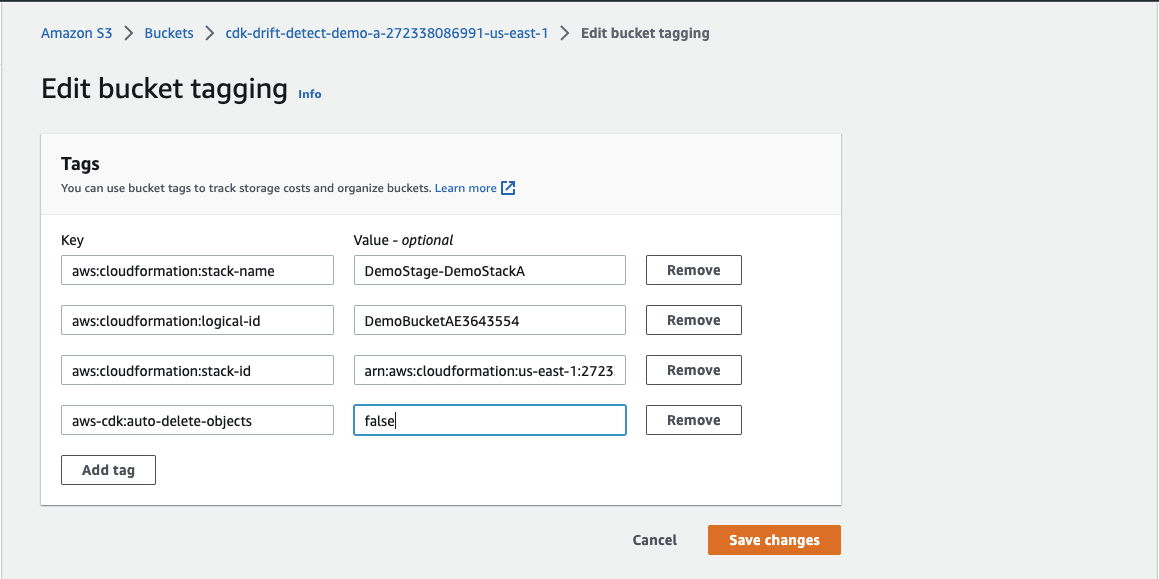
Locate the S3 bucket created by
DemoStackA
under resources, navigate to the S3 bucket and modify the tag
aws-cdk:auto-delete-objects
from
true
to
false
as shown below
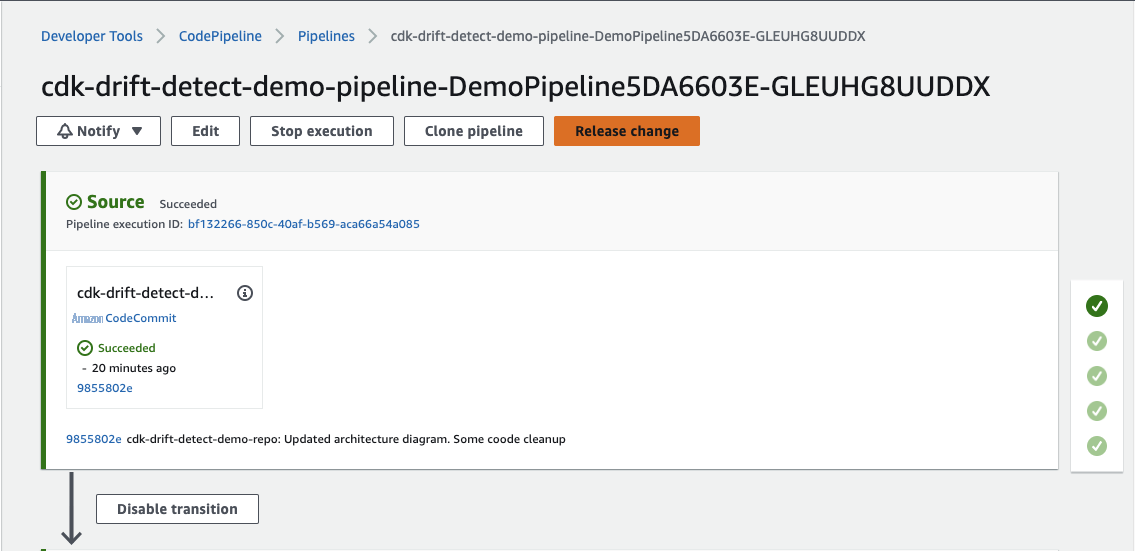
Now, go to the pipeline and trigger a new execution by clicking on
Release Change
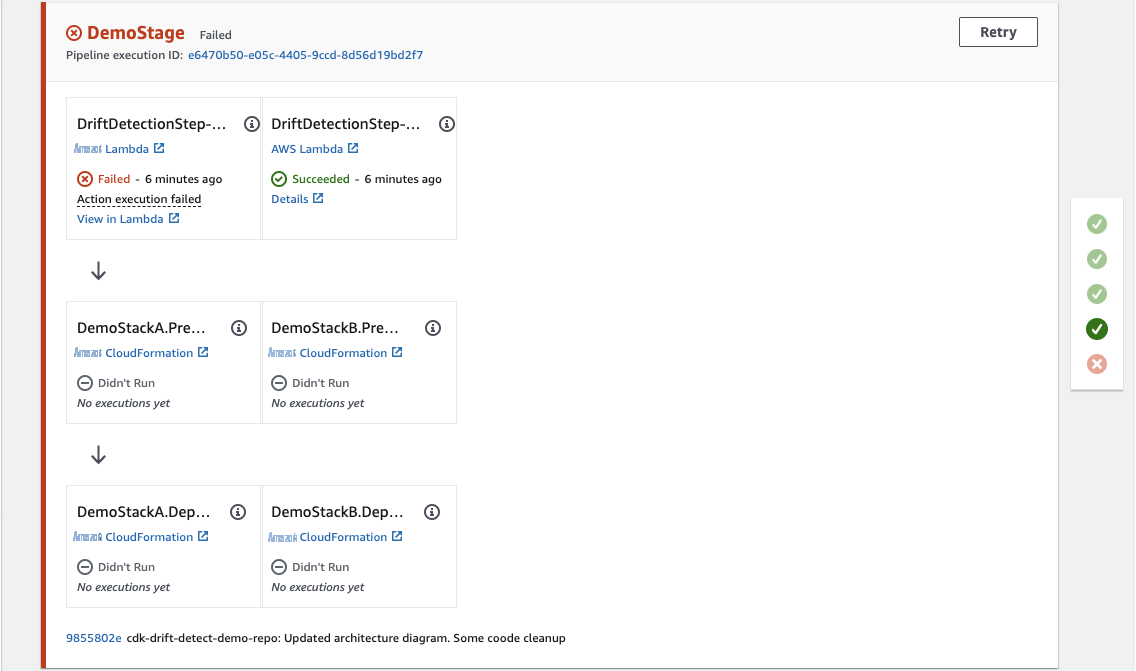
The pipeline run will now end in failure at the pre-deployment drift detection step.
Cleanup
Please follow the steps below to clean up all the stacks.
-
Navigate to S3 console and empty the buckets created by stacks
DemoStackAandDemoStackB. -
Navigate to the CloudFormation console and delete stacks
DemoStackAandDemoStackB, since deleting CDK Pipelines stack does not delete the application stacks that the pipeline deploys. -
Delete the CDK Pipelines stack
cdk-drift-detect-demo-pipeline -
Delete the pre-requisites stack
cdk-drift-detect-demo-drift-detection-prereq
Conclusion
In this post, I showed how to add a custom implementation step in CDK Pipelines. I also used that mechanism to integrate a drift detection check as a pre-deployment step. This allows us to validate the integrity of a CloudFormation Stack before its deployment. Since the validation is integrated into the pipeline, it is easier to manage the solution in one place as part of the overarching pipeline. Give the solution a try, and then see if you can incorporate it into your organization’s delivery pipelines.
About the author:

Damodar Shenvi Wagle is a Senior Cloud Application Architect at Amazon Web Services Professional Services. His areas of expertise include architecting serverless solutions, CI/CD, and automation.
The mentioned AWS GenAI Services service names relating to generative AI are only available or previewed in the Global Regions. Amazon Web Services China promotes AWS GenAI Services relating to generative AI solely for China-to-global business purposes and/or advanced technology introduction.