We use machine learning technology to do auto-translation. Click "English" on top navigation bar to check Chinese version.
Filter delete operations with Amazon Web Services DMS
In this post, we demonstrate two options to configure Amazon Web Services DMS to filter deletes when replicating data to the target database. The first strategy uses
Use Amazon S3 as a staging environment
One way to filter deletes with Amazon Web Services DMS is to use Amazon S3 as a staging environment. Amazon Web Services DMS migrates inserts and updates and ignores deletes from the source database to an S3 bucket. You can use this approach for any supported
As shown in the following diagram, Amazon S3 acts as an intermediate system that filters out the deletes from applying to the final target by using the
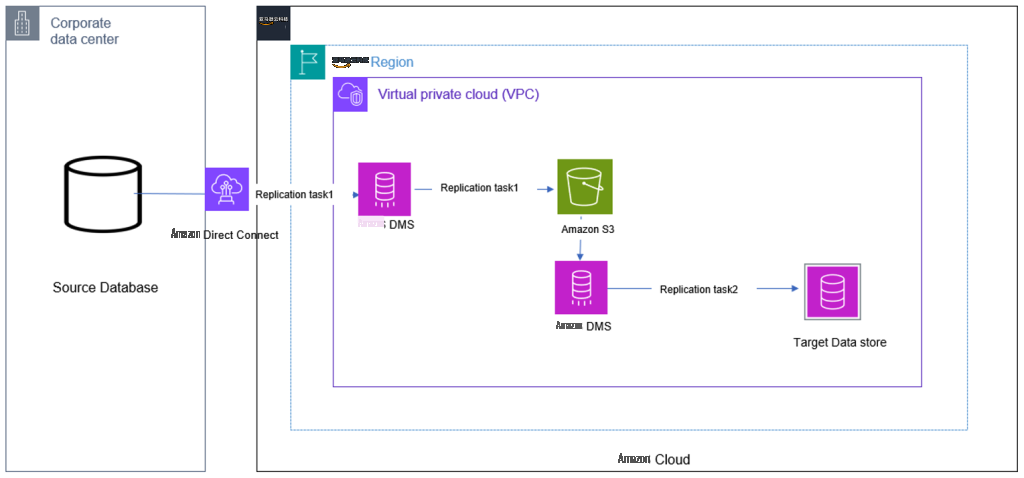
When you use the
cdcInsertsAndUpdates
S3 target endpoint setting, an additional first field is added, which indicates whether the row was inserted (I) or updated (U) at the source database. How Amazon Web Services DMS creates and sets this field depends on the
includeOpForFullLoad
,
cdcInsertsOnly
, and
cdcInsertsAndUpdates
.
If our Amazon Web Services DMS task performs both a full load and change data capture (CDC), we must add the
includeOpForFullLoad
parameter to our target S3 endpoint settings. Amazon Web Services DMS creates an additional field in our load files, which ensures that the columns in the load and CDC files are consistent.
Without this parameter, the load and CDC files will have different numbers of columns, which can cause the following error if you try to use the data from both files together:
For example, let’s say we have the following data in our source table:
Now, let’s say we perform the following DML operations on this table:
After performing these operations, the data present in our table is as follows:
The following is the Amazon Web Services DMS output in the S3 staging bucket when the
cdcInsertsAndUpdates
parameter is used:
We can observe that only inserts and updates are captured and deletes were filtered when the
cdcInsertsAndUpdates
parameter was used. This is because this parameter tells Amazon Web Services DMS to only capture change data that is inserted or updated, and to filter out any change data that is deleted.
Now we use this intermediate S3 bucket as a source and create another Amazon Web Services DMS task between Amazon S3 and the target database.
When configuring Amazon S3 as source, we also need to provide a JSON file with the
The target database shows that the deletes were not applied, and the record with ID 2 still exists:
By using Amazon S3 as a staging environment to filter DML operations, you can selectively capture only the changes that you want to replicate. For example, if we want replicate only inserts, we can use
cdcinsertsonly
. This is useful for us to retain the deleted data on the target for auditing purposes even after the records are deleted in the source.
Use an Amazon Web Services DMS transformation rule
As shown in the following diagram, Amazon Web Services DMS is used to migrate and replicate the data from the on-premises data center. With the built-in functionality of the transformation rule, it filters out the delete operations.
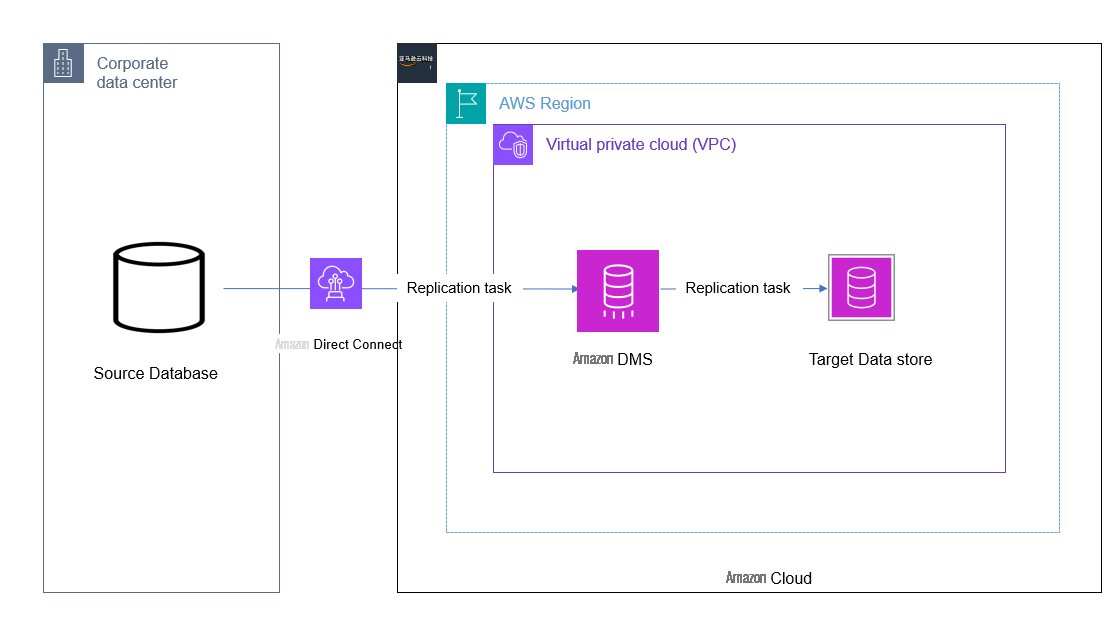
Using the
This allows you to keep the record alive in the target even though it has been deleted in the source. The deleted record at the source gets flagged with the user-provided value of D as per the previous transformation rule in the target.
To test this functionality, we use the same table metadata and the DML transactions mentioned in the beginning of the post. The final output at the target table with the preceding activities is as follows:
The record with ID 2 is still intact in the target with a value of D under the operation column, as specified in the transformation rule. We can also view the table contents without deletes by running a query or creating a view with the condition operator <> ‘D’.
Conclusion
In this post, we demonstrated two approaches to filtering out the delete operation at the source database by using the in-house functionalities of Amazon Web Services DMS. Depending on the data requirement at the target database, you can use either approach. Using Amazon S3 as a target adds an additional cost of intermediate data storage, but it can be useful if multiple consumers need to process different subsets of the data from Amazon S3. Similarly, using the
operation_indicator
function of the transformation rule is a good option when there is a single line of source-to-target data migration or replication requirement.
Check out
About the authors
 Deepthi Saina
is a Data Architect at Amazon Web Services based in the UK. Deepthi specializes in Amazon RDS, Amazon Aurora, and Amazon Web Services DMS. She is also a subject matter expert in Amazon Web Services DMS and Amazon RDS. In her role, she helps customers across the EMEA migrate, modernize, and optimize database solutions on Amazon Web Services.
Deepthi Saina
is a Data Architect at Amazon Web Services based in the UK. Deepthi specializes in Amazon RDS, Amazon Aurora, and Amazon Web Services DMS. She is also a subject matter expert in Amazon Web Services DMS and Amazon RDS. In her role, she helps customers across the EMEA migrate, modernize, and optimize database solutions on Amazon Web Services.
 Vivekananda Mohapatra
is a Lead Consultant with the Amazon Web Services ProServe team. He has deep expertise in database development and administration on Amazon RDS for Oracle, Amazon RDS for PostgreSQL, Amazon Aurora PostgreSQL, and Amazon Redshift databases. He is also a subject matter expert in Amazon Web Services DMS. He works closely with customers to help migrate and modernize their databases and applications to Amazon Web Services on a daily basis.
Vivekananda Mohapatra
is a Lead Consultant with the Amazon Web Services ProServe team. He has deep expertise in database development and administration on Amazon RDS for Oracle, Amazon RDS for PostgreSQL, Amazon Aurora PostgreSQL, and Amazon Redshift databases. He is also a subject matter expert in Amazon Web Services DMS. He works closely with customers to help migrate and modernize their databases and applications to Amazon Web Services on a daily basis.
The mentioned AWS GenAI Services service names relating to generative AI are only available or previewed in the Global Regions. Amazon Web Services China promotes AWS GenAI Services relating to generative AI solely for China-to-global business purposes and/or advanced technology introduction.