我们使用机器学习技术将英文博客翻译为简体中文。您可以点击导航栏中的“中文(简体)”切换到英文版本。
解锁效率:在亚马逊 SageMaker Pipelines 中利用选择性处决的力量
mLOps 是一门关键学科,经常监督机器学习 (ML) 模型的生产路径。专注于想要训练和部署的单一模型是很自然的。但是,实际上,你可能会使用数十甚至数百个模型,并且该过程可能涉及多个复杂的步骤。因此,重要的是要有基础设施来大规模跟踪、训练、部署和监控复杂程度不同的模型。这就是 mLops 工具的用武之地。mLops 工具可帮助您重复可靠地构建和简化这些流程,使其成为专为 ML 量身定制的工作流程。
在这篇文章中,我们重点介绍了 SageMaker Pipelines 的一项激动人心的新功能,即
解决方案概述
SageMaker Pipelines 推出 “
请务必注意,所选步骤可能依赖于未选定步骤的结果。在这种情况下,这些未选定步骤的输出将从当前管道版本的参考运行中重复使用。这意味着参考运行必须已经完成。默认参考运行是当前管道版本的最新运行,但您也可以选择使用当前管道版本的不同运行作为参考。
参考运行的总体状态必须为 “ 成功 ” 、“ 失败 ” 或 “ 已停止 ” 。 当选择性执行尝试使用其输出时,它无法 运行 。使用选择性执行时,您可以选择任意数量的步骤来运行,只要它们构成管道的连续部分。
下图说明了完全运行时的管道行为。

下图说明了使用选择性执行的管道行为。
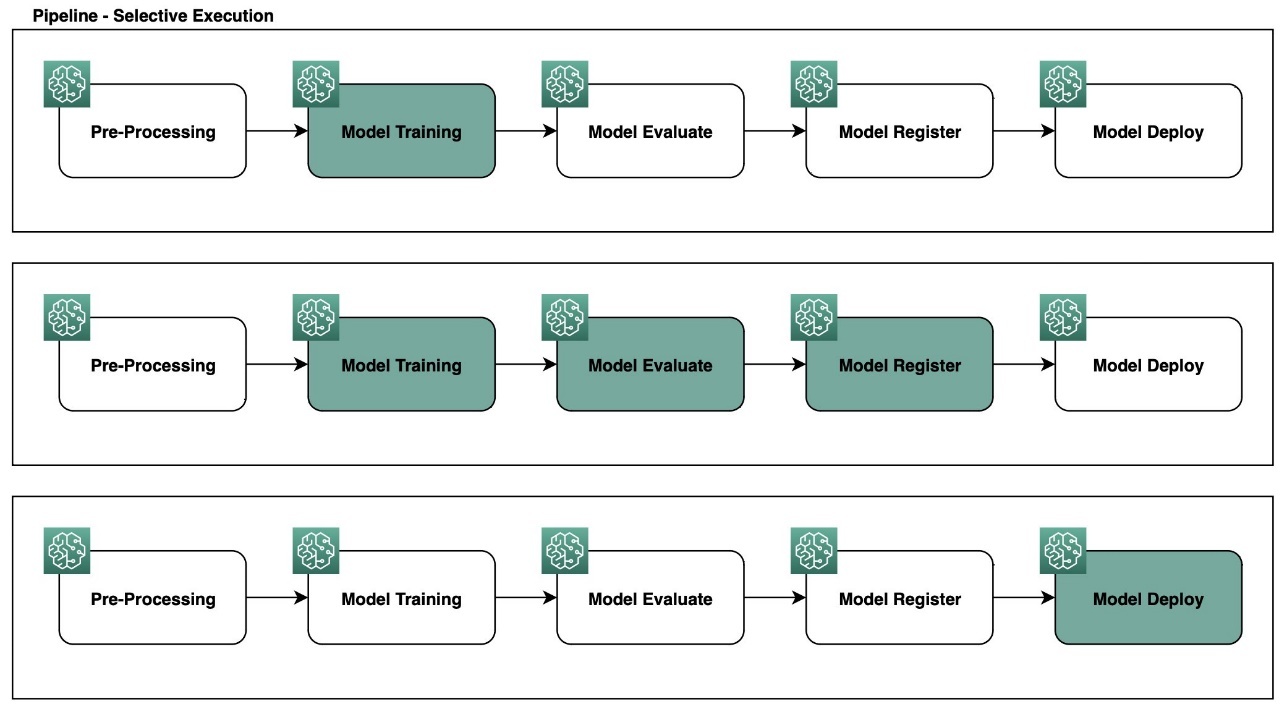
在以下部分中,我们将介绍如何在各种场景中使用选择性执行,包括管道直接无环图 (DAG) 中的复杂工作流程。
先决条件
要开始尝试选择性执行,我们需要首先设置您的 SageMaker 环境的以下组件:
-
SageMaker Python SDK
— 确保在 Python 环境中 安装了更新的
SageMaker Python SDK 。你可以从笔记本电脑或终端运行以下命令将 SageMaker Python SDK 版本安装或升级到 2.162.0 或更高版本:python3-m pip install sagemaker>= 2.162.0 或 pip3安装 sagemaker>=2.162.0。 -
访问 SageMaker Studio(可选) ——
亚马逊 S ageMaker Studio 可以帮助直观地显示管道运行情况以及与现有管道 ARN 进行可视化交 互。如果你无权访问 SageMaker Studio 或者使用的是按需笔记本电脑或其他 IDE,你仍然可以关注这篇文章并使用 Python SDK 与你的工作流 ARN 进行交互。
完整端到端演练的示例代码可在
设置
在
选择性执行功能依赖于之前标记为 “
成功
” 、“
失败
” 或 “已
停止
” 的管道 ARN。以下代码片段演示了如何导入
sagemaker>=1.162.0 Python S
el
ective_execution_config 模块的一部分。
SelectiveExecutionConfig
类、检索参考管道 ARN 以及如何收集管理管道运行的相关工作流步骤和运行时参数:
import boto3
from sagemaker.workflow.pipeline import Pipeline
from sagemaker.workflow.selective_execution_config import SelectiveExecutionConfig


sm_client = boto3.client('sagemaker')
# reference the name of your sample pipeline
pipeline_name = "AbalonePipeline"
# filter for previous success pipeline execution arns
pipeline_executions = [_exec
    for _exec in Pipeline(name=pipeline_name).list_executions()['PipelineExecutionSummaries']
    if _exec['PipelineExecutionStatus'] == "Succeeded"
]
# get the last successful execution
latest_pipeline_arn = pipeline_executions[0]['PipelineExecutionArn']
print(latest_pipeline_arn)
>>> arn:aws:sagemaker:us-east-1:123123123123:pipeline/AbalonePipeline/execution/x62pbar3gs6h

# list all steps of your sample pipeline
execution_steps = sm_client.list_pipeline_execution_steps(
    PipelineExecutionArn=latest_pipeline_arn
)['PipelineExecutionSteps']
print(execution_steps)
>>>
[{'StepName': 'Abalone-Preprocess',
  'StartTime': datetime.datetime(2023, 6, 27, 4, 41, 30, 519000, tzinfo=tzlocal()),
  'EndTime': datetime.datetime(2023, 6, 27, 4, 41, 30, 986000, tzinfo=tzlocal()),
  'StepStatus': 'Succeeded',
  'AttemptCount': 0,
  'Metadata': {'ProcessingJob': {'Arn': 'arn:aws:sagemaker:us-east-1:123123123123:processing-job/pipelines-fvsmu7m7ki3q-Abalone-Preprocess-d68CecvHLU'}},
  'SelectiveExecutionResult': {'SourcePipelineExecutionArn': 'arn:aws:sagemaker:us-east-1:123123123123:pipeline/AbalonePipeline/execution/ksm2mjwut6oz'}},
 {'StepName': 'Abalone-Train',
  'StartTime': datetime.datetime(2023, 6, 27, 4, 41, 31, 320000, tzinfo=tzlocal()),
  'EndTime': datetime.datetime(2023, 6, 27, 4, 43, 58, 224000, tzinfo=tzlocal()),
  'StepStatus': 'Succeeded',
  'AttemptCount': 0,
  'Metadata': {'TrainingJob': {'Arn': 'arn:aws:sagemaker:us-east-1:123123123123:training-job/pipelines-x62pbar3gs6h-Abalone-Train-PKhAc1Q6lx'}}},
 {'StepName': 'Abalone-Evaluate',
  'StartTime': datetime.datetime(2023, 6, 27, 4, 43, 59, 40000, tzinfo=tzlocal()),
  'EndTime': datetime.datetime(2023, 6, 27, 4, 57, 43, 76000, tzinfo=tzlocal()),
  'StepStatus': 'Succeeded',
  'AttemptCount': 0,
  'Metadata': {'ProcessingJob': {'Arn': 'arn:aws:sagemaker:us-east-1:123123123123:processing-job/pipelines-x62pbar3gs6h-Abalone-Evaluate-vmkZDKDwhk'}}},
 {'StepName': 'Abalone-MSECheck',
  'StartTime': datetime.datetime(2023, 6, 27, 4, 57, 43, 821000, tzinfo=tzlocal()),
  'EndTime': datetime.datetime(2023, 6, 27, 4, 57, 44, 124000, tzinfo=tzlocal()),
  'StepStatus': 'Succeeded',
  'AttemptCount': 0,
  'Metadata': {'Condition': {'Outcome': 'True'}}}]

# list all configureable pipeline parameters
# params can be altered during selective execution
parameters = sm_client.list_pipeline_parameters_for_execution(
    PipelineExecutionArn=latest_pipeline_arn
)['PipelineParameters']
print(parameters)
>>>
[{'Name': 'XGBNumRounds', 'Value': '120'},
 {'Name': 'XGBSubSample', 'Value': '0.9'},
 {'Name': 'XGBGamma', 'Value': '2'},
 {'Name': 'TrainingInstanceCount', 'Value': '1'},
 {'Name': 'XGBMinChildWeight', 'Value': '4'},
 {'Name': 'XGBETA', 'Value': '0.25'},
 {'Name': 'ApprovalStatus', 'Value': 'PendingManualApproval'},
 {'Name': 'ProcessingInstanceCount', 'Value': '1'},
 {'Name': 'ProcessingInstanceType', 'Value': 'ml.t3.medium'},
 {'Name': 'MseThreshold', 'Value': '6'},
 {'Name': 'ModelPath',
  'Value': 's3://sagemaker-us-east-1-123123123123/Abalone/models/'},
 {'Name': 'XGBMaxDepth', 'Value': '12'},
 {'Name': 'TrainingInstanceType', 'Value': 'ml.c5.xlarge'},
 {'Name': 'InputData',
  'Value': 's3://sagemaker-us-east-1-123123123123/sample-dataset/abalone/abalone.csv'}]
用例
在本节中,我们介绍几种选择性执行可以节省时间和资源的场景。我们使用典型的管道流程(包括数据提取、训练、评估、模型注册和部署等步骤)作为参考,来演示选择性执行的优势。
SageMaker Pipelines 允许您使用管道参数为管道运行定义运行时参数。当触发新的运行时,它通常会从头到尾运行整个管道。但是,如果启用了
随着 “选择性执行” 功能的发布,您现在可以使用先前的管道 ARN 重新运行整个工作流或有选择地运行部分步骤。即使没有启用步骤缓存,也可以这样做。以下用例说明了使用选择性执行的各种方式。
用例 1:运行单个步骤
数据科学家通常将注意力集中在 mLOPs 管道的训练阶段,不想担心预处理或部署步骤。选择性执行允许数据科学家仅专注于训练步骤,并即时修改训练参数或超参数以改进模型。这可以节省时间并降低成本,因为计算资源仅用于运行用户选择的工作流步骤。参见以下代码:
# select a reference pipeline arn and subset step to execute
selective_execution_config = SelectiveExecutionConfig(
    source_pipeline_execution_arn="arn:aws:sagemaker:us-east-1:123123123123:pipeline/AbalonePipeline/execution/9e3ljoql7s0n",
    selected_steps=["Abalone-Train"]
)

# start execution of pipeline subset
select_execution = pipeline.start(
    selective_execution_config=selective_execution_config,
    parameters={
        "XGBNumRounds": 120,
        "XGBSubSample": 0.9,
        "XGBGamma": 2,
        "XGBMinChildWeight": 4,
        "XGBETA": 0.25,
        "XGBMaxDepth": 12
    }
)
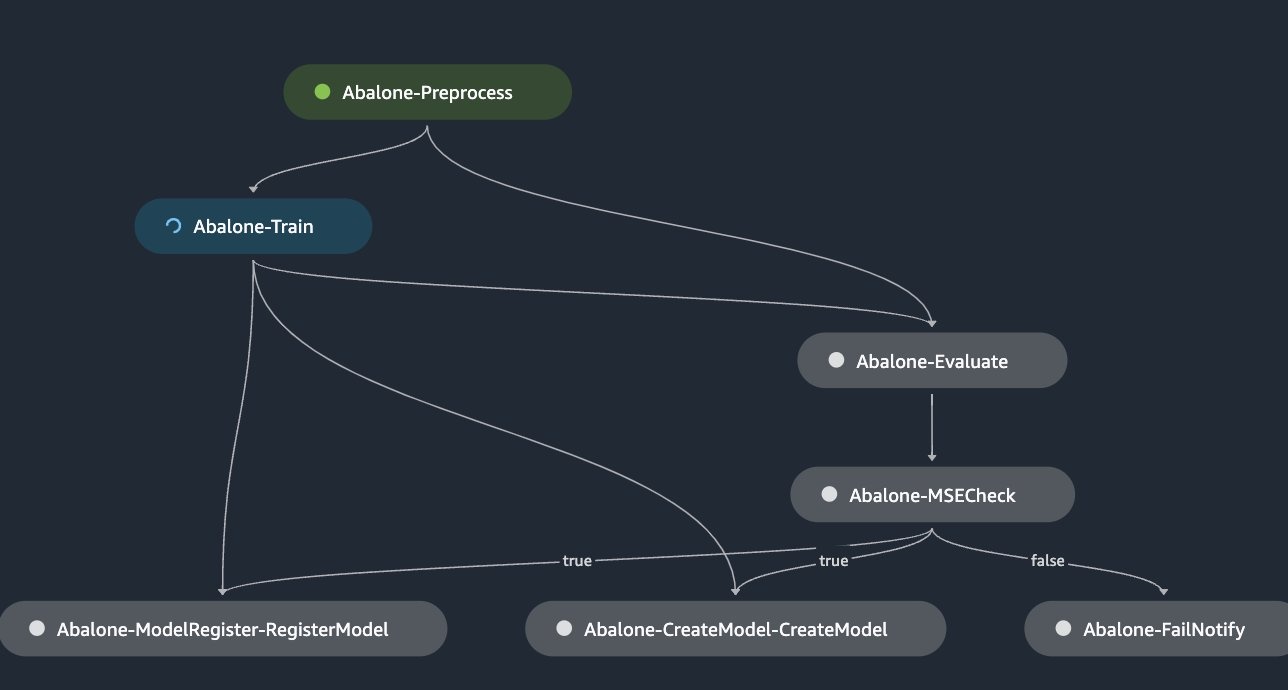
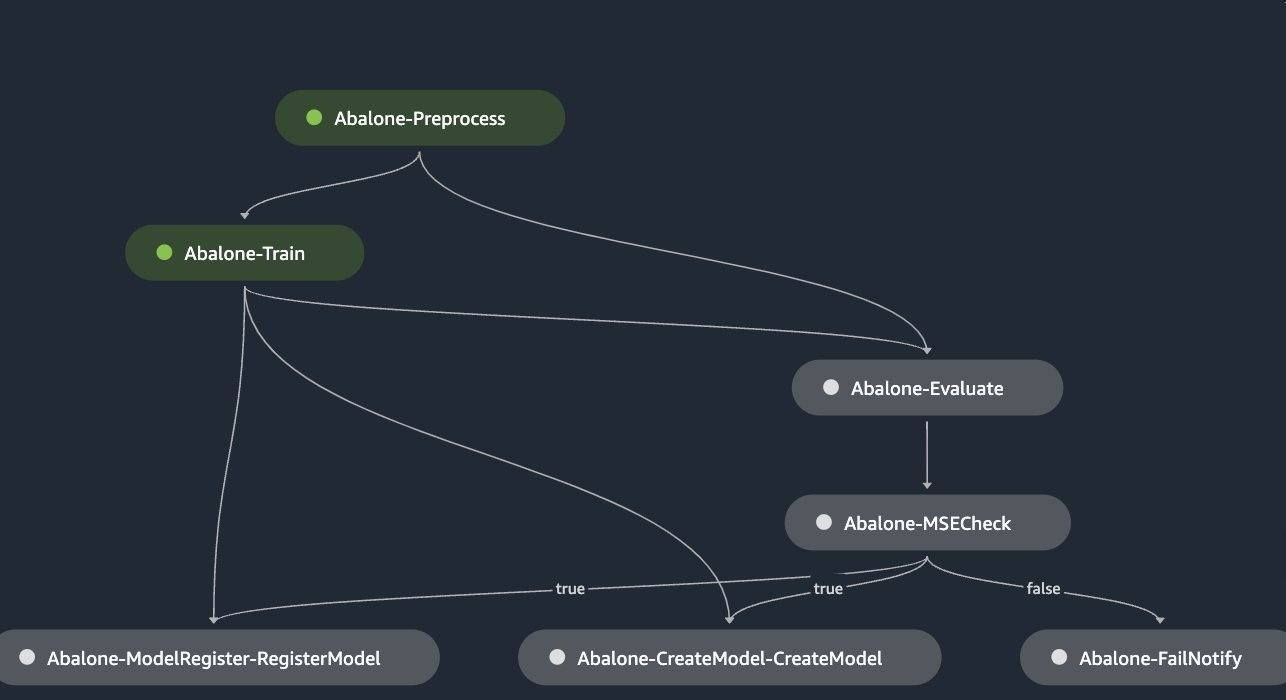
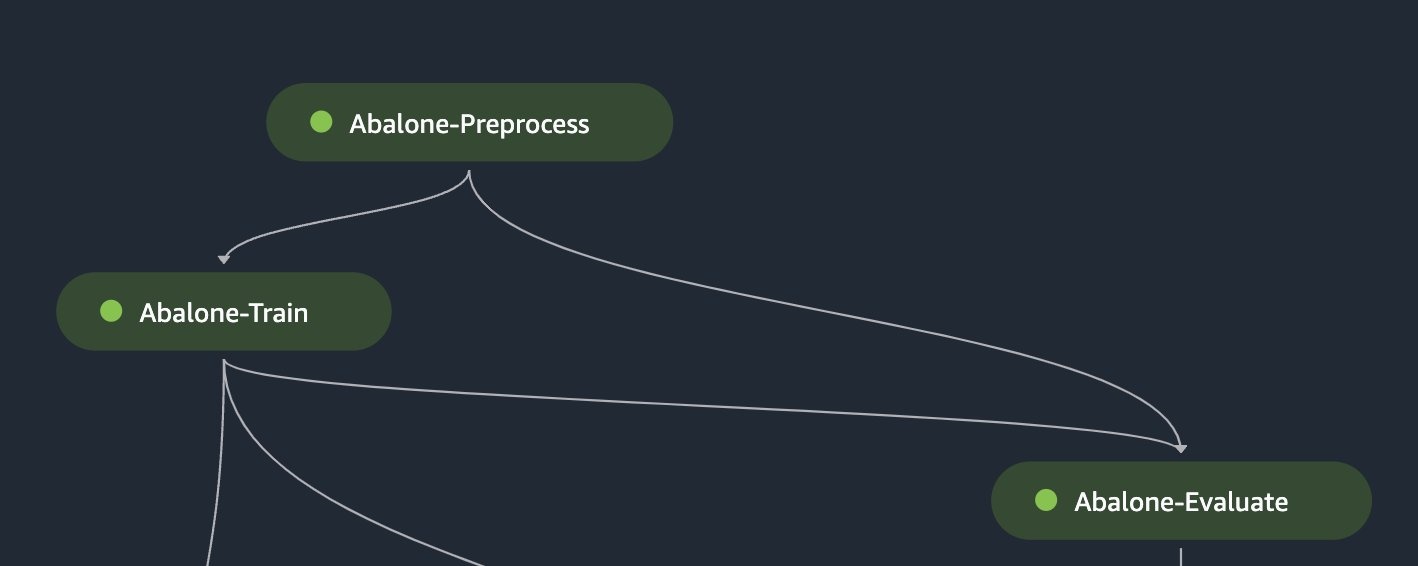
下图说明了流水线,先进行一个步骤,然后才完成。
用例 2:运行多个连续的管道步骤
继续使用之前的用例,一位数据科学家想要训练一个新模型并根据黄金测试数据集评估其性能。该评估对于确保模型符合严格的用户接受度测试 (UAT) 或生产部署准则至关重要。但是,数据科学家不想运行整个管道工作流程或部署模型。他们可以使用选择性执行来仅专注于培训和评估步骤,从而节省时间和资源,同时仍能获得所需的验证结果:
# select a reference pipeline arn and subset step to execute
selective_execution_config = SelectiveExecutionConfig(
    source_pipeline_execution_arn="arn:aws:sagemaker:us-east-1:123123123123:pipeline/AbalonePipeline/execution/9e3ljoql7s0n",
    selected_steps=["Abalone-Train", "Abalone-Evaluate"]
)

# start execution of pipeline subset
select_execution = pipeline.start(
    selective_execution_config=selective_execution_config,
    parameters={
        "ProcessingInstanceType": "ml.t3.medium",
        "XGBNumRounds": 120,
        "XGBSubSample": 0.9,
        "XGBGamma": 2,
        "XGBMinChildWeight": 4,
        "XGBETA": 0.25,
        "XGBMaxDepth": 12
    }
)
用例 3:更新并重新运行失败的管道步骤
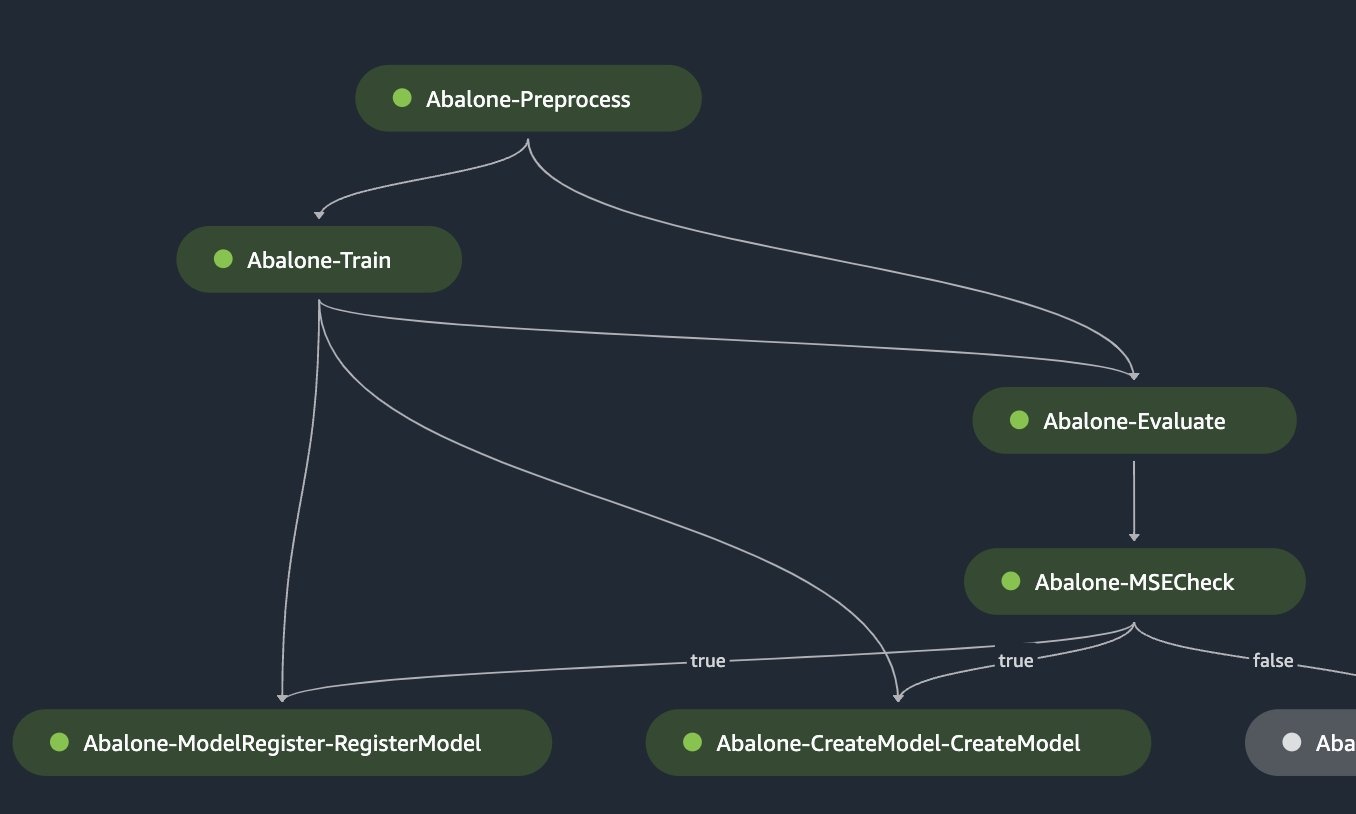
您可以使用选择性执行来重新运行管道中失败的步骤,或者从失败的步骤开始恢复管道的运行。这对于故障排除和调试失败的步骤很有用,因为它允许开发人员专注于需要解决的特定问题。这可以提高问题解决效率和缩短迭代时间。以下示例说明如何选择仅重新运行管道中失败的步骤。
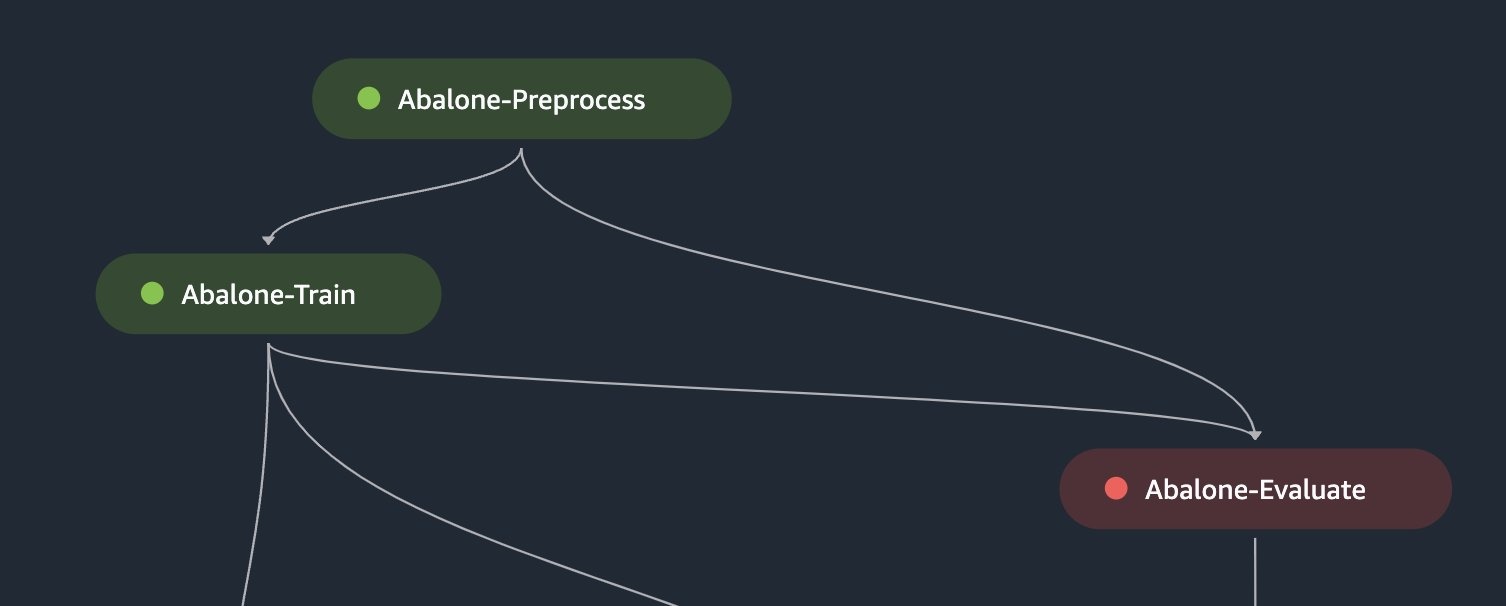
# select a previously failed pipeline arn
selective_execution_config = SelectiveExecutionConfig(
    source_pipeline_execution_arn="arn:aws:sagemaker:us-east-1:123123123123:pipeline/AbalonePipeline/execution/fvsmu7m7ki3q",
    selected_steps=["Abalone-Evaluate"]
)

# start execution of failed pipeline subset
select_execution = pipeline.start(
    selective_execution_config=selective_execution_config
)
或者,数据科学家可以通过在 SelectiveEx
ec
utionConfig 中指定失败的步骤及其后面的所有步骤,将流水线从失败的步骤恢复到工作流程的结束。
用例 4:管道覆盖范围
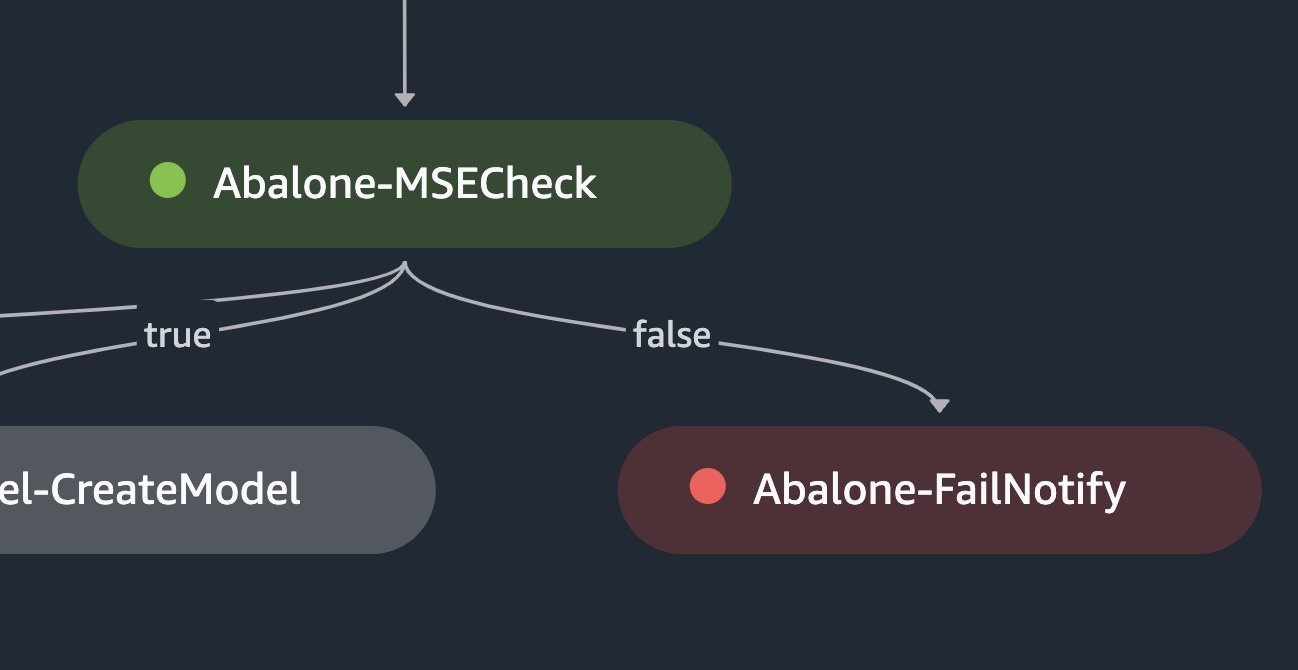
在某些管道中,某些分支的运行频率低于其他分支。例如,可能有一个分支只有在特定条件失败时才会运行。重要的是要彻底测试这些分支,以确保它们在出现故障时能够按预期工作。通过测试这些运行频率较低的分支,开发人员可以验证其流水线是否稳健,错误处理机制可以有效地维持所需的工作流程并产生可靠的结果。
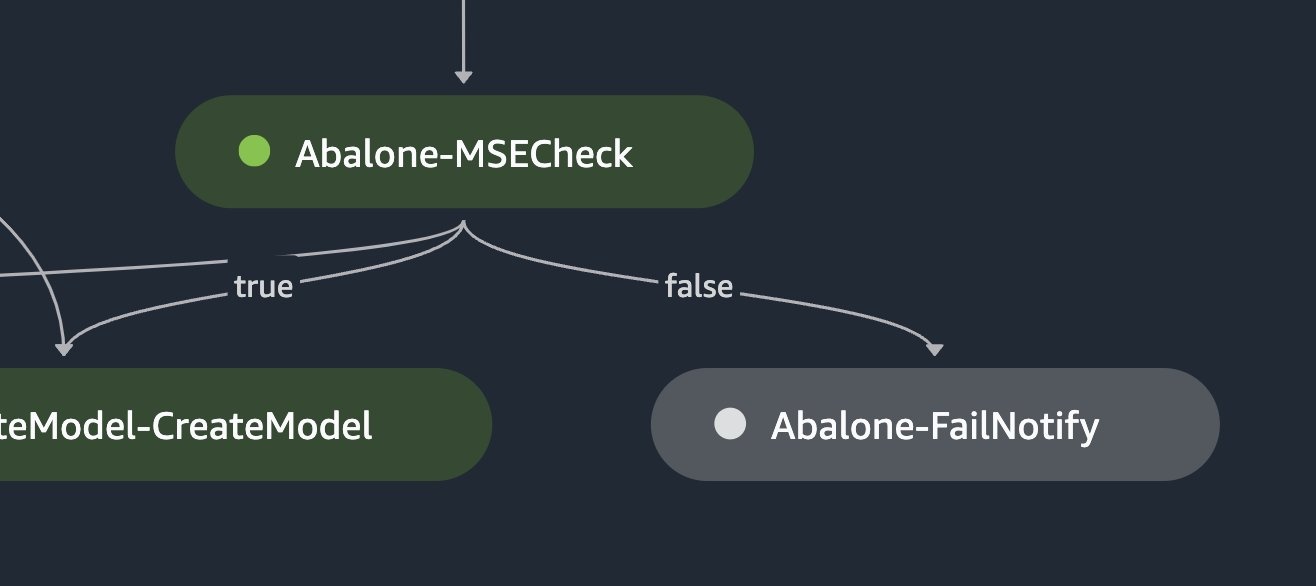
selective_execution_config = SelectiveExecutionConfig(
    source_pipeline_execution_arn="arn:aws:sagemaker:us-east-1:123123123123:pipeline/AbalonePipeline/execution/9e3ljoql7s0n",
    selected_steps=["Abalone-Train", "Abalone-Evaluate", "Abalone-MSECheck", "Abalone-FailNotify"]
)
结论
在这篇文章中,我们讨论了 SageMaker Pipelines 的选择性执行功能,该功能使您能够有选择地运行机器学习工作流程的特定步骤。这种功能可以节省大量时间和计算资源。我们在
作者简介
 Pranav Murthy 是 AW
S 的人工智能/机器学习专家解决方案架构师。他专注于帮助客户构建、训练、部署机器学习 (ML) 工作负载并将其迁移到 SageMaker。他之前曾在半导体行业开发大型计算机视觉 (CV) 和自然语言处理 (NLP) 模型以改善半导体工艺。在空闲时间,他喜欢下象棋和旅行。
Pranav Murthy 是 AW
S 的人工智能/机器学习专家解决方案架构师。他专注于帮助客户构建、训练、部署机器学习 (ML) 工作负载并将其迁移到 SageMaker。他之前曾在半导体行业开发大型计算机视觉 (CV) 和自然语言处理 (NLP) 模型以改善半导体工艺。在空闲时间,他喜欢下象棋和旅行。
 Akhil Numarsu
是一名高级产品经理兼技术经理,致力于通过云端高效的工具和服务帮助团队加快机器学习成果。他喜欢打乒乓球,是一个体育迷。
Akhil Numarsu
是一名高级产品经理兼技术经理,致力于通过云端高效的工具和服务帮助团队加快机器学习成果。他喜欢打乒乓球,是一个体育迷。
 Nishant Krishnamoorthy 是亚马逊
商店的高级软件开发工程师。他拥有计算机科学硕士学位,目前专注于通过在 SageMaker 上构建和运营机器学习解决方案,加速亚马逊不同组织采用机器学习。
Nishant Krishnamoorthy 是亚马逊
商店的高级软件开发工程师。他拥有计算机科学硕士学位,目前专注于通过在 SageMaker 上构建和运营机器学习解决方案,加速亚马逊不同组织采用机器学习。
*前述特定亚马逊云科技生成式人工智能相关的服务仅在亚马逊云科技海外区域可用,亚马逊云科技中国仅为帮助您发展海外业务和/或了解行业前沿技术选择推荐该服务。