我们使用机器学习技术将英文博客翻译为简体中文。您可以点击导航栏中的“中文(简体)”切换到英文版本。
StackSets 部署策略:平衡速度、安全性和规模,针对不同组织需求优化部署
Amazon CloudFormation 堆栈集使组织能够在多个亚马逊云科技账户和地区一致地部署基础设施。但是,成功取决于选择正确的部署策略,以平衡三个关键因素:部署速度、运营安全和组织规模。本指南探讨了专门为多账户基础设施管理设计的成熟的 StackSet 部署策略。
了解 StackSet 部署基础知识
堆栈集实际上是用来做什么的?
与单账户 Amazon CloudFormation 模板不同,StackSets 专为多账户基础设施治理而设计。常见用例包括安全基准(在所有账户中部署 IAM 策略、安全组和访问控制)、合规控制(推出 Amazon Config 规则、Amazon CloudTrail 配置和审计要求)、组织标准(建立一致的 VPC 配置、标签策略和命名规范)、共享服务(部署监控解决方案、日志基础设施和备份策略)或成本管理(实施预算控制、成本分配标签和资源优化策略)
多账户挑战赛
管理数十或数百个亚马逊云科技账户的基础设施面临着独特的挑战:
Single Account (CFN Template) Multi-Account (StackSets)
App A Org Unit A (50 accounts)
| |
[Deploy Once] [Deploy consistently across all]
| |
Success/Fail Complex success/failure matrix
多账户和多区域 Cloudformation 部署的复杂性
速度安全尺度三角形
每个 StackSet 部署策略都需要权衡取舍:速度(变更在组织中传播的速度)、安全性(风险缓解和故障控制)和规模(有效管理数百个账户的能力)
先决条件
在实施本指南中描述的任何部署策略之前,请确保:
- 亚马逊云科技 CLI 安装
- 按照亚马逊云科技 CLI 安装指南安装最新版本的亚马逊云科技 CLI
- 使用以下命令验证安装:aws —version
- 亚马逊云科技配置文件配置
- 使用以下方法配置您的亚马逊云科技凭证:aws 配置
- 有关配置的详细信息,请参阅亚马逊云科技 CLI 配置基础知识
- 按照亚马逊云科技 StackSets 先决条件中所述,确保您的个人资料具有执行 CloudFormation StackSets 操作的相应权限
- 正确的账户访问本指南中的命令必须通过以下任一方式执行:
- 您的亚马逊云科技组织的管理账户
- 或者 CloudFormation 的委托管理员账户
有关设置委派管理员的信息,请参阅注册委派管理员
注意:使用服务管理权限的 StackSet 部署无法从独立账户执行。
通过以下方式验证您使用的是正确的账户:
bash
# For management account
aws organizations describe-organization
# For delegated admin
aws cloudformation list-stack-sets —call-as DELEGATED_ADMIN
亚马逊云科技 CLI 用于检查组织而不是独立账户的使用情况
核心部署策略
正如 StackSet 文档中所解释的那样:
- "对于更保守的部署,将最大并发账户数设置为 1,将容错能力设置为 0。将影响最低的区域设置为 "区域顺序从一个区域开始" 中的第一个。"
- "为了加快部署,请根据需要增加 "最大并发帐户" 和 "容错能力" 的值。"
基于上述内容,我们在下面提出了几种部署策略,具体取决于您想要实现的速度、安全性和规模。
1. 顺序部署:最大安全性
用例:关键安全更新、合规性要求、首次组织部署
以下列出了一些可能的用例:
- 安全基准更新:影响根访问权限的新 IAM 政策
- 合规性部署:SOX、HIPAA 或 PCI-DSS 控制实施
- 关键基础设施变更:VPC 安全组修改
- 组织政策变更:新的 Amazon Config 审计合规规则
实现示例:
在本示例中,我们将从亚马逊云科技文档的 Cloudformation 示例库中下载以下模板 configruleCloudTrailEnabled.yml,以配置亚马逊云科技配置规则,以确定是否启用 Amazon CloudTrail 并执行后续步骤:
第 1 步:创建 StackSet
使用亚马逊云科技 CLI:
# Create Stackset for security baseline
# StackSet operation managed from us-east-1
aws cloudformation create-stack-set \
--stack-set-name security-baseline \
--template-body file://ConfigRuleCloudtrailEnabled.yml \
--capabilities CAPABILITY_NAMED_IAM \
--permission-model SERVICE_MANAGED \
--auto-deployment Enabled=true,RetainStacksOnAccountRemoval=false \
--region us-east-1
用于创建安全基准堆栈集的亚马逊云科技 CLI
预期的响应应类似于以下内容:
{"StacksetId": "security-baseline: ...."}
第 2 步:创建堆栈实例
在启动以下命令之前,需要调整以下参数的值:
- organialUnitIDS:你必须将以下命令行中的 "ou-test" 值更改为要部署到的目标 OU 的名称。为了进行此项测试,我建议在控制台中或通过 CLI 创建一个新的测试 OU。
- 区域:如果需要,更改 "us-east-1 eu-west-1" 值,您需要在此处列出要部署的所有区域。Amazon Config 必须在您选择的账户/区域中处于活动状态,否则在部署堆栈时会出错。
# Deploy security baseline to production accounts
# StackSet operation managed from us-east-1
# Deployed to regions us-east-1 and eu-west-1
# SEQUENTIAL = One region at a time, sequentially
# MaxConcurrentPercentage = Deploy to 5% of accounts at once
# FailureTolerancePercentage = Stop on first failure
aws cloudformation create-stack-instances \
--stack-set-name security-baseline \
--deployment-targets OrganizationalUnitIds=ou-test\
--regions us-east-1 eu-west-1 \
--region us-east-1 \
--operation-preferences RegionConcurrencyType=SEQUENTIAL,MaxConcurrentPercentage=5,FailureTolerancePercentage=0
亚马逊云科技 CLI 将按顺序创建安全基准堆栈实例,以最大限度地提高安全性
CLI 输出应如下所示:
{"OperationId": ....}
或者创建 StackSet 并使用亚马逊云科技控制台添加堆栈:
在 CloudFormation 控制台中,单击 "创建 StackSet"
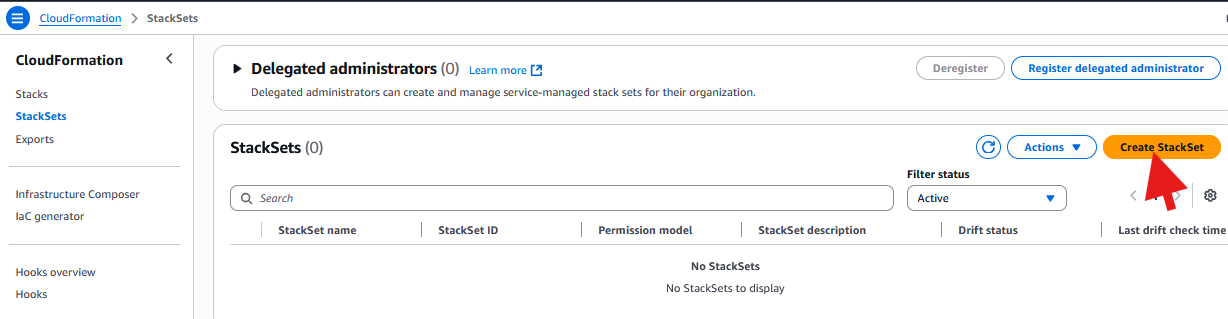
Amazon CloudFormation 控制台:创建安全基准堆栈集
从 S3 或计算机上传您的模板,然后单击 "下一步":
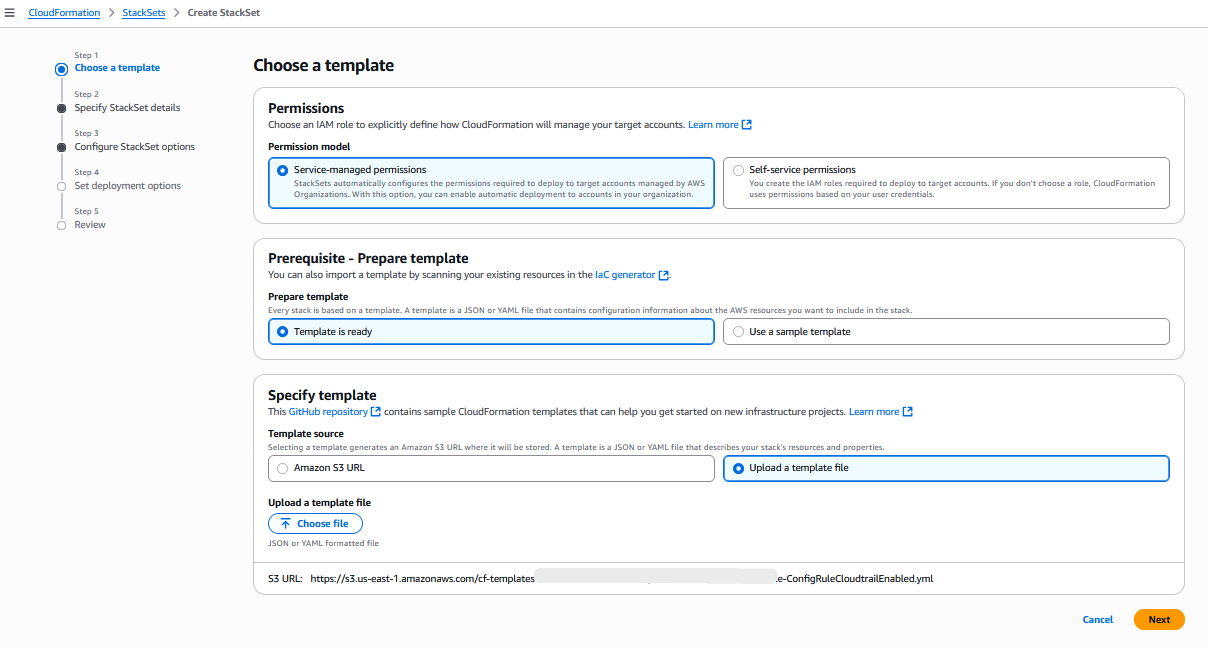
Amazon CloudFormation 控制台:指定模板
指定 StackSet 的名称和参数,然后单击 "下一步":
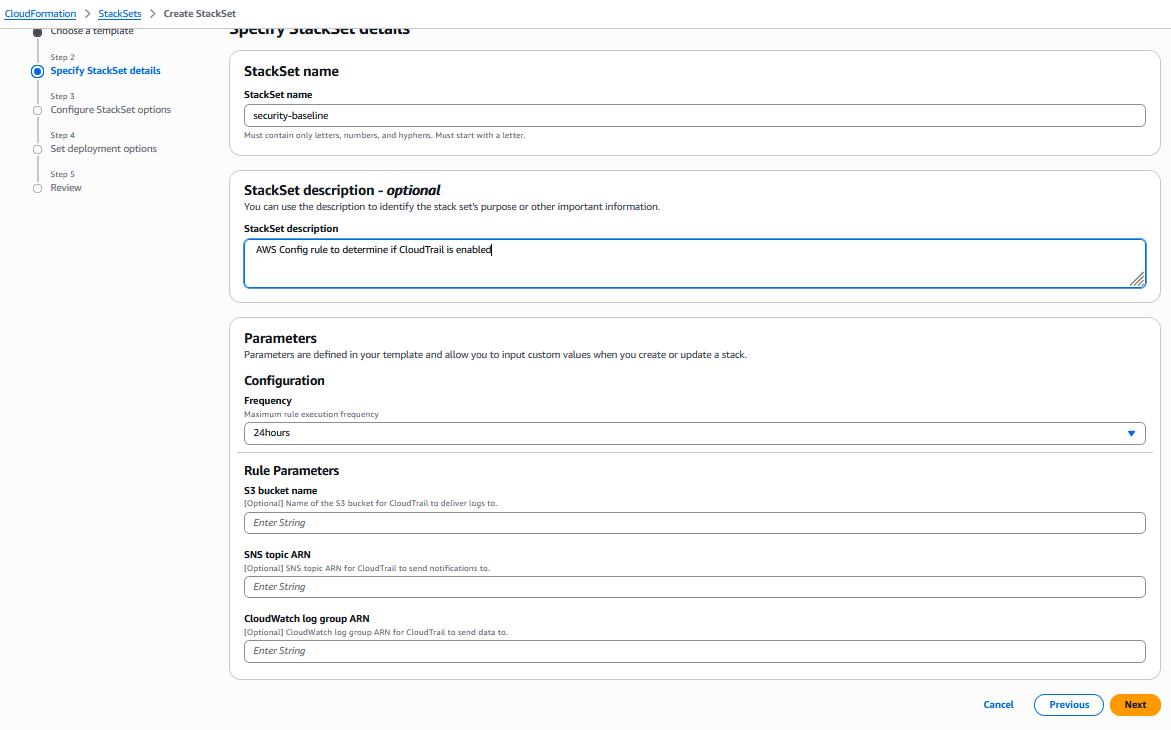
Amazon CloudFormation 控制台:指定 StackSet 名称和参数
配置 StackSet 选项,然后单击 "下一步":
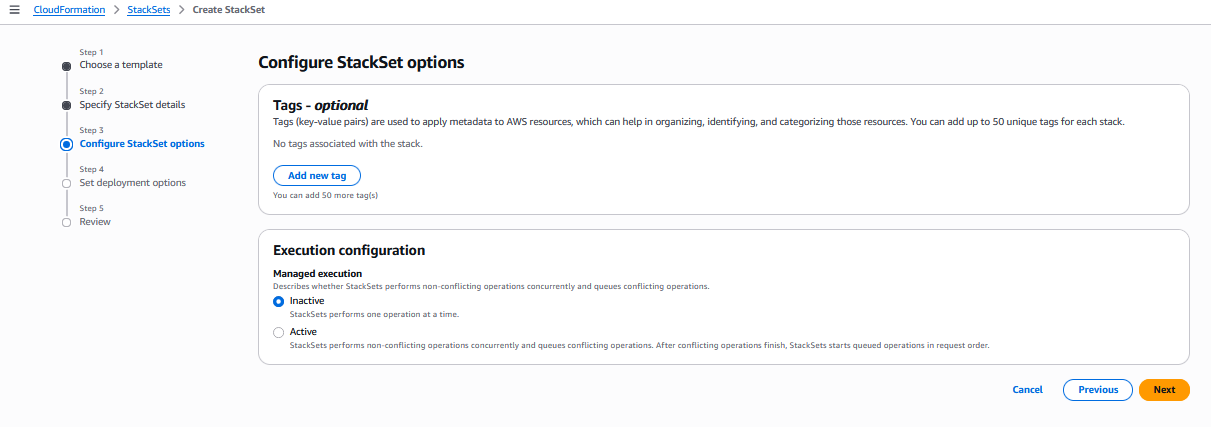
Amazon CloudFormation 控制台:配置 StackSet 选项
设置部署选项,然后单击 "下一步":
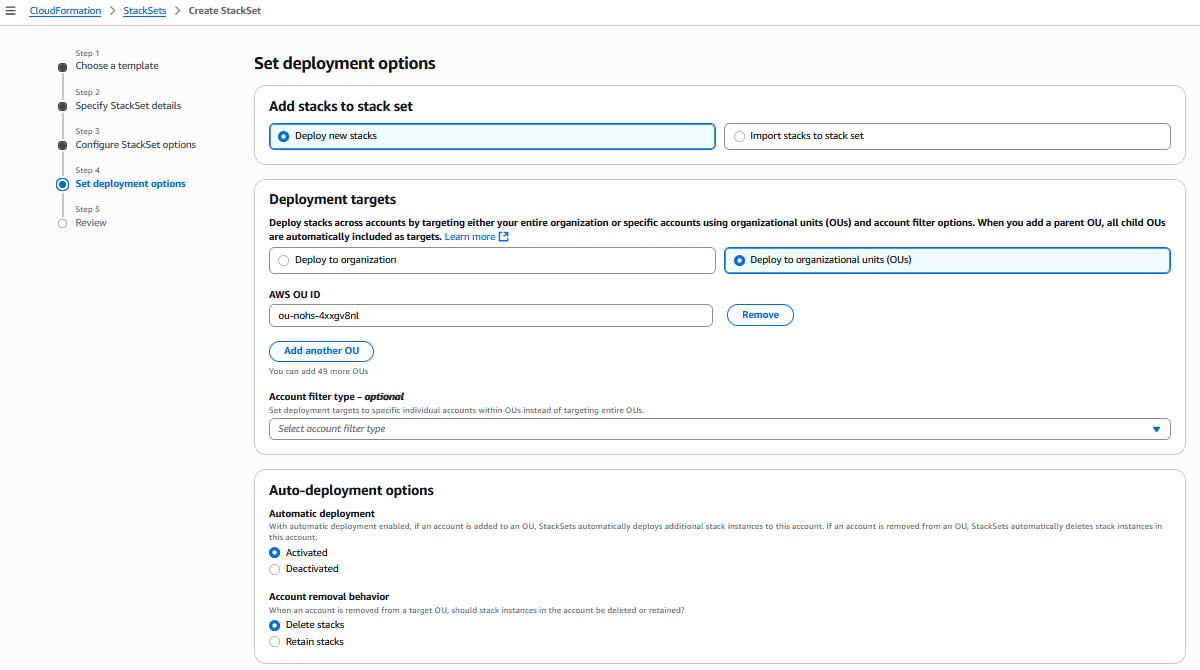
Amazon CloudFormation 控制台:设置部署选项
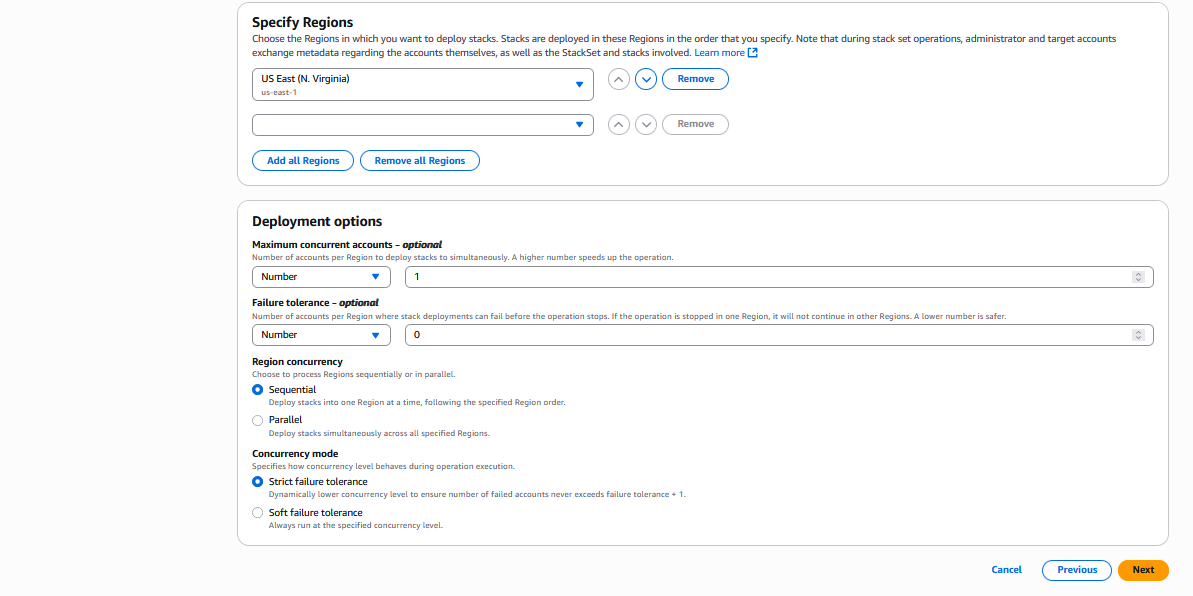
Amazon CloudFormation 控制台:设置更多部署选项
然后查看并提交。
为了不夸大本篇博客,我们将仅提供这个 CLI 输出和控制台屏幕截图的示例,但是 "并行部署" 和 "平衡方法" 将与此示例类似。您只需要更新不同 StackSet 操作选项的参数即可。
一个真实的例子是金融服务公司在 200 个生产账户中部署新的 MFA 要求。他们可以使用具有 5 个并发性的顺序部署,确保每个批次在继续操作之前都经过验证。
2. 并行部署:最大速度
并行部署最适合非关键更新、开发环境和日常维护
以下是一些可能的用例:
- 开发账户标准化:推出新的开发工具
- 监控基础设施:部署 Amazon CloudWatch 控制面板和警报
- 成本优化:实施自动资源清理策略
- 非生产更新:更新开发和暂存环境
实现示例:
在本示例中,我们将把这篇关于监控 IAM 事件的 Re: Post 文章中的 .yml 模板复制粘贴到一个名为 "monitoring-baseline.yml" 的文件中,并在以下命令行中使用它。
第 1 步:创建 StackSet
# Create Stackset for monitoring baseline
# StackSet operation managed from us-east-1
aws cloudformation create-stack-set \
--stack-set-name monitoring-baseline \
--template-body file://monitoring-baseline.yml \
--capabilities CAPABILITY_NAMED_IAM \
--permission-model SERVICE_MANAGED \
--auto-deployment Enabled=true,RetainStacksOnAccountRemoval=false \
--region us-east-1
亚马逊云科技 CLI 用于创建监控基准堆栈集
步骤 2:创建堆栈实例
就像前面的示例一样,在启动以下命令之前,需要调整 organialUnitID 和区域参数的值。
# Deploy monitoring baseline to dev and sandbox accounts
# StackSet operation managed from us-east-1
# Deployed to regions us-east-1 and eu-west-1
# PARALLEL = Deployment in parallel
# MaxConcurrentPercentage = Deploy to 80% of accounts at once
# FailureTolerancePercentage = Tolerate failures in 20% of accounts
aws cloudformation create-stack-instances \
--stack-set-name monitoring-baseline \
--deployment-targets OrganizationalUnitIds=ou-development,ou-sandbox \
--regions us-east-1 eu-west-1 \
--region us-east-1 \
--operation-preferences RegionConcurrencyType=PARALLEL,MaxConcurrentPercentage=80,FailureTolerancePercentage=20
亚马逊云科技 CLI 将以高值并行创建监控基准堆栈实例,以最大并发百分比实现最大速度
3. 渐进式部署:平衡方法或多阶段方法(推荐)
对于大多数风险容忍度适中的生产场景,建议使用平衡方法或多阶段实施。
平衡方法
在本示例中,为了简化起见,你可以创建先前创建的 "monitoring-baseline.yml" 的副本,并将其命名为 "balanced-template.yml"。
cp monitoring-baseline.yml balanced-template.yml
bash 命令将 monitoring-baseline.yml 文件复制到 balanced-template.yml
然后你可以在以下命令行中使用它。
第 1 步:创建 StackSet
# Create Stackset for a balanced creation
# StackSet operation managed from us-east-1
aws cloudformation create-stack-set \
--stack-set-name balanced-deployment \
--template-body file://balanced-template.yml \
--capabilities CAPABILITY_NAMED_IAM \
--permission-model SERVICE_MANAGED \
--auto-deployment Enabled=true,RetainStacksOnAccountRemoval=false \
--region us-east-1
用于创建平衡部署堆栈集的亚马逊云科技 CLI
步骤 2:创建堆栈实例
您需要调整组织单位标识和区域参数的值。
# Deploy monitoring baseline to production accounts
# StackSet operation managed from us-east-1
# Deployed to regions us-east-1, eu-west-1 and ap-southeast-1
# PARALLEL = Deployment in parallel
# MaxConcurrentPercentage = Deploy to 25% of accounts at once
# FailureTolerancePercentage = Tolerate failures in 8% of accounts
aws cloudformation create-stack-instances \
--stack-set-name balanced-deployment \
--deployment-targets OrganizationalUnitIds=ou-development,ou-sandbox \
--regions us-east-1 eu-west-1 ap-southeast-1 \
--region us-east-1 \
--operation-preferences RegionConcurrencyType=PARALLEL,MaxConcurrentPercentage=25,FailureTolerancePercentage=8
亚马逊云科技 CLI 将以较低的最大并发百分比并行创建平衡部署堆栈实例,以实现均衡部署
多阶段实施:
第 1 步:创建 StackSet
# Create Stackset for a balanced creation
# StackSet operation managed from us-east-1
aws cloudformation create-stack-set \
--stack-set-name balanced-deployment \
--template-body file://balanced-template.yml \
--capabilities CAPABILITY_NAMED_IAM \
--permission-model SERVICE_MANAGED \
--auto-deployment Enabled=true,RetainStacksOnAccountRemoval=false \
--region us-east-1
用于创建平衡部署堆栈集的亚马逊云科技 CLI
第 1 阶段:试点账户(目标的 10%)
第 1 阶段:创建试点堆栈实例
您需要调整组织单位标识和区域参数的值。
# Deploy monitoring baseline to production accounts
# StackSet operation managed from us-east-1
# Deployed to regions us-east-1
# SEQUENTIAL = Deployment in sequence
# MaxConcurrentPercentage = 100% Deploy full speed for small pilot
# FailureTolerancePercentage = Zero tolerance in pilot
aws cloudformation create-stack-instances \
--stack-set-name balanced-deployment \
--deployment-targets Accounts=pilot-account-1,pilot-account-2 \
--regions us-east-1 \
--region us-east-1 \
--operation-preferences RegionConcurrencyType=SEQUENTIAL,MaxConcurrentPercentage=100,FailureTolerancePercentage=0
亚马逊云科技 CLI 将按顺序创建平衡部署堆栈实例,以最大限度地提高试点账户的安全性
等待试点验证,然后再进入第 2 阶段
第 2 阶段:早期采用者 OU(目标的 30%)
第 2 阶段:创建早期采用者堆栈实例
您需要调整组织单位标识和区域参数的值。
# Deploy monitoring baseline to production accounts
# StackSet operation managed from us-east-1
# Deployed to regions us-east-1, eu-west-1
# PARALLEL = Deployment in parallel
# MaxConcurrentPercentage = Deploy to 25% of accounts at once
# FailureTolerancePercentage = Tolerate failures in 5% of accounts
aws cloudformation create-stack-instances \
--stack-set-name balanced-deployment \
--deployment-targets OrganizationalUnitIds=ou-early-adopter \
--regions us-east-1 \
--region us-east-1 eu-west-1 \
--operation-preferences RegionConcurrencyType=PARALLEL,MaxConcurrentPercentage=25,FailureTolerancePercentage=5
亚马逊云科技 CLI 将以较低的最大并发百分比并行创建平衡部署堆栈实例,以实现早期采用者 OU 中的平衡部署
等待早期采用者验证后再进入第 3 阶段
第 3 阶段:全面部署(剩余 60%)
第 3 阶段:全面部署
您需要调整组织单位标识和区域参数的值。
# Deploy monitoring baseline to production accounts
# StackSet operation managed from us-east-1
# Deployed to regions us-east-1, eu-west-1 and ap-southeast-1
# PARALLEL = Deployment in parallel
# MaxConcurrentPercentage = Deploy to 40% of accounts at once for higher speed after validation
# FailureTolerancePercentage = Tolerate failures in 10% of accounts for moderate tolerance
aws cloudformation create-stack-instances \
--stack-set-name balanced-deployment \
--deployment-targets OrganizationalUnitIds=ou-standard-prod,ou-legacy-prod \
--regions us-east-1 \
--region us-east-1 eu-west-1 ap-southeast-1 \
--operation-preferences RegionConcurrencyType=PARALLEL,MaxConcurrentPercentage=25,FailureTolerancePercentage=5
亚马逊云科技 CLI 将以较低的最大并发百分比并行创建平衡部署堆栈实例,以实现其余 OU 中的均衡部署
使用步进函数进行编排
Amazon Step Functions 提供无服务器工作流程服务,可利用高级控制流、错误处理和状态管理功能编排 StackSet 部署。这种方法利用仅通过标准 StackSets 操作无法提供的功能,增强了您的多账户部署。
一些主要好处包括:
- 高级部署编排:使用验证门协调多阶段部署
- 人工审批工作流程:对关键变更实施手动批准步骤
- 增强的错误处理:定义复杂的重试策略和备用机制
- 可视化监控:通过 Step Functions 可视化控制台跟踪部署进度
现实世界用例:合规控制推出
在受监管的行业中,Amazon Step Functions 支持分阶段的方法,将自动化与必要的治理相结合。例如,你可以:
- 将合规控制措施部署到测试账户
- 运行自动验证并生成合规性报告
- 获得合规团队的手动批准
- 通过全面监控部署到生产账户
这种方法可确保一致的治理,同时保持监管合规所需的完整审计跟踪。
监控和优化
Amazon CloudFormation 堆栈集没有专门用于监控堆栈集运行和运行状况的大量内置亚马逊云观察指标。实际上,这就是为什么我们博客文章中的监控实施非常有价值的原因。
以下是亚马逊云科技开箱即用的功能和不提供的功能:
亚马逊云科技本机提供的内容:
- 通过 Amazon CloudTrail 调用基本的亚马逊云科技 API 指标(显示操作已完成,但不跟踪成功率或性能)
- 整个 CloudFormation 的通用服务配额和限制指标
- CloudFormation 为单个堆栈提供一些指标,但不提供特定于 StackSet 的合并指标
需要自定义实现的内容(如我们的博客文章所示):
- 跨账户 StackSet 操作的成功率指标
- 部署完成时间跟踪
- 配置偏差检测和监控
- 特定账户的失败分析
- 显示组织中 StackSet 运行状况的全面仪表板
我们博客文章中的代码演示了如何通过以下方式实现成功率自定义指标:
- 从 CloudFormation API 收集有关 StackSet 操作的数据
- 计算 StackSet 部署的成功率指标
- 在定制命名空间中创建自定义 Amazon CloudWatch 指标(例如 "StackSetMonitoring")
- 为问题设置警报
这解释了为什么组织需要实施自定义监控解决方案,例如我们的博客文章中显示的解决方案,而不是仅仅依赖内置指标。
自动监控实施:监控 StackSet 操作成功率的自定义指标示例
以下亚马逊云科技 Cloudformation 模板通过自动部署基础架构,为 Amazon CloudFormation StackSet 操作提供实时监控和警报。该解决方案使用 Amazon Lambda 函数、亚马逊事件桥规则、亚马逊 SNS 通知和亚马逊云观察仪表板来创建完整的监控系统,以跟踪 StackSet 的成功率和失败率。名为 StacksetMonitor 的核心 Lambda 函数持续监控您账户中的所有活跃堆栈集,计算成功率并将自定义指标发布到 StacksetMonitoring 命名空间下的亚马逊云手表。
以下是一些可能的自定义指标示例,这些指标可以基于此亚马逊云科技 Cloudformation 模板实施:
- 一段时间内每个 StackSet 的所有操作(创建、更新、删除)的计数
- 存在配置偏差的堆栈实例数量(需要额外的 API 调用)
- 完成 StackSet 操作所花费的平均时间
- 用于确定高峰使用时间的 StackSet 操作速率
- 操作期间失败的单个堆栈实例的数量
- 重试操作的次数(表示基础架构问题)
- ...
这是 StackSetMonitor.yml CloudFormation 模板:
# StackSetMonitor.yml
# CFN template for monitoring Amazon CloudFormation StackSet operations with real-time alerts, metrics, and dashboards.
AWSTemplateFormatVersion: '2010-09-09'
Description: 'CloudFormation template for StackSet operation monitoring using CloudWatch and SNS'
Parameters:
StackSetName:
Type: String
Description: 'Name of the StackSet to monitor'
Default: 'security-baseline'
MinLength: 1
MaxLength: 128
AllowedPattern: '[a-zA-Z][-a-zA-Z0-9]*'
ConstraintDescription: 'Must be a valid StackSet name (1-128 characters, alphanumeric and hyphens, must start with a letter)'
VpcId:
Type: String
Description: 'VPC ID where the Lambda function will be deployed (leave empty to create new VPC)'
Default: ''
SubnetIds:
Type: CommaDelimitedList
Description: 'List of subnet IDs for the Lambda function (leave empty to create new subnets)'
Default: ''
SecurityGroupIds:
Type: CommaDelimitedList
Description: 'List of security group IDs for the Lambda function (leave empty to create new security group)'
Default: ''
Conditions:
CreateVPC: !Equals [!Ref VpcId, '']
CreateVPCAndSubnets: !And [!Equals [!Ref VpcId, ''], !Equals [!Join [',', !Ref SubnetIds], '']]
HasCustomSecurityGroups: !Not [!Equals [!Join [',', !Ref SecurityGroupIds], '']]
Resources:
# KMS Key for CloudWatch Logs encryption
LogsKMSKey:
Type: AWS::KMS::Key
DeletionPolicy: Delete
UpdateReplacePolicy: Delete
Properties:
Description: 'KMS Key for StackSet Monitor CloudWatch Logs and Lambda environment variable encryption'
EnableKeyRotation: true
KeyPolicy:
Version: '2012-10-17'
Statement:
- Sid: Enable IAM User Permissions
Effect: Allow
Principal:亚马逊云科技: !Sub 'arn:${AWS::Partition}:iam::${AWS::AccountId}:root'
Action: 'kms:*'
Resource: '*'
- Sid: Allow CloudWatch Logs
Effect: Allow
Principal:
Service: !Sub 'logs.${AWS::Region}.amazonaws.com'
Action:
- 'kms:Encrypt'
- 'kms:Decrypt'
- 'kms:ReEncrypt*'
- 'kms:GenerateDataKey*'
- 'kms:DescribeKey'
Resource: '*'
Condition:
ArnEquals:
'kms:EncryptionContext:aws:logs:arn':
- !Sub 'arn:${AWS::Partition}:logs:${AWS::Region}:${AWS::AccountId}:log-group:/aws/lambda/StackSetMonitor'
- !Sub 'arn:${AWS::Partition}:logs:${AWS::Region}:${AWS::AccountId}:log-group:/aws/cloudformation/stacksets'
- Sid: Allow Lambda Service
Effect: Allow
Principal:
Service: lambda.amazonaws.com
Action:
- 'kms:Encrypt'
- 'kms:Decrypt'
- 'kms:ReEncrypt*'
- 'kms:GenerateDataKey*'
- 'kms:DescribeKey'
Resource: '*'
LogsKMSKeyAlias:
Type: AWS::KMS::Alias
Properties:
AliasName: alias/stackset-monitor-logs
TargetKeyId: !Ref LogsKMSKey
# VPC Resources (created when no existing VPC is provided)
StackSetMonitorVPC:
Type: AWS::EC2::VPC
Condition: CreateVPC
Properties:
CidrBlock: 10.0.0.0/16
EnableDnsHostnames: true
EnableDnsSupport: true
Tags:
- Key: Name
Value: StackSetMonitor-VPC
- Key: Purpose
Value: VPC for StackSet Monitor Lambda function
PrivateSubnet1:
Type: AWS::EC2::Subnet
Condition: CreateVPC
Properties:
VpcId: !Ref StackSetMonitorVPC
CidrBlock: 10.0.1.0/24
AvailabilityZone: !Select [0, !GetAZs '']
Tags:
- Key: Name
Value: StackSetMonitor-Private-Subnet-1
- Key: Purpose
Value: Private subnet for StackSet Monitor Lambda
PrivateSubnet2:
Type: AWS::EC2::Subnet
Condition: CreateVPC
Properties:
VpcId: !Ref StackSetMonitorVPC
CidrBlock: 10.0.2.0/24
AvailabilityZone: !Select [1, !GetAZs '']
Tags:
- Key: Name
Value: StackSetMonitor-Private-Subnet-2
- Key: Purpose
Value: Private subnet for StackSet Monitor Lambda
PrivateRouteTable1:
Type: AWS::EC2::RouteTable
Condition: CreateVPC
Properties:
VpcId: !Ref StackSetMonitorVPC
Tags:
- Key: Name
Value: StackSetMonitor-Private-RT-1
PrivateRouteTable2:
Type: AWS::EC2::RouteTable
Condition: CreateVPC
Properties:
VpcId: !Ref StackSetMonitorVPC
Tags:
- Key: Name
Value: StackSetMonitor-Private-RT-2
PrivateSubnet1RouteTableAssociation:
Type: AWS::EC2::SubnetRouteTableAssociation
Condition: CreateVPC
Properties:
RouteTableId: !Ref PrivateRouteTable1
SubnetId: !Ref PrivateSubnet1
PrivateSubnet2RouteTableAssociation:
Type: AWS::EC2::SubnetRouteTableAssociation
Condition: CreateVPC
Properties:
RouteTableId: !Ref PrivateRouteTable2
SubnetId: !Ref PrivateSubnet2
# VPC Endpoints for亚马逊云科技Services (no internet access needed)
CloudFormationVPCEndpoint:
Type: AWS::EC2::VPCEndpoint
Condition: CreateVPC
Properties:
VpcId: !Ref StackSetMonitorVPC
ServiceName: !Sub com.amazonaws.${AWS::Region}.cloudformation
VpcEndpointType: Interface
SubnetIds:
- !Ref PrivateSubnet1
- !Ref PrivateSubnet2
SecurityGroupIds:
- !Ref VPCEndpointSecurityGroup
PrivateDnsEnabled: true
PolicyDocument:
Version: '2012-10-17'
Statement:
- Effect: Allow
Principal: '*'
Action:
- cloudformation:ListStackSets
- cloudformation:ListStackSetOperations
- cloudformation:ListStackInstances
- cloudformation:DescribeStackInstance
- cloudformation:DescribeStacks
- cloudformation:GetTemplate
Resource: '*'
CloudWatchVPCEndpoint:
Type: AWS::EC2::VPCEndpoint
Condition: CreateVPC
Properties:
VpcId: !Ref StackSetMonitorVPC
ServiceName: !Sub com.amazonaws.${AWS::Region}.monitoring
VpcEndpointType: Interface
SubnetIds:
- !Ref PrivateSubnet1
- !Ref PrivateSubnet2
SecurityGroupIds:
- !Ref VPCEndpointSecurityGroup
PrivateDnsEnabled: true
PolicyDocument:
Version: '2012-10-17'
Statement:
- Effect: Allow
Principal: '*'
Action:
- cloudwatch:PutMetricData
Resource: '*'
SNSVPCEndpoint:
Type: AWS::EC2::VPCEndpoint
Condition: CreateVPC
Properties:
VpcId: !Ref StackSetMonitorVPC
ServiceName: !Sub com.amazonaws.${AWS::Region}.sns
VpcEndpointType: Interface
SubnetIds:
- !Ref PrivateSubnet1
- !Ref PrivateSubnet2
SecurityGroupIds:
- !Ref VPCEndpointSecurityGroup
PrivateDnsEnabled: true
PolicyDocument:
Version: '2012-10-17'
Statement:
- Effect: Allow
Principal: '*'
Action:
- sns:Publish
Resource: '*'
EventsVPCEndpoint:
Type: AWS::EC2::VPCEndpoint
Condition: CreateVPC
Properties:
VpcId: !Ref StackSetMonitorVPC
ServiceName: !Sub com.amazonaws.${AWS::Region}.events
VpcEndpointType: Interface
SubnetIds:
- !Ref PrivateSubnet1
- !Ref PrivateSubnet2
SecurityGroupIds:
- !Ref VPCEndpointSecurityGroup
PrivateDnsEnabled: true
PolicyDocument:
Version: '2012-10-17'
Statement:
- Effect: Allow
Principal: '*'
Action:
- events:PutEvents
Resource: '*'
LogsVPCEndpoint:
Type: AWS::EC2::VPCEndpoint
Condition: CreateVPC
Properties:
VpcId: !Ref StackSetMonitorVPC
ServiceName: !Sub com.amazonaws.${AWS::Region}.logs
VpcEndpointType: Interface
SubnetIds:
- !Ref PrivateSubnet1
- !Ref PrivateSubnet2
SecurityGroupIds:
- !Ref VPCEndpointSecurityGroup
PrivateDnsEnabled: true
PolicyDocument:
Version: '2012-10-17'
Statement:
- Effect: Allow
Principal: '*'
Action:
- logs:CreateLogGroup
- logs:CreateLogStream
- logs:PutLogEvents
Resource: '*'
SQSVPCEndpoint:
Type: AWS::EC2::VPCEndpoint
Condition: CreateVPC
Properties:
VpcId: !Ref StackSetMonitorVPC
ServiceName: !Sub com.amazonaws.${AWS::Region}.sqs
VpcEndpointType: Interface
SubnetIds:
- !Ref PrivateSubnet1
- !Ref PrivateSubnet2
SecurityGroupIds:
- !Ref VPCEndpointSecurityGroup
PrivateDnsEnabled: true
PolicyDocument:
Version: '2012-10-17'
Statement:
- Effect: Allow
Principal: '*'
Action:
- sqs:SendMessage
Resource: '*'
STSVPCEndpoint:
Type: AWS::EC2::VPCEndpoint
Condition: CreateVPC
Properties:
VpcId: !Ref StackSetMonitorVPC
ServiceName: !Sub com.amazonaws.${AWS::Region}.sts
VpcEndpointType: Interface
SubnetIds:
- !Ref PrivateSubnet1
- !Ref PrivateSubnet2
SecurityGroupIds:
- !Ref VPCEndpointSecurityGroup
PrivateDnsEnabled: true
PolicyDocument:
Version: '2012-10-17'
Statement:
- Effect: Allow
Principal: '*'
Action:
- sts:AssumeRole
- sts:GetCallerIdentity
- sts:AssumeRoleWithWebIdentity
Resource: '*'
# Security Group for Lambda function
LambdaSecurityGroup:
Type: AWS::EC2::SecurityGroup
Properties:
GroupDescription: Security group for StackSet Monitor Lambda function
VpcId: !If
- CreateVPC
- !Ref StackSetMonitorVPC
- !Ref VpcId
SecurityGroupEgress:
- IpProtocol: tcp
FromPort: 443
ToPort: 443
CidrIp: 10.0.0.0/16
Description: HTTPS to VPC Endpoints
- IpProtocol: tcp
FromPort: 53
ToPort: 53
CidrIp: 10.0.0.0/16
Description: DNS TCP to VPC for name resolution
- IpProtocol: udp
FromPort: 53
ToPort: 53
CidrIp: 10.0.0.0/16
Description: DNS UDP to VPC for name resolution
Tags:
- Key: Name
Value: StackSetMonitor-Lambda-SG
- Key: Purpose
Value: Security group for StackSet Monitor Lambda
VPCEndpointSecurityGroup:
Type: AWS::EC2::SecurityGroup
Condition: CreateVPC
Properties:
GroupDescription: Security group for VPC Endpoints
VpcId: !Ref StackSetMonitorVPC
SecurityGroupIngress:
- IpProtocol: tcp
FromPort: 443
ToPort: 443
SourceSecurityGroupId: !Ref LambdaSecurityGroup
Description: HTTPS from Lambda security group
- IpProtocol: tcp
FromPort: 53
ToPort: 53
SourceSecurityGroupId: !Ref LambdaSecurityGroup
Description: DNS TCP from Lambda security group
- IpProtocol: udp
FromPort: 53
ToPort: 53
SourceSecurityGroupId: !Ref LambdaSecurityGroup
Description: DNS UDP from Lambda security group
SecurityGroupEgress:
- IpProtocol: tcp
FromPort: 443
ToPort: 443
CidrIp: 10.0.0.0/16
Description: HTTPS outbound within VPC
- IpProtocol: tcp
FromPort: 53
ToPort: 53
CidrIp: 10.0.0.0/16
Description: DNS TCP outbound within VPC
- IpProtocol: udp
FromPort: 53
ToPort: 53
CidrIp: 10.0.0.0/16
Description: DNS UDP outbound within VPC
Tags:
- Key: Name
Value: StackSetMonitor-VPCEndpoint-SG
- Key: Purpose
Value: Security group for VPC Endpoints
# Dead Letter Queue for Lambda function
StackSetMonitorDLQ:
Type: AWS::SQS::Queue
DeletionPolicy: Delete
UpdateReplacePolicy: Delete
Properties:
QueueName: StackSetMonitor-DLQ
MessageRetentionPeriod: 1209600 # 14 days
KmsMasterKeyId: alias/aws/sqs
Tags:
- Key: Purpose
Value: Dead Letter Queue for StackSet Monitor Lambda
StackSetAlertsTopic:
Type: AWS::SNS::Topic
Properties:
TopicName: StackSetAlerts
DisplayName: StackSet Monitoring Alerts
KmsMasterKeyId: alias/aws/sns
StackSetLogGroup:
Type: AWS::Logs::LogGroup
DeletionPolicy: Delete
UpdateReplacePolicy: Delete
Properties:
LogGroupName: /aws/cloudformation/stacksets
RetentionInDays: 30
KmsKeyId: !GetAtt LogsKMSKey.Arn
LambdaLogGroup:
Type: AWS::Logs::LogGroup
DeletionPolicy: Delete
UpdateReplacePolicy: Delete
Properties:
LogGroupName: /aws/lambda/StackSetMonitor
RetentionInDays: 30
KmsKeyId: !GetAtt LogsKMSKey.Arn
StackSetMonitoringDashboard:
Type: AWS::CloudWatch::Dashboard
Properties:
DashboardName: StackSetMonitoring
DashboardBody: !Sub |
{
"widgets": [
{
"type": "metric",
"width": 24,
"height": 8,
"properties": {
"metrics": [
[ "StackSetMonitoring", "SuccessRate", "StackSetName", "${StackSetName}" ]
],
"region": "${AWS::Region}",
"title": "StackSet Operations",
"period": 300,
"stat": "Average"
}
},
{
"type": "log",
"width": 24,
"height": 6,
"properties": {
"query": "SOURCE '/aws/lambda/StackSetMonitor' | fields @timestamp, @message\n| sort @timestamp desc\n| limit 20",
"region": "${AWS::Region}",
"title": "Latest StackSet Monitor Logs",
"view": "table"
}
}
]
}
# Consolidated rule to catch ALL StackSet events for comprehensive monitoring
AllStackSetOperationsRule:
Type: AWS::Events::Rule
Properties:
Name: AllStackSetOperationsRule
Description: "Rule for monitoring all CloudFormation StackSet operations with failure notifications"
EventPattern: {source: ["aws.cloudformation"], detail-type: ["CloudFormation StackSet Operation Status Change"]}
State: ENABLED
Targets:
- Id: ProcessAllEvents
Arn: !GetAtt StackSetMonitorLambda.Arn
- Id: NotifyFailure
Arn: !Ref StackSetAlertsTopic
InputTransformer:
InputPathsMap:
"stackSetId": "$.detail.stack-set-id"
"operationId": "$.detail.operation-id"
"status": "$.detail.status"
"time": "$.time"
InputTemplate: '"StackSet Event: ID: <stackSetId>, Op: <operationId>, Status: <status>, Time: <time>"'
StackSetMonitorLambda:
Type: AWS::Lambda::Function
DependsOn: LambdaLogGroup
Properties:
FunctionName: StackSetMonitor
Handler: index.lambda_handler
Role: !GetAtt StackSetMonitorRole.Arn
Runtime: python3.12
Timeout: 300
MemorySize: 512
ReservedConcurrentExecutions: 1
DeadLetterConfig:
TargetArn: !GetAtt StackSetMonitorDLQ.Arn
VpcConfig:
SecurityGroupIds: !If
- HasCustomSecurityGroups
- !Ref SecurityGroupIds
- - !Ref LambdaSecurityGroup
SubnetIds: !If
- CreateVPCAndSubnets
- - !Ref PrivateSubnet1
- !Ref PrivateSubnet2
- !Ref SubnetIds
KmsKeyArn: !GetAtt LogsKMSKey.Arn
Code:
ZipFile: |
import boto3
import json
import os
import logging
import time
import datetime
from typing import Dict, Any, Optional
# Custom JSON encoder to handle datetime objects
class DateTimeEncoder(json.JSONEncoder):
def default(self, obj):
if isinstance(obj, datetime.datetime):
return obj.isoformat()
return super().default(obj)
# Set up logging with more details
logger = logging.getLogger()
logger.setLevel(logging.INFO)
# Log initialization to verify Lambda is loading correctly
print("StackSetMonitor Lambda initializing...")
def validate_event(event: Dict[str, Any]) -> bool:
"""Validate the incoming event structure"""
if not isinstance(event, dict):
logger.error("Event must be a dictionary")
return False
# If it's an EventBridge event, validate required fields
if 'detail' in event:
detail = event.get('detail', {})
if not isinstance(detail, dict):
logger.error("Event detail must be a dictionary")
return False
# Validate StackSet event structure
if 'stack-set-id' in detail:
stack_set_id = detail.get('stack-set-id')
if not isinstance(stack_set_id, str) or not stack_set_id.strip():
logger.error("stack-set-id must be a non-empty string")
return False
# Validate operation-id if present
operation_id = detail.get('operation-id')
if operation_id is not None and not isinstance(operation_id, str):
logger.error("operation-id must be a string if provided")
return False
# Validate status if present
status = detail.get('status')
if status is not None and not isinstance(status, str):
logger.error("status must be a string if provided")
return False
return True
def validate_context(context: Any) -> bool:
"""Validate the Lambda context object"""
if context is None:
logger.error("Context cannot be None")
return False
# Check for required context attributes
required_attrs = ['function_name', 'function_version', 'invoked_function_arn', 'memory_limit_in_mb']
for attr in required_attrs:
if not hasattr(context, attr):
logger.error(f"Context missing required attribute: {attr}")
return False
return True
def sanitize_string(value: str, max_length: int = 255) -> str:
"""Sanitize and truncate string inputs"""
if not isinstance(value, str):
return str(value)[:max_length]
return value.strip()[:max_length]
def lambda_handler(event: Dict[str, Any], context: Any) -> Dict[str, Any]:
"""Main Lambda handler function for StackSet monitoring with input validation"""
# Input validation
if not validate_event(event):
return {
"statusCode": 400,
"body": json.dumps({
"status": "error",
"message": "Invalid event structure"
}, cls=DateTimeEncoder)
}
if not validate_context(context):
return {
"statusCode": 400,
"body": json.dumps({
"status": "error",
"message": "Invalid context object"
}, cls=DateTimeEncoder)
}
# Log the validated event for debugging
logger.info(f"Event received: {json.dumps(event, cls=DateTimeEncoder)}")
logger.info(f"Function: {context.function_name}, Version: {context.function_version}")
try:
cf = boto3.client('cloudformation')
cw = boto3.client('cloudwatch')
# Log that we're starting processing
logger.info(f"Starting StackSet monitoring at {time.time()}")
# Check if this is an event from EventBridge
if 'detail' in event and 'stack-set-id' in event.get('detail', {}):
detail = event['detail']
stack_set_id = sanitize_string(detail['stack-set-id'])
operation_id = sanitize_string(detail.get('operation-id', 'N/A'))
status = sanitize_string(detail.get('status', 'N/A'))
# Validate stack_set_id format
if not stack_set_id or len(stack_set_id) > 128:
logger.error(f"Invalid stack_set_id: {stack_set_id}")
return {
"statusCode": 400,
"body": json.dumps({
"status": "error",
"message": "Invalid stack_set_id format"
}, cls=DateTimeEncoder)
}
# Log the StackSet operation with additional context
logger.info(f"Processing StackSet event - ID: {stack_set_id}, Op: {operation_id}, Status: {status}")
# Extract stack set name from the ID
stack_set_name = stack_set_id.split('/')[-1] if '/' in stack_set_id else stack_set_id
stack_set_name = sanitize_string(stack_set_name, 128)
logger.info(f"Extracted StackSet name: {stack_set_name}")
# Always gather metrics regardless of event type
# Get all active StackSets
stack_sets_response = cf.list_stack_sets(Status='ACTIVE')
stack_sets = stack_sets_response.get('Summaries', [])
if not isinstance(stack_sets, list):
logger.error("Invalid response from list_stack_sets")
return {
"statusCode": 500,
"body": json.dumps({
"status": "error",
"message": "Invalid CloudFormation API response"
}, cls=DateTimeEncoder)
}
logger.info(f"Found {len(stack_sets)} active StackSets")
for stack_set in stack_sets:
if not isinstance(stack_set, dict) or 'StackSetName' not in stack_set:
logger.warning(f"Skipping invalid stack_set entry: {stack_set}")
continue
stack_set_name = sanitize_string(stack_set['StackSetName'], 128)
logger.info(f"Processing StackSet: {stack_set_name}")
try:
operations = cf.list_stack_set_operations(StackSetName=stack_set_name, MaxResults=5)
# Validate operations response
if not isinstance(operations, dict):
logger.error(f"Invalid operations response for {stack_set_name}")
continue
# Calculate success rate
successes = 0
operations_list = operations.get('Summaries', [])
if not isinstance(operations_list, list):
logger.error(f"Invalid operations list for {stack_set_name}")
continue
total_ops = len(operations_list)
logger.info(f"Found {total_ops} recent operations for {stack_set_name}")
for op in operations_list:
if isinstance(op, dict) and op.get('Status') == 'SUCCEEDED':
successes += 1
success_rate = (successes / total_ops * 100) if total_ops > 0 else 100
# Validate success_rate is within expected bounds
if not (0 <= success_rate <= 100):
logger.error(f"Invalid success_rate calculated: {success_rate}")
continue
# Publish metrics to CloudWatch
cw.put_metric_data(
Namespace='StackSetMonitoring',
MetricData=[
{'MetricName': 'SuccessRate', 'Value': success_rate,
'Dimensions': [{'Name': 'StackSetName', 'Value': stack_set_name}]}
]
)
logger.info(f"Published metrics for {stack_set_name}: Success Rate = {success_rate}%")
except Exception as e:
logger.error(f"Error processing StackSet {stack_set_name}: {str(e)}")
return {
"statusCode": 200,
"body": json.dumps({
"status": "completed",
"message": f"Processed {len(stack_sets)} StackSets"
}, cls=DateTimeEncoder)
}
except Exception as e:
logger.error(f"Error in Lambda function: {str(e)}")
# Return a proper response even on error
return {
"statusCode": 500,
"body": json.dumps({
"status": "error",
"message": str(e)
}, cls=DateTimeEncoder)
}
# Managed IAM Policies
CloudFormationAccessPolicy:
Type: AWS::IAM::ManagedPolicy
Properties:
Description: 'Policy for CloudFormation and CloudWatch access for StackSet Monitor'
PolicyDocument:
Version: '2012-10-17'
Statement:
- Effect: Allow
Action:
- cloudformation:ListStackSets
- cloudformation:ListStackSetOperations
- cloudformation:ListStackInstances
- cloudformation:DescribeStackInstance
Resource:
- !Sub "arn:${AWS::Partition}:cloudformation:${AWS::Region}:${AWS::AccountId}:stackset/*"
- !Sub "arn:${AWS::Partition}:cloudformation:${AWS::Region}:${AWS::AccountId}:stackset-target/*"
- Effect: Allow
Action:
- cloudwatch:PutMetricData
Resource: "*"
Condition:
StringEquals:
"cloudwatch:namespace": "StackSetMonitoring"
- Effect: Allow
Action:
- sns:Publish
Resource: !Ref StackSetAlertsTopic
EventsAccessPolicy:
Type: AWS::IAM::ManagedPolicy
Properties:
Description: 'Policy for EventBridge access for StackSet Monitor'
PolicyDocument:
Version: '2012-10-17'
Statement:
- Effect: Allow
Action:
- events:PutEvents
Resource: !Sub "arn:${AWS::Partition}:events:${AWS::Region}:${AWS::AccountId}:event-bus/default"
LogsAccessPolicy:
Type: AWS::IAM::ManagedPolicy
Properties:
Description: 'Policy for CloudWatch Logs access for StackSet Monitor'
PolicyDocument:
Version: '2012-10-17'
Statement:
- Effect: Allow
Action:
- logs:CreateLogGroup
- logs:CreateLogStream
- logs:PutLogEvents
Resource:
- !Sub "arn:${AWS::Partition}:logs:${AWS::Region}:${AWS::AccountId}:log-group:/aws/lambda/StackSetMonitor"
- !Sub "arn:${AWS::Partition}:logs:${AWS::Region}:${AWS::AccountId}:log-group:/aws/lambda/StackSetMonitor:*"
- !Sub "arn:${AWS::Partition}:logs:${AWS::Region}:${AWS::AccountId}:log-group:/aws/cloudformation/stacksets"
- !Sub "arn:${AWS::Partition}:logs:${AWS::Region}:${AWS::AccountId}:log-group:/aws/cloudformation/stacksets:*"
DLQAccessPolicy:
Type: AWS::IAM::ManagedPolicy
Properties:
Description: 'Policy for Dead Letter Queue access for StackSet Monitor'
PolicyDocument:
Version: '2012-10-17'
Statement:
- Effect: Allow
Action:
- sqs:SendMessage
Resource: !GetAtt StackSetMonitorDLQ.Arn
StackSetMonitorRole:
Type: AWS::IAM::Role
Properties:
AssumeRolePolicyDocument:
Version: '2012-10-17'
Statement:
- Effect: Allow
Principal:
Service: lambda.amazonaws.com
Action: sts:AssumeRole
ManagedPolicyArns:
- arn:aws:iam::aws:policy/service-role/AWSLambdaVPCAccessExecutionRole
- !Ref CloudFormationAccessPolicy
- !Ref EventsAccessPolicy
- !Ref LogsAccessPolicy
- !Ref DLQAccessPolicy
# Permissions for event rules to invoke Lambda
AllOperationsRuleLambdaPermission:
Type: AWS::Lambda::Permission
Properties:
FunctionName: !Ref StackSetMonitorLambda
Action: lambda:InvokeFunction
Principal: events.amazonaws.com
SourceArn: !GetAtt AllStackSetOperationsRule.Arn
# Using a one minute schedule for testing, but you can change this value
StackSetMonitorSchedule:
Type: AWS::Events::Rule
Properties:
Name: RegularStackSetMonitoring
Description: "Triggers Lambda function every 1 minute to check StackSet operations"
ScheduleExpression: "rate(1 minute)"
State: ENABLED
Targets:
- Id: RunMonitor
Arn: !GetAtt StackSetMonitorLambda.Arn
ScheduleLambdaInvokePermission:
Type: AWS::Lambda::Permission
Properties:
FunctionName: !Ref StackSetMonitorLambda
Action: lambda:InvokeFunction
Principal: events.amazonaws.com
SourceArn: !GetAtt StackSetMonitorSchedule.Arn
StackSetSuccessRateAlarm:
Type: AWS::CloudWatch::Alarm
Properties:
AlarmDescription: "Alarm when StackSet operation success rate is low"
MetricName: SuccessRate
Namespace: "StackSetMonitoring"
Statistic: Average
Period: 300
EvaluationPeriods: 3
DatapointsToAlarm: 2
Threshold: 80
ComparisonOperator: LessThanThreshold
AlarmActions: [!Ref StackSetAlertsTopic]
Dimensions: [{Name: StackSetName, Value: !Ref StackSetName}]
Outputs:
SNSTopicArn:
Description: The ARN of the SNS topic for alerts
Value: !Ref StackSetAlertsTopic
DashboardURL:
Description: URL to the CloudWatch Dashboard
Value: !Sub https://console.our website
LambdaLogGroupName:
Description: Name of the CloudWatch Log Group for Lambda logs
Value: !Ref LambdaLogGroup
DeadLetterQueueArn:
Description: ARN of the Dead Letter Queue for Lambda function failures
Value: !GetAtt StackSetMonitorDLQ.Arn
DeadLetterQueueURL:
Description: URL of the Dead Letter Queue for monitoring failed Lambda executions
Value: !Ref StackSetMonitorDLQ
TestLambdaCommand:
Description: Command to manually test the Lambda function
Value: !Sub "aws lambda invoke --function-name ${StackSetMonitorLambda} --payload '{}' response.json && cat response.json"
LambdaFunctionArn:
Description: ARN of the Lambda function configured with VPC
Value: !GetAtt StackSetMonitorLambda.Arn
LambdaSecurityGroupId:
Description: Security Group ID created for the Lambda function
Value: !Ref LambdaSecurityGroup
VpcConfiguration:
Description: VPC configuration summary for the Lambda function
Value: !Sub
- "VPC: ${VpcId}, Subnets: ${SubnetList}, Security Groups: ${LambdaSecurityGroup}"
- SubnetList: !Join [',', !Ref SubnetIds]你需要运行以下 CLI 命令来部署 CloudFormation 堆栈。你可以用你要监控的堆栈集的名称来更改堆栈集名称 "你的堆栈集名称" 的参数值。默认值为 "安全基线"。您的 CLI 配置文件应使用 region= "us-east-1"。
aws cloudformation create-stack --stack-name stackset-monitor --template-body file://StackSetMonitor.yml --parameters ParameterKey=StackSetName,ParameterValue="security-baseline" --capabilities CAPABILITY_IAM
用于部署 StackSetMonitor.yml CloudFormation 模板的亚马逊云科技 CLI
CLI 输出应如下所示:
{"StackId": "arn:aws:cloudformation:...."}
以下是 CloudFormation 模板的预期输出:
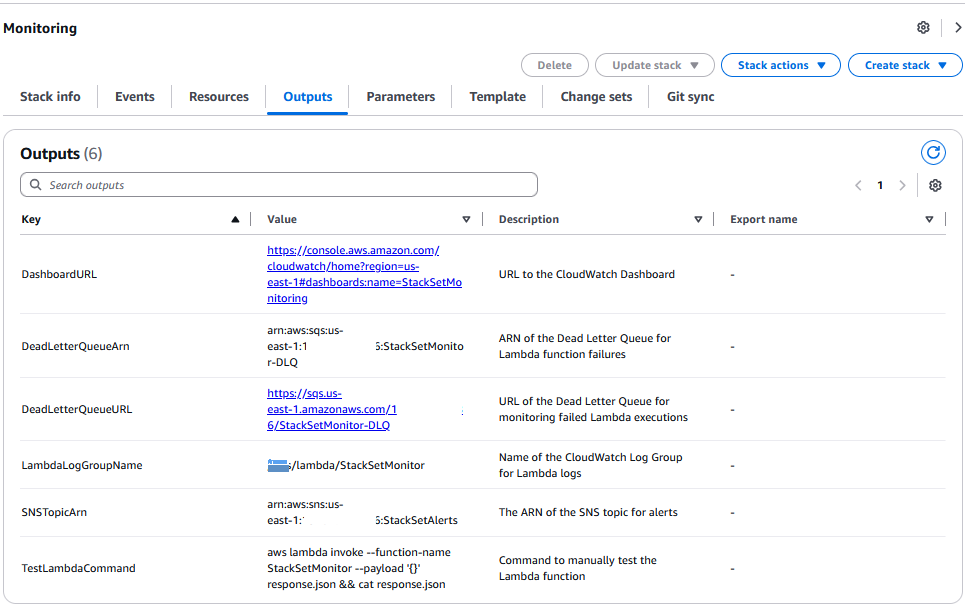
StackSetMonitor 控制台输出
还有亚马逊 CloudWatch 控制面板和警报屏幕的示例:
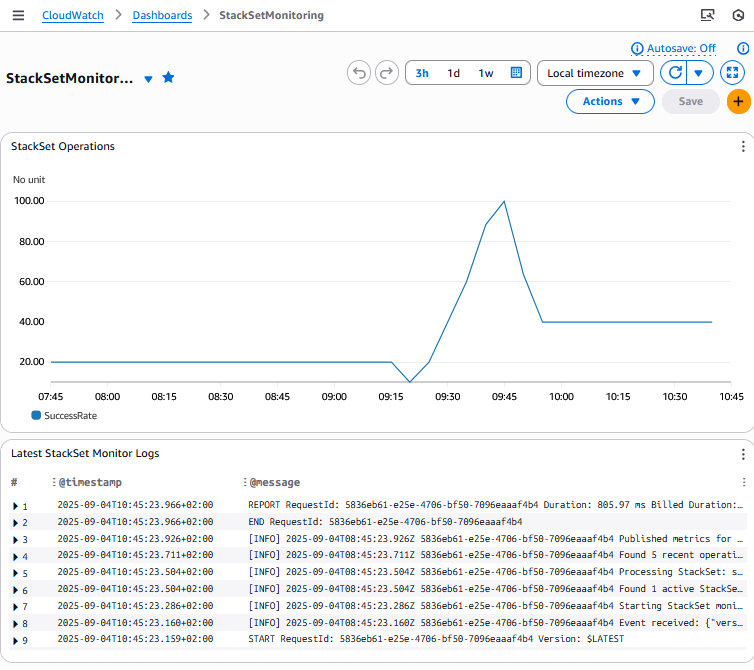
用于跟踪 StackSet 操作成功率的 StackSetMonitor 堆栈的亚马逊 CloudWatch 控制面板截图
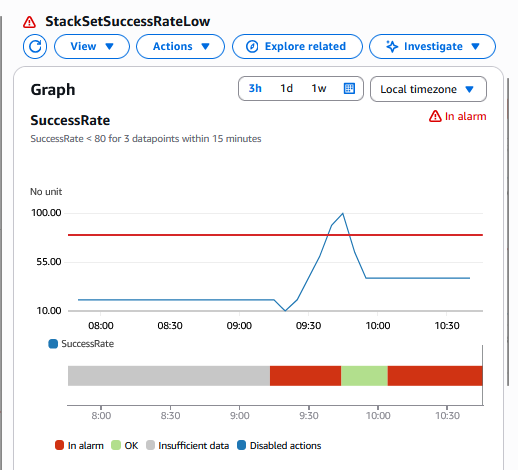
用于跟踪 StackSet 操作成功率的 StackSetMonitor 堆栈的 Amazon CloudWatch 警报截图
SNS 订阅设置包括从堆栈输出中检索主题 ARN 以及为电子邮件或 SMS 终端节点配置通知(以下是电子邮件订阅的 CLI 示例):
aws sns subscribe --topic-arn $SNS_TOPIC_ARN --protocol email --notification-endpoint your-email@example.com
亚马逊云科技 CLI 订阅提供用户电子邮件的主题
成本:
预计每月支出在 5 到 15 美元之间,具体取决于 StackSet 的活动水平,根据默认监控计划,每天(每分钟)大约有 2,880 次 Lambda 执行次数。
该解决方案支持通过修改 ScheduleExpression 的默认一分钟间隔来自定义监控频率。如果减少监测频率,成本就会降低。
清理:
要进行清理,您可以运行以下命令行:
- 要清理在 "核心部署策略" 部分中创建的堆栈实例和堆栈集,请执行以下操作:
aws cloudformation delete-stack-instances --stack-set-name security-baseline --deployment-targets OrganizationalUnitIds=ou-xxx --regions us-east-1 eu-west-1 --region us-east-1 --no-retain-stack
用于删除堆栈实例的亚马逊云科技 CLI
您需要使用 OU 的名称更改参数 organialUnitIDS 值、包含要删除堆栈实例的区域列表的参数区域以及堆栈集名称参数的值(安全基线、监控基准、平衡部署...)。
然后你可以删除 StackSet:
aws cloudformation delete-stack-set --stack-set-name security-baseline
用于删除 StackSet 的亚马逊云科技 CLI
您可以更改堆栈集名称参数的值。
- 清理堆栈集监视器堆栈
aws cloudformation delete-stack --stack-name stackset-monitor
用于删除堆栈集监控堆栈的亚马逊云科技 CLI
您还可以删除专门为此博客创建的所有 IAM 角色/策略,但您可能不再需要了
结论
在本指南中,我们探讨了在大规模环境中部署 Amazon CloudFormation StackSets 的细致方法。关键要点包括:
- 平衡至关重要:每种部署策略都需要根据组织需求仔细考虑速度、安全性和规模之间的权衡。
- 渐进式采用行之有效:对于大多数组织而言,带有验证门的渐进式部署方法提供了安全与效率的优秀平衡。
- 组织背景很重要:企业、初创企业和受监管的行业模式表明,部署策略应根据您的特定业务要求和风险承受能力量身定制。
- 监控至关重要:随着组织扩展到数百个账户,全面监控对于保持可见性和确保合规性变得至关重要。
这些不同的方法将帮助您在亚马逊云科技组织中部署 Amazon CloudFormation 堆栈集采用正确的策略。
现在,您可以在沙盒环境上测试这些不同的方法,然后再根据您的特定需求进行调整,以便平衡速度、安全性和规模,从而优化部署。
*前述特定亚马逊云科技生成式人工智能相关的服务仅在亚马逊云科技海外区域可用,亚马逊云科技中国仅为帮助您发展海外业务和/或了解行业前沿技术选择推荐该服务。